EasyManua.ls Logo

Dexcom G5 Mobile - Page 122

Dexcom G5 Mobile
392 pages
Print Icon
To Next Page IconTo Next Page
To Previous Page IconTo Previous Page
Loading...
Dexcom G5 Mobile System User Guide
120Calibration
(Continued from previous page)
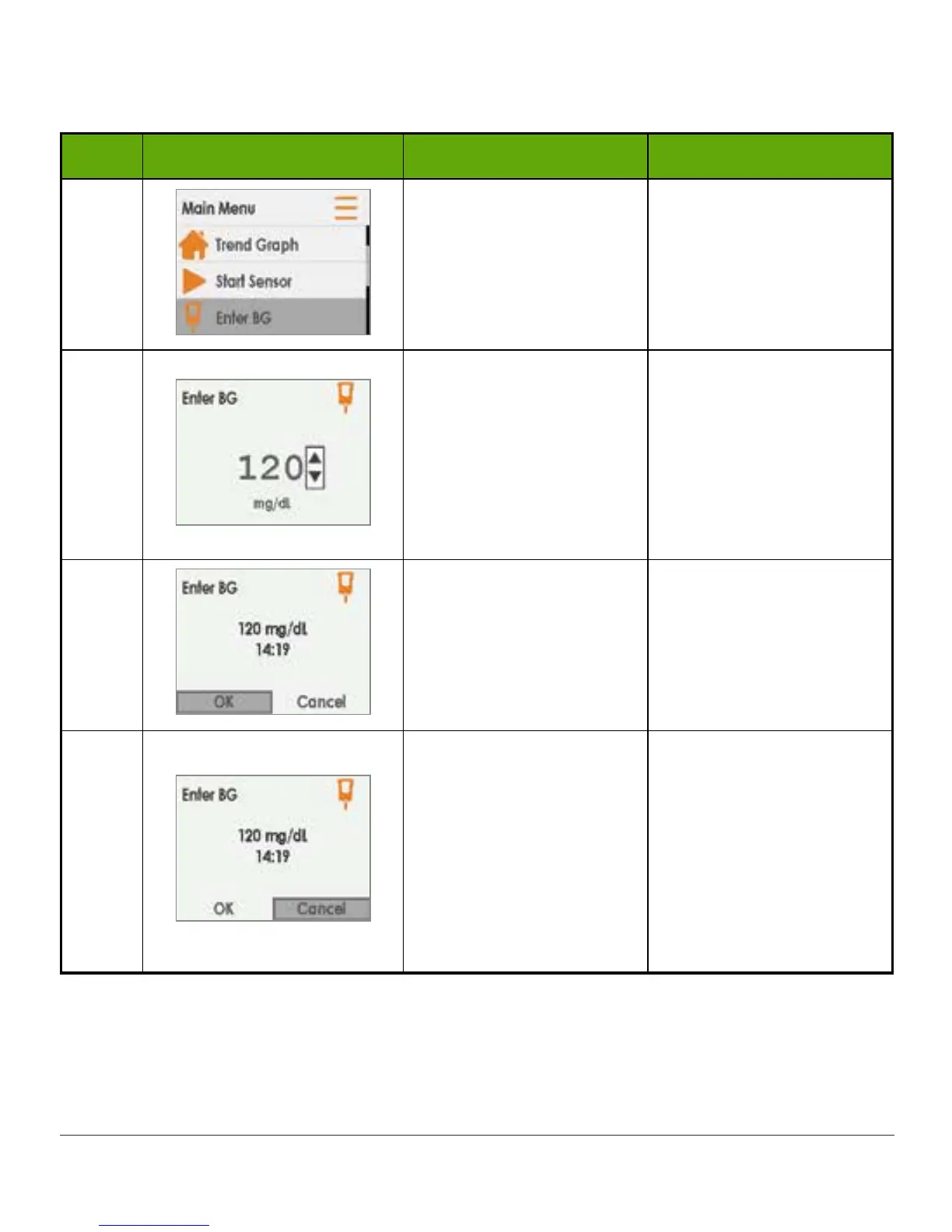
Step What you see What you do Additional info
4
Press up/down arrows
to highlight Enter BG.
Press select button.
N/A
5
Press up/down arrows
to change numbers.
Stop at meters BG
value.
Press select button.
Sensor default reading is
120 mg/dL.
If sensor glucose
reading is within the last
15 minutes, screen will
show sensors actual
reading.
6a
Verify BG value is
correct.
If correct:
Press select button.
If select button is not
pressed:
Receiver times out
BG level isn’t recorded
6b
Verify BG value is
correct.
If incorrect:
Press right arrow to
highlight Cancel.
Press select button.
Reenter BG value.
Cancel and reenter BG
value.
Fingerstick
measurement must
be within five-minute
window.
(Continued on next page)

Table of Contents

Other manuals for Dexcom G5 Mobile

Related product manuals