Dexcom G5 Mobile System User Guide
375Dexcom Share
(Continued from previous page)
Step What you see What you do
3
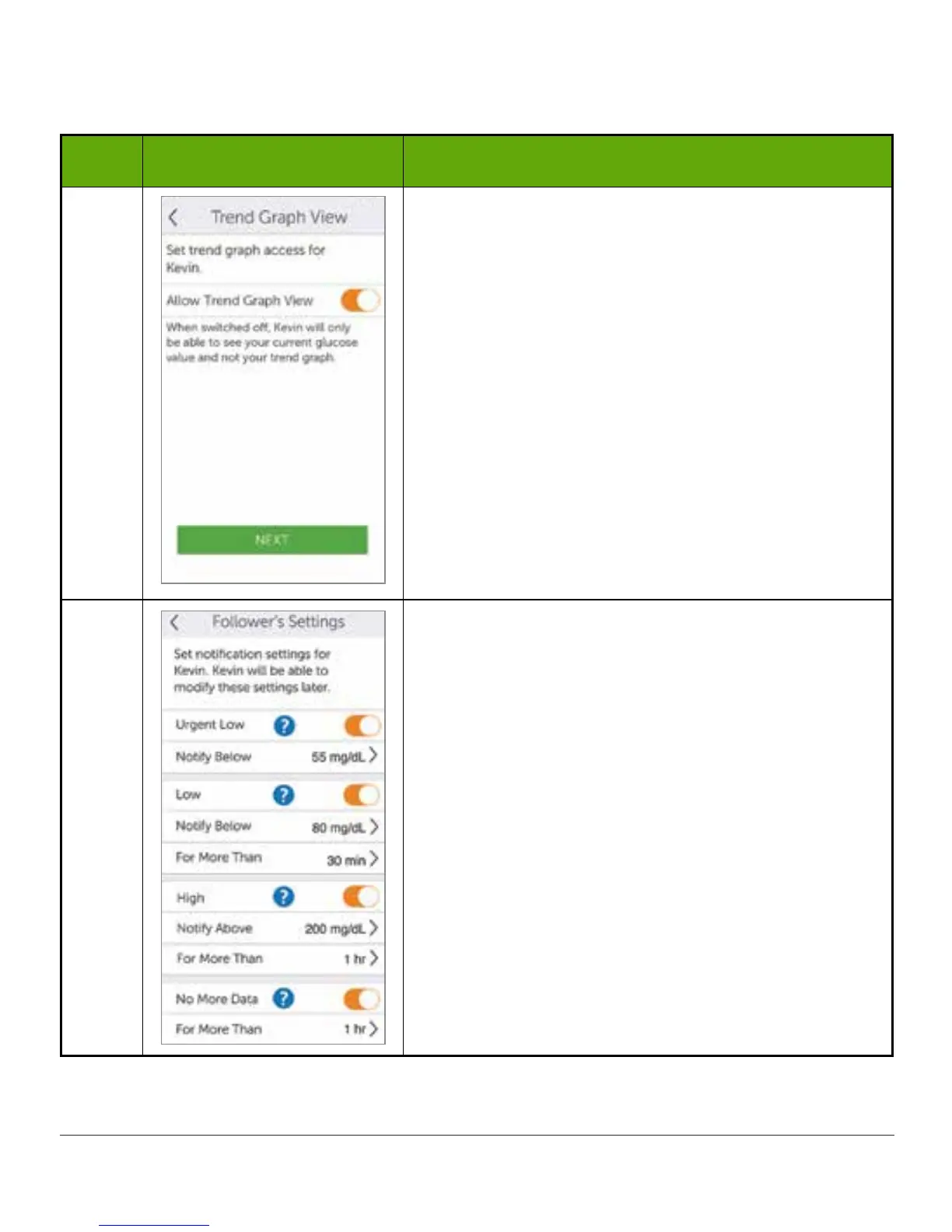
Slide Allow Trend Graph View on/off switch if you
want Follower to see your trend graph.
Tap Next.
Turned off: Follower sees only your sensor glucose
reading and trend arrow.
Turned on: Follower sees your sensor glucose
reading, trend arrow, and trend graph.
4
Choose if you want your Follower to get your Urgent
Low, Low, and High sensor glucose Alarm/Alerts.
Choose if you want your Follower to get
notifications if not receiving your sensor glucose
readings.
Select what Alarm/Alerts your follower gets and
how long you are low/high or not sharing data (for
example, if you want your Follower to know when
your glucose is above 200 mg/dL for more than 2
hours, you can set this up in the Follower’s Settings
menu).
Tap Save for each Follower’s Setting “Save.”
Tap Next when done.
(Continued on next page)



 To Next Page