Dexcom G5 Mobile System User Guide
381Dexcom Share
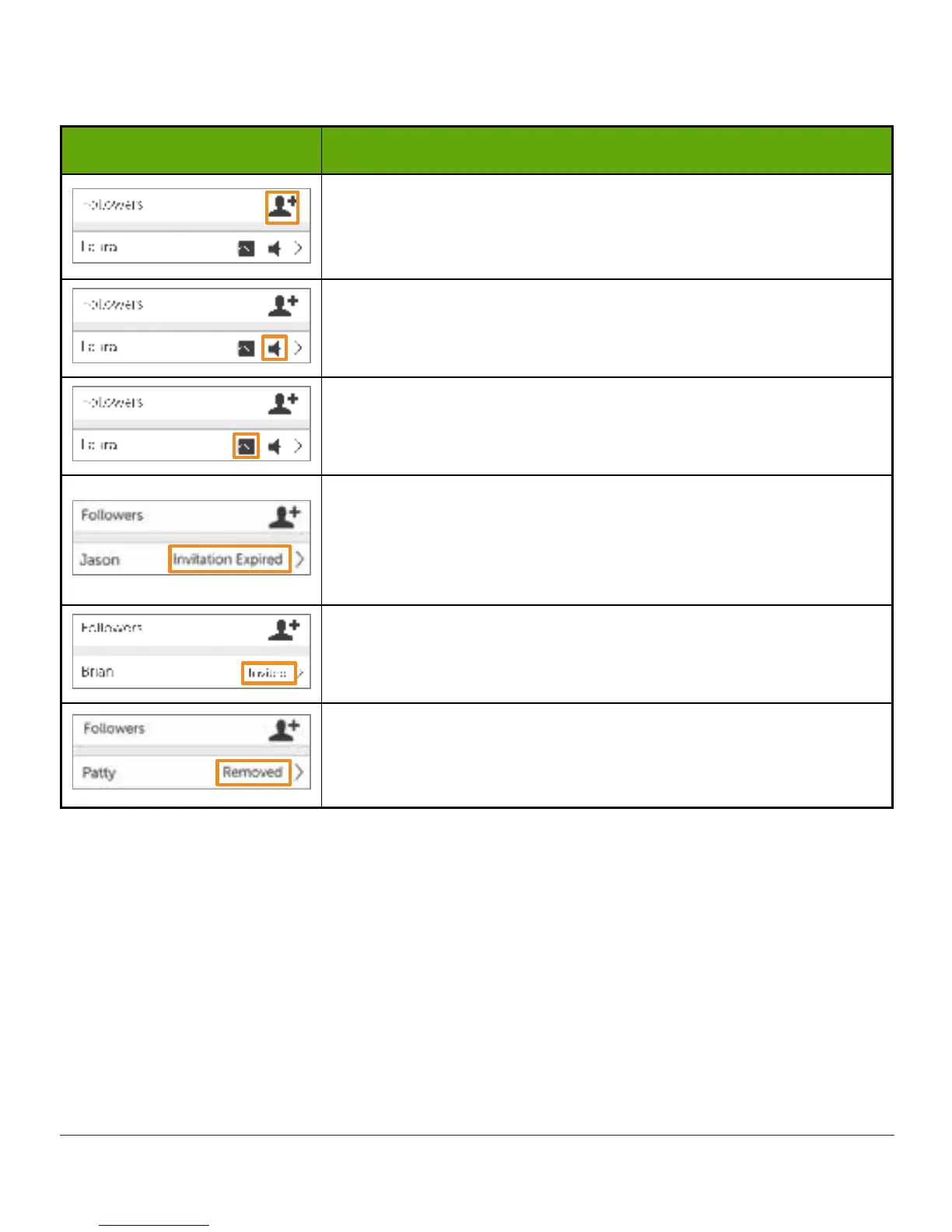
Follower Icon/Status
What you see What it means
Invite a new Follower.
Follower is set to get notifications from Sharer.
Follower is able to view Sharer’s trend graph.
Follower did not accept Sharer’s Follow Invitation email
within 7 days.
Sharer can invite Follower again by pressing on the + icon in
the top right corner of the screen.
Follower has been sent a Follow Invitation email but has not
accepted it yet.
Sharer stopped sharing with Follower.
Follower will not get any of Sharer’s glucose information,
Alarm/Alerts, or trend graph updates.
Editing/Removing Followers
Tap on a Follower to edit the Follower’s profile (nickname or ability to view trend graph) or
remove a Follower. Remove a Follower by tapping “Remove Follower.” Once removed, the
Follower won’t get glucose information or Alarm/Alerts.
NOTE: The Sharer cannot change any Follower settings after the Follow Invitation email is
sent.



 To Next Page