MCQ-PRO RFID Reader — Installation and Tuning Manual Version 1.00
Page 50 of 89
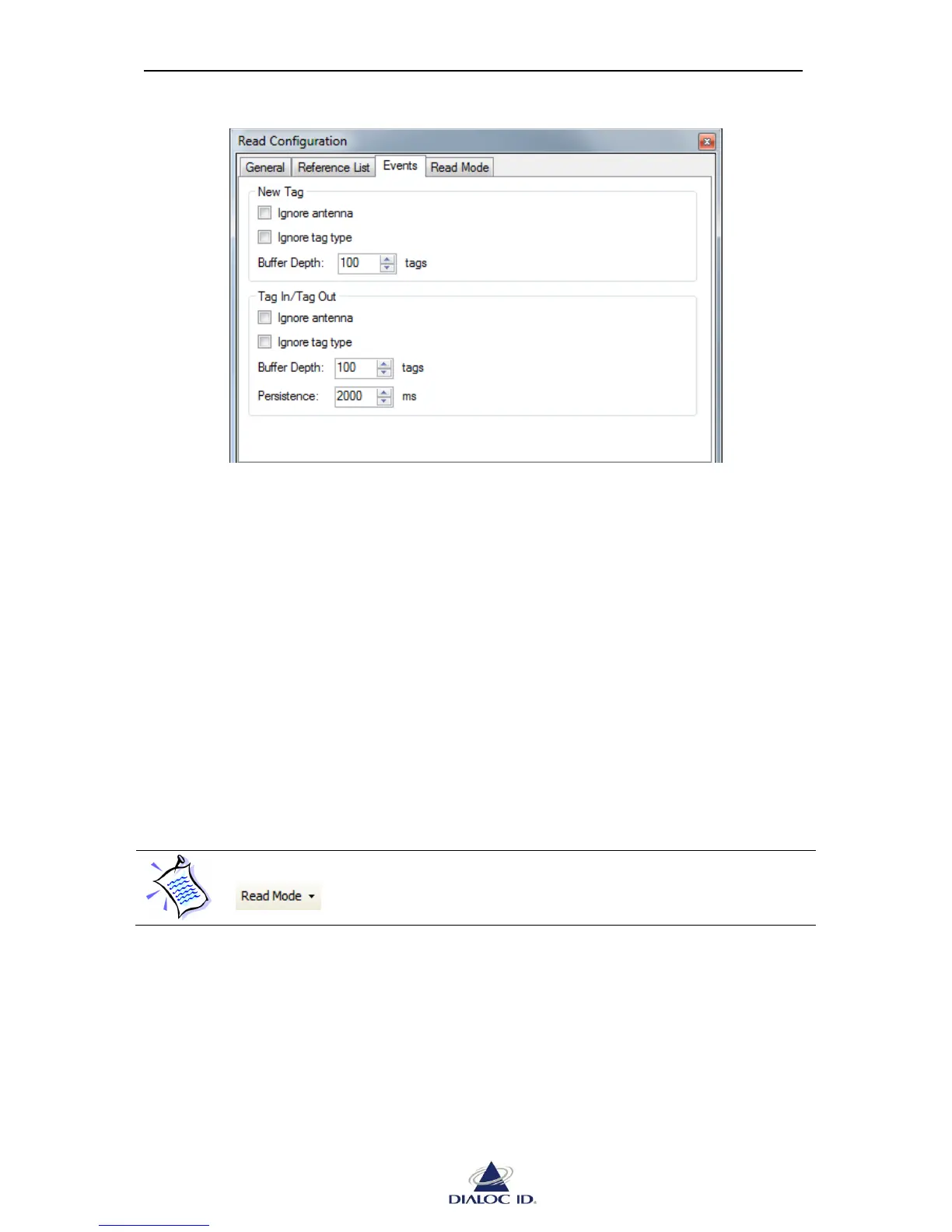
Figure 39: Read Configuration panel (Events tab)
New Tag:
Ignore antenna: indicates that tag data detected by multiple antennas should be reported
only once.
Ignore tag type: indicates that tags of different types with same tag data should be
reported only once.
Buffer Depth: represents the number of tags to be stored in internal radio buffer for “Tag
New” event.
Tag In/Tag Out:
Ignore antenna, Ignore tag type and Buffer Depth settings are similar to “New Tag” ones.
Persistence: represents the number of milliseconds that should elapse without having
detected the tag in the radio field before triggering a “Tag Out” event.
8.2.4 Read Mode
Read mode defines the radio device behavior during default read.
Before starting a default read, you must select read mode options you need in
drop down menu of toolbar.
There are several read mode options available:
“Enable Multiplexer” indicates, when reading asynchronously, whether radio should
use multiplexer's configuration or, otherwise, default RF configuration.
“Enable Input Trigger” indicates that radio should start/stop reading when the state of
digital input #1 of IO Set #1 is set to its active/inactive level.
“Enable Output Feedback” indicates, when reading asynchronously, that radio should
report read activity by changing states of digital outputs..



 To Next Page