MCQ-PRO RFID Reader — Installation and Tuning Manual Version 1.00
Page 48 of 89
8.2.2 Reference List
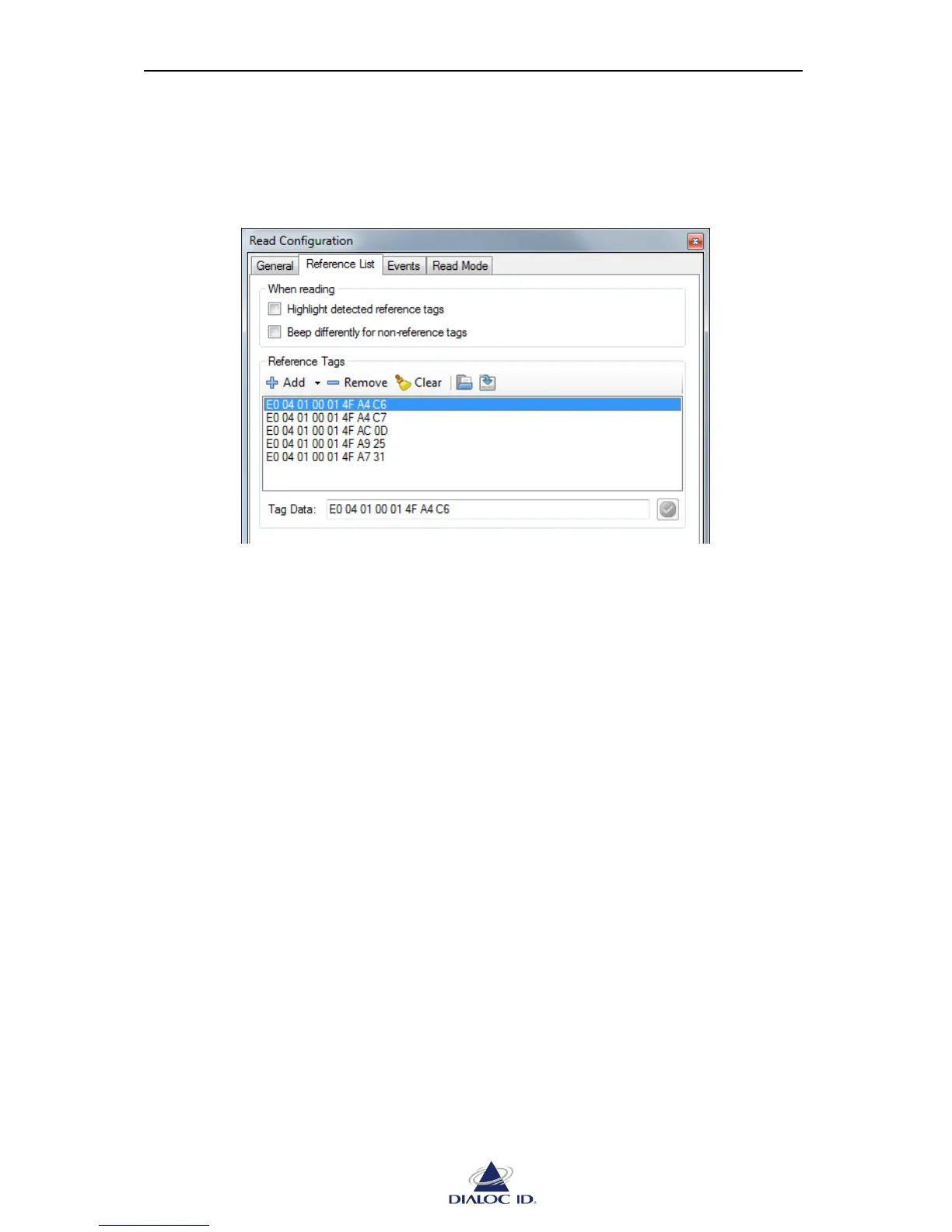
In “Reference List” tab, you can define a set of tags you expect to read.
Figure 38: Read Configuration panel (Reference List tab)
When reading:
Highlight detected reference tags: requests DIALOC ID MCQ-Pro to highlight detected
reference tags in tag event panels.
Beep differently for non-reference tags: requests DIALOC ID MCQ-Pro to play a special
system bell each time a non-reference tag is detected in RF.
Reference Tags:
Add: adds tags in reference list. You can add tags manually or from tag event panels. Tags
are defined by data/UID returned during default read. Use “Tag Data” field below
reference list to modify data/UID of selected tag.
Remove: removes selected tag from reference list.
Clear: removes all tags from reference list.
Load: loads tags in reference list from a CSV file. Each line of the file must contain the
data of a single tag as hexadecimal bytes.
Example (whitespace between each byte is optional):
E0 04 01 00 01 4F A4 C6
E0 04 01 00 01 4F A4 C7
E0 04 01 00 01 4F AC 0D
E0 04 01 00 01 4F A9 25
E0 04 01 00 01 4F A7 31
Save: saves tags in reference list to a CSV file.



 To Next Page