UTM-00339 | Rev 19
Page 118 of 253
DetNet South Africa Copyright © 2021
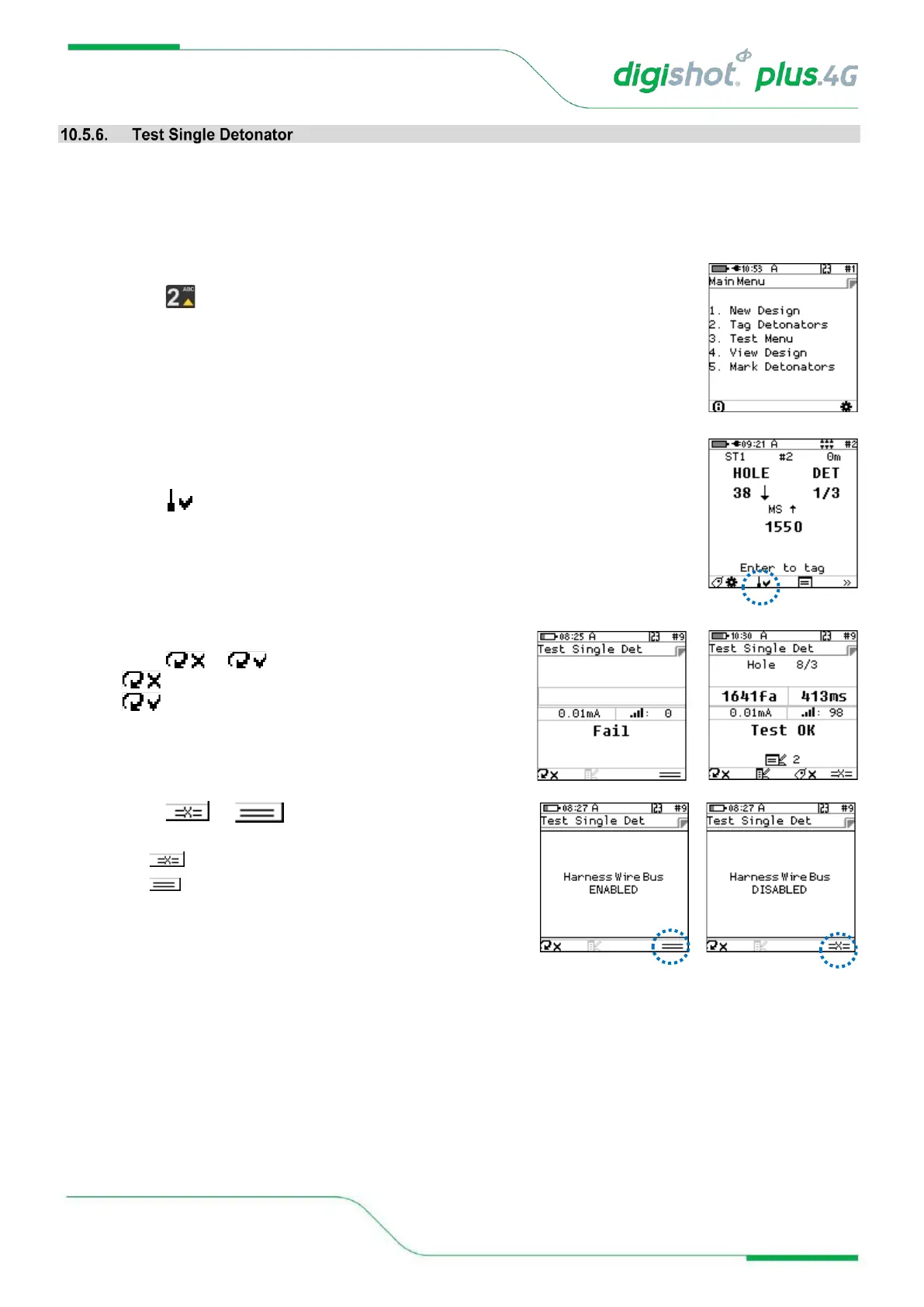
At times it is useful to allow testing of detonators from the tagging screen, and to check if a detonator has
previously been tagged or if it is untagged, without disturbing the setup of the current tagging context.
The information displayed with this test contains the location, the time the detonator was tagged to, the length of
the detonator and also the mark allocated to the detonator.
1. From the Main Menu
• Press to select Tag Detonators
2. From Advanced Tagging Screen
• Connect a detonator to the Tagger
• Press SoftKey to select Test Single Det
3. From Test Single Det screen
• Press or to toggle between options
• indicates single test
• indicates continuous test
• Press or SoftKey to toggle between
Disabling and Enabling Harness Bus wire:
• indicates Harness Wire Bus disabled
• indicates Harness Wire Bus enabled



 To Next Page