UTM-00339 | Rev 19
Page 120 of 253
DetNet South Africa Copyright © 2021
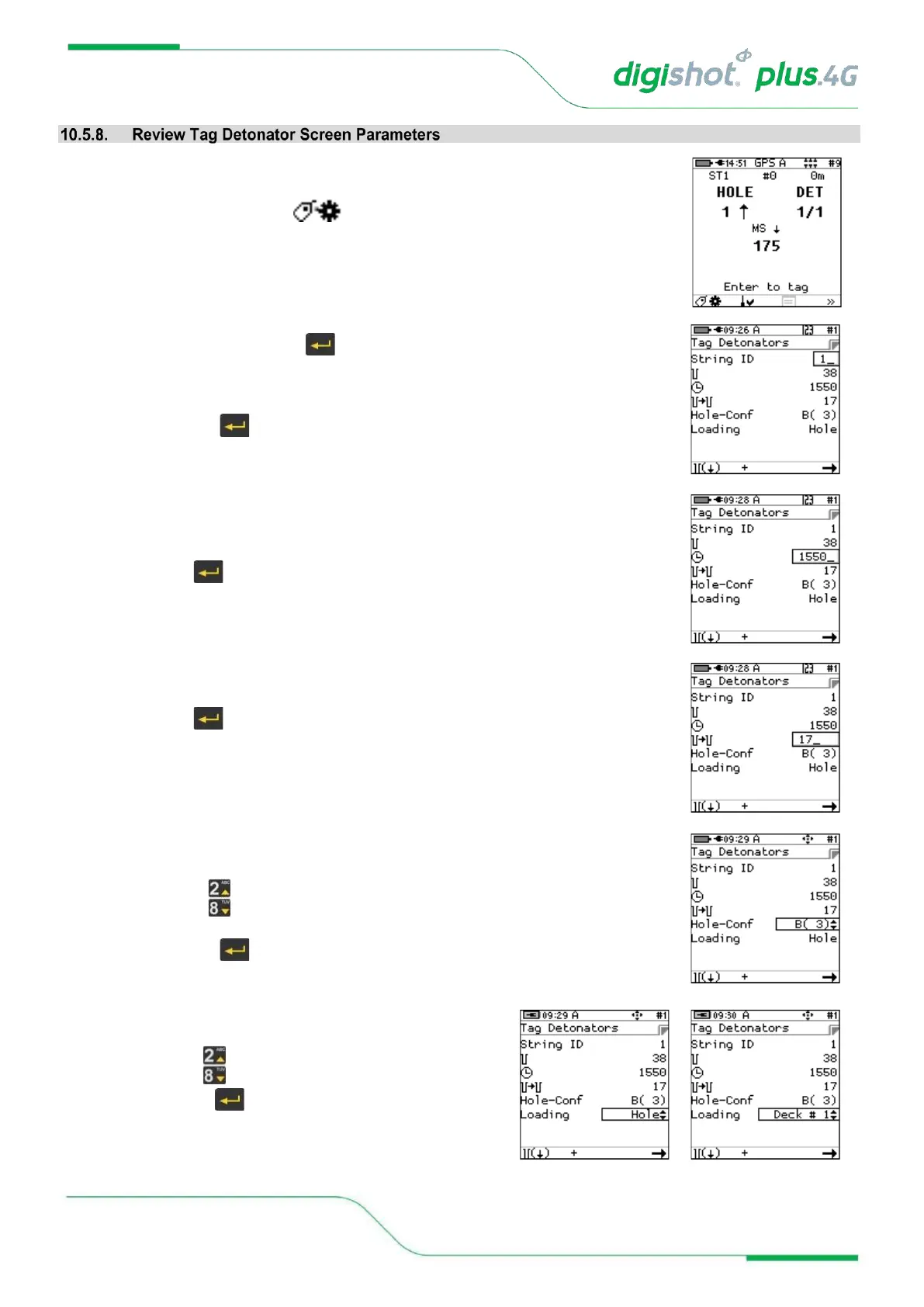
The user may review the parameters at any time in the tagging screen.
1. From Advanced Tagging Screen
• Press Tag Configuration SoftKey to select Tag Detonators Screen
2. From Tag Detonators Screen, check the following:
Should the value be correct, press key to move to the next field.
a) String
Check that the correct Row is being tagged; if not, adjust it as follows:
• Use numeric keypad to enter new Row number, and
• Press to continue
b) Initial Time
Ability to modify the Initial time
• Use numeric keypad to set the initial time
• Press to continue
c) Inter-hole Increment
Ability to modify the Dealy time from one hole to the next.
• Use numeric keypad to set the inter-hole increment
• Press to continue
d) Hole –Conf(iguration)
Ability to switch to a user defined hole configuration
• Use to toggle (Available options as configured during the initial
setup)
• Press to continue
e) Loading mode
• Set the Loading mode.
• Use to toggle between available options.
• Press to continue



 To Next Page