UTM-00339 | Rev 19
Page 177 of 253
DetNet South Africa Copyright © 2021
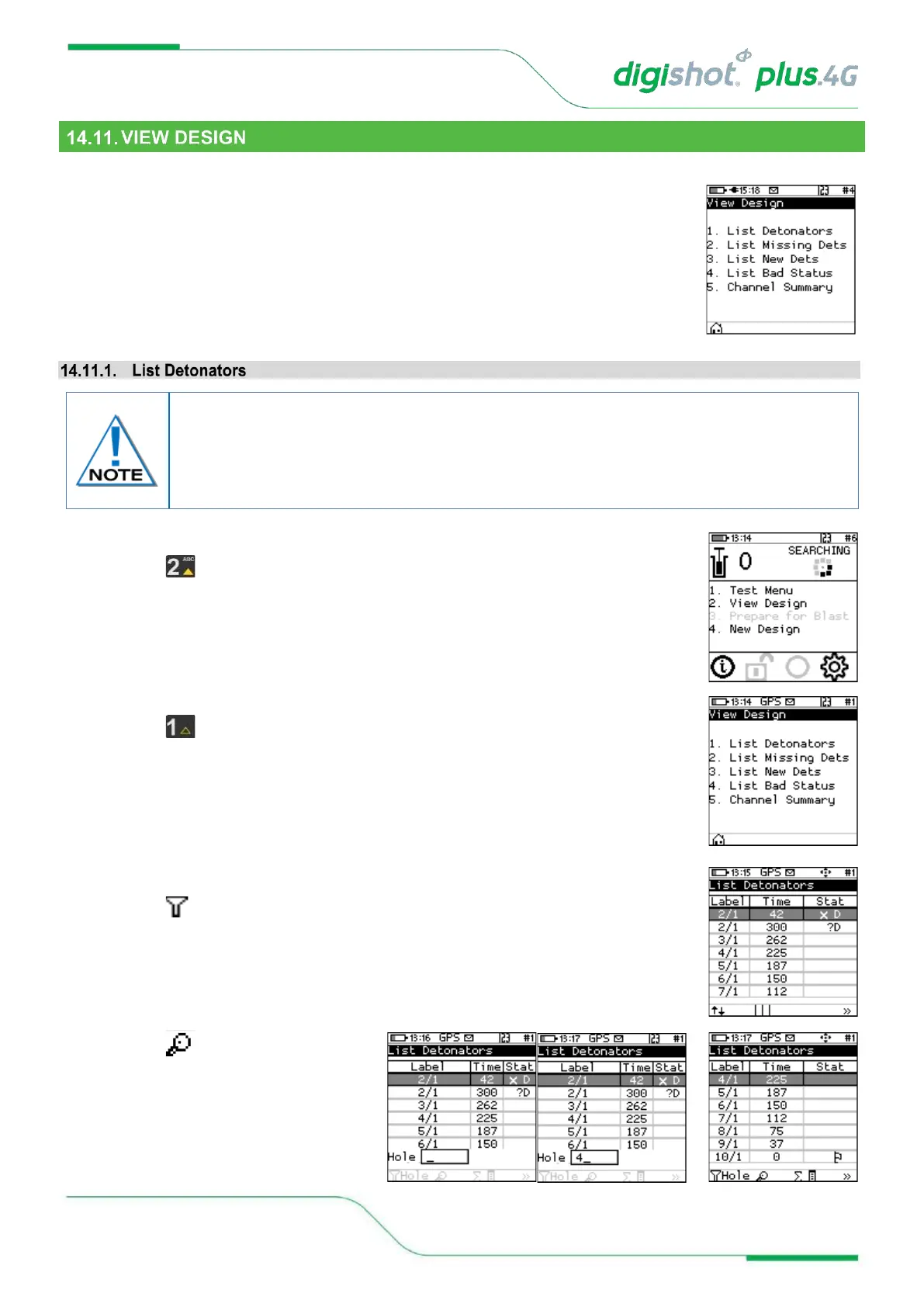
The View Design Menu will allow the user to view detonator lists sorted or filtered as desired. The following menu
options are available:
1. List Detonators,
2. List Missing Detonators,
3. List New Detonators,
4. List Bad Status Detonators,
5. Channel Summary.
1. Main Menu
• Press Key to select View Design.
2. View Design
• Press Key to select List Detonators.
3. Detonator list will be displayed
• Press >> SoftKey to cycle between various views as required
• Press SoftKey to filter
• Press SoftKey to search Hole
o Enter Hole number
o Press ENTER to filter the list
and place the required
detonator at the top of the list
The Lists do NOT include untagged detonators.
Viewing the detonator list will stop and restart the current detonator search process. Note
that detonator programming can only be started once the search process was completed
at least once after power-on.



 To Next Page