UTM-00339 | Rev 19
Page 189 of 253
DetNet South Africa Copyright © 2021
12. Remote Blast
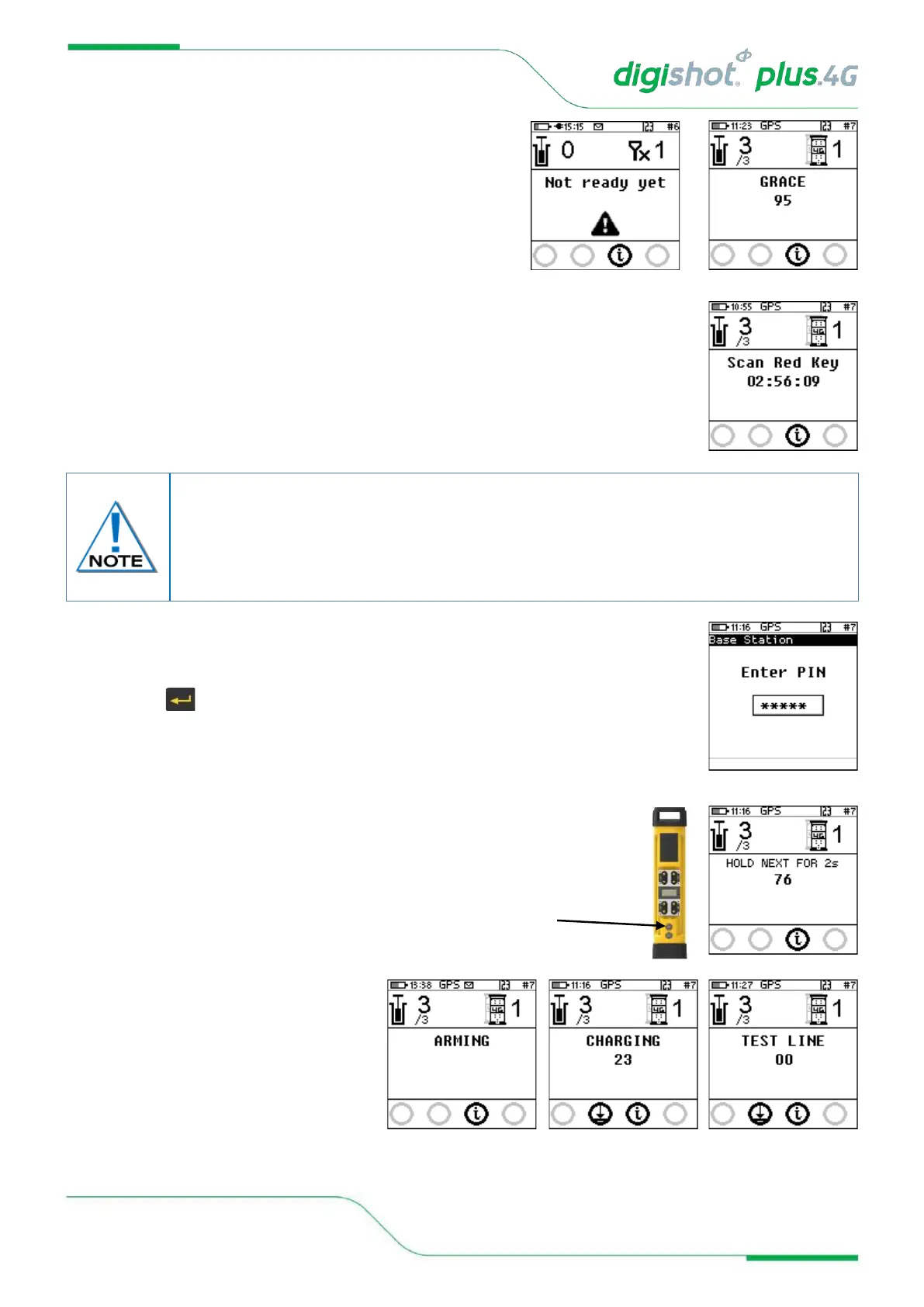
• Wait if message “Not ready yet” is displayed and when
connected to the bench the base will display Grace and
the time left for grace period to elapse
13. User will be prompted to Scan Key once all the bench commanders are out of grace
period and ready to blast.
14. Scan Key
• Scan the RED BlastCard at the back of the DigiShot
®
Plus 4G Commander
• Enter the corresponding PIN
• Press to continue
• Press and Hold the NEXT button on the front of
the DigiShot
®
Plus 4G Commander for 2 seconds
• The DigiShot
®
Plus 4G Commander
will initiate arming and a 30-second
high-voltage charging period
followed by Testing Line and the
120-second blast window.
The user is also provided with an option to Arm the commander without the need to
connect the tagger via an AutoArm function. The AutoArm function will allow the user to
scan a no PIN yellow BlastCard and if there are no errors present; program and move to
the waiting for next press state. The user will then have to press next for 2 seconds and
the unit will then be ready to arm.



 To Next Page