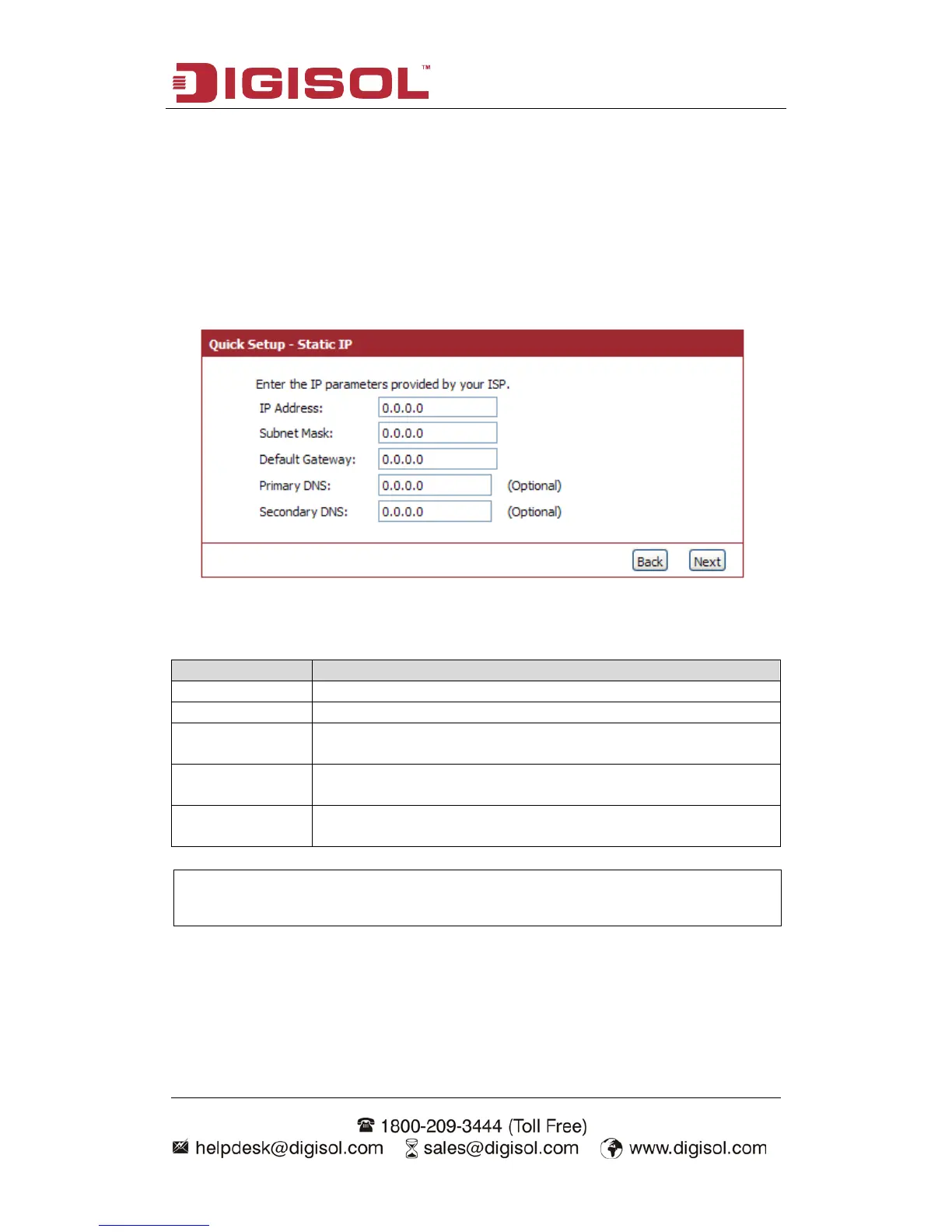
Setup procedure for ‘Static IP’:
Select Static IP Address if IP information is provided to you by your ISP. You will
need to enter in the IP address, subnet mask, gateway address and DNS address
provided to you by your ISP. Each IP address entered in the fields must be in the
appropriate IP form, which are four octets separated by a dot (x.x.x.x). The Router
will not accept the IP address if it is not in this format. Below given screen will be
displayed.
Here is the description of every setup item:
Please input the IP address assigned by your service provider.
Please input the subnet mask assigned by your service provider
Please input the default gateway assigned by your service
provider.
Please input the DNS IP address in dotted-decimal notation
provided by your ISP.
Please input another DNS IP address in dotted-decimal notation
provided by your ISP.
When you finish with all settings, press ‘Next’; if you want to go back to previous
menu, click ‘Back’.
NOTE: You must use the addresses provided by your Internet service
provider, wrong setting value will cause connection problem.



 To Next Page