14
7.19 reverb type set
Range: 1.off ; 2. Room ; 3 Small hall; 4.Hall; 5. Church; 6. Cathedral; 7. Vocal.
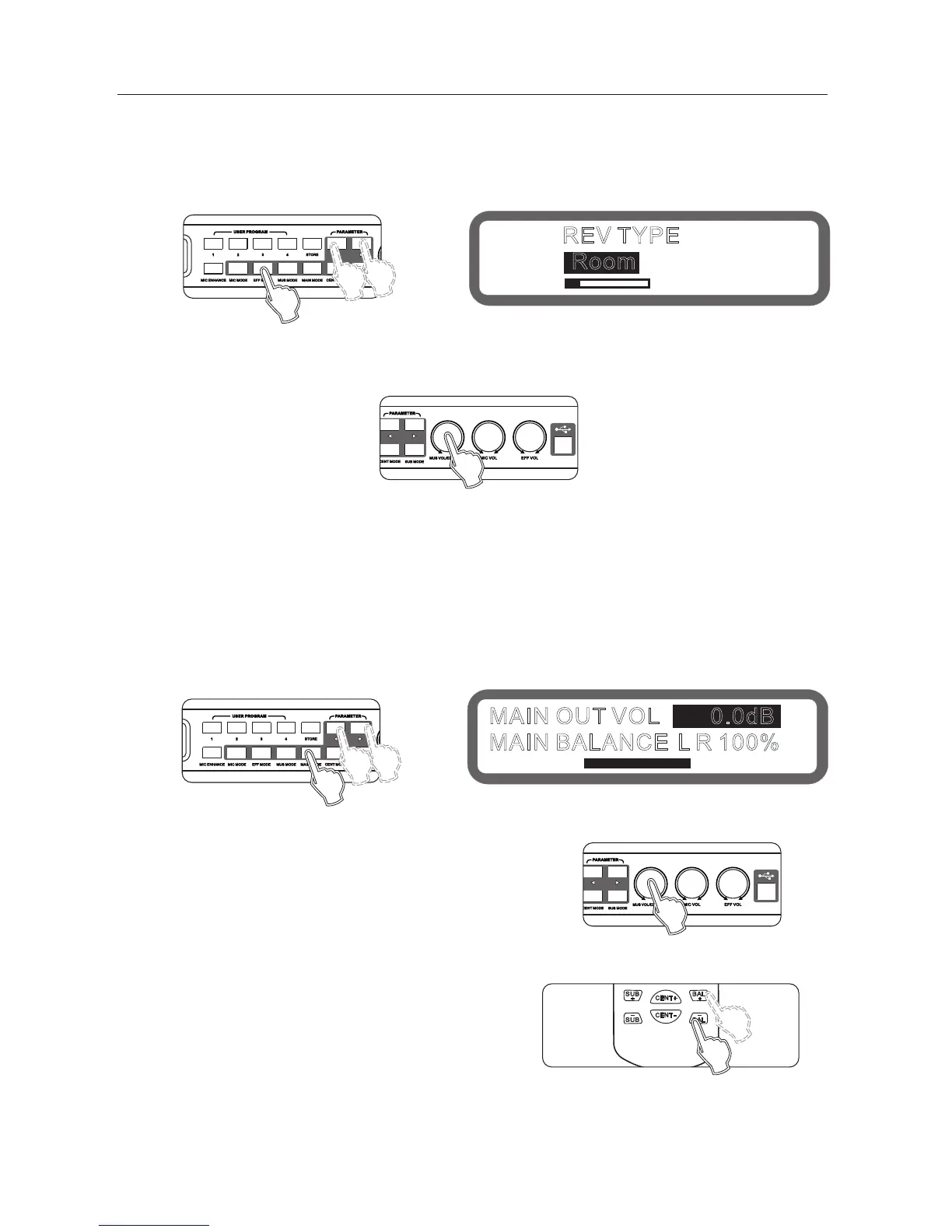
Operation: Press the buttons "Effect Mode" on the panel continuously into the Reverb Type, as shown below:
Turning knob "music volume / Edit (press)" to set the reverb type
Operating method 2: Operation from the interface software to set up
REV TYPE
Room
8、the main output section instructions
8.1 main output volume, balance setting
Range: mute,-30db ~ 0db, Stepping: 0.5db
Operation: Press the buttons "Main output Mode" on the panel continuously into the Main output volume and
main output balance, as shown below:
Keys "<" and ">" to switch the main output volume and main
output balance.
Turning knob "music volume / edit (press) "to set
Operating method 2: Press keys "balance + " and" balance - "
on the remote control.
Operating method 3: Operation from the interface software to set up
MAIN OUT VOL 0.0dB
MAIN BALANCE L R 100%
Panel
Display
Panel
Panel
Display
Panel



 To Next Page