10.5 Subwoofer compressor settings
Threshold range: -20 ~ +16 db, stepping 0.5db
Ratio: 2:1 4:1 8:1 16:1 32:1 64:1 128:1
Range: On, Off
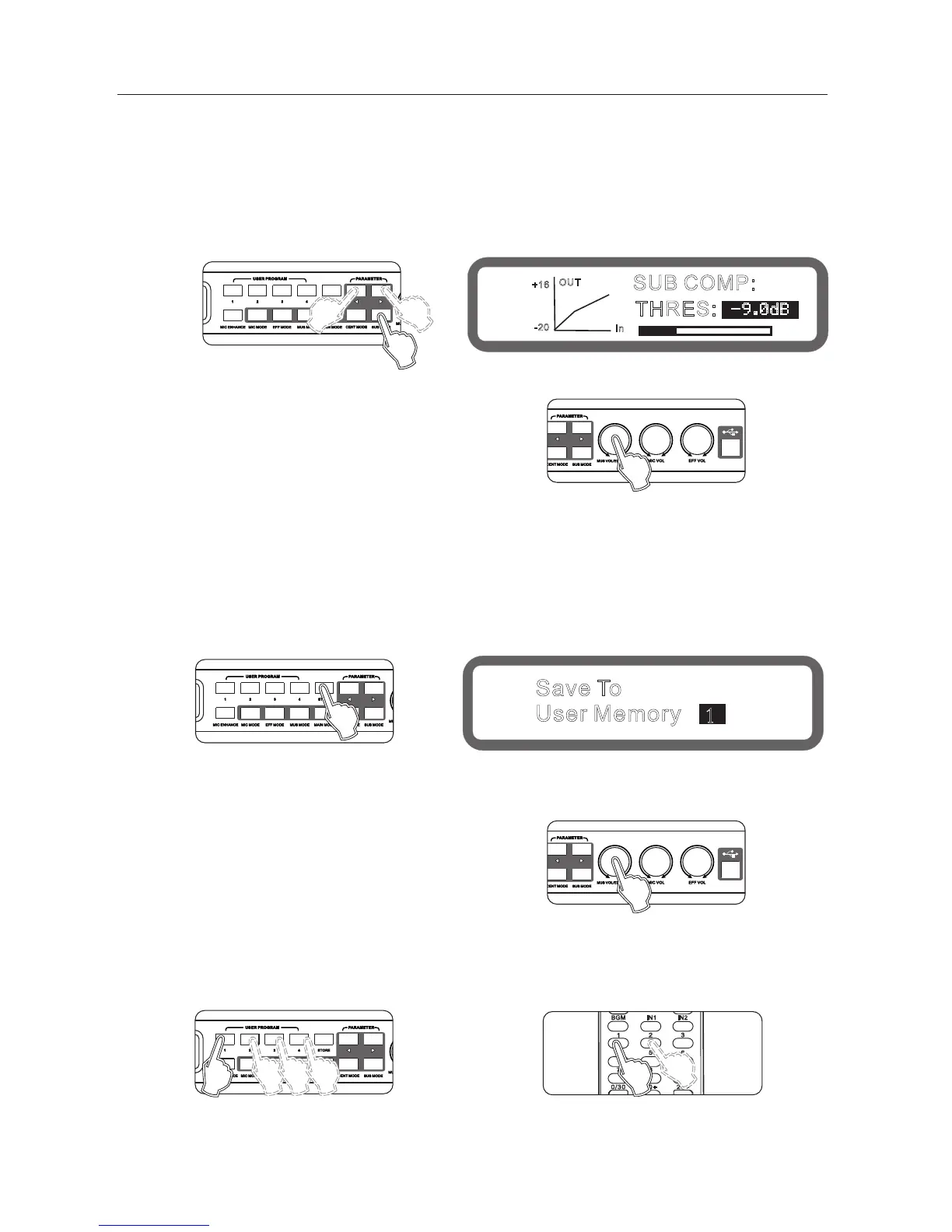
Operation method 1: (Only Threshold can be set )Press the buttons "Sub Mode" on the panel continuously into the
Subwoofer compressor, as shown below:
Turning knob "music volume / edit (press) "to set Threshold
Operating method 2: Operation from the interface software to set up
The processor unit provides 15-preset programs and 30-user programs.
1 1.1 Program saved
Operation method 1: Press the keys "Save" on the panel, as below:
Turning knob "music volume / edit (press) "to choose the program to save .
Press the key " ave? again to save the program.
Operating method 2: Operation from the interface software to set up
11.2 program recall
Operating method 1: Press the keys[1], [2],[3], [4]: recall the program directly.
Operating method 2: by remote control
Operating method 3: Operation from the interface software to set up
11、Program/Memories management functions
21
SUB COMP:
THRES:
-9.0dB
OUT
In
+16
-20
Save To
1
User Memory ?
Panel
Display
Panel
Panel
Display
Panel
Panel



 To Next Page