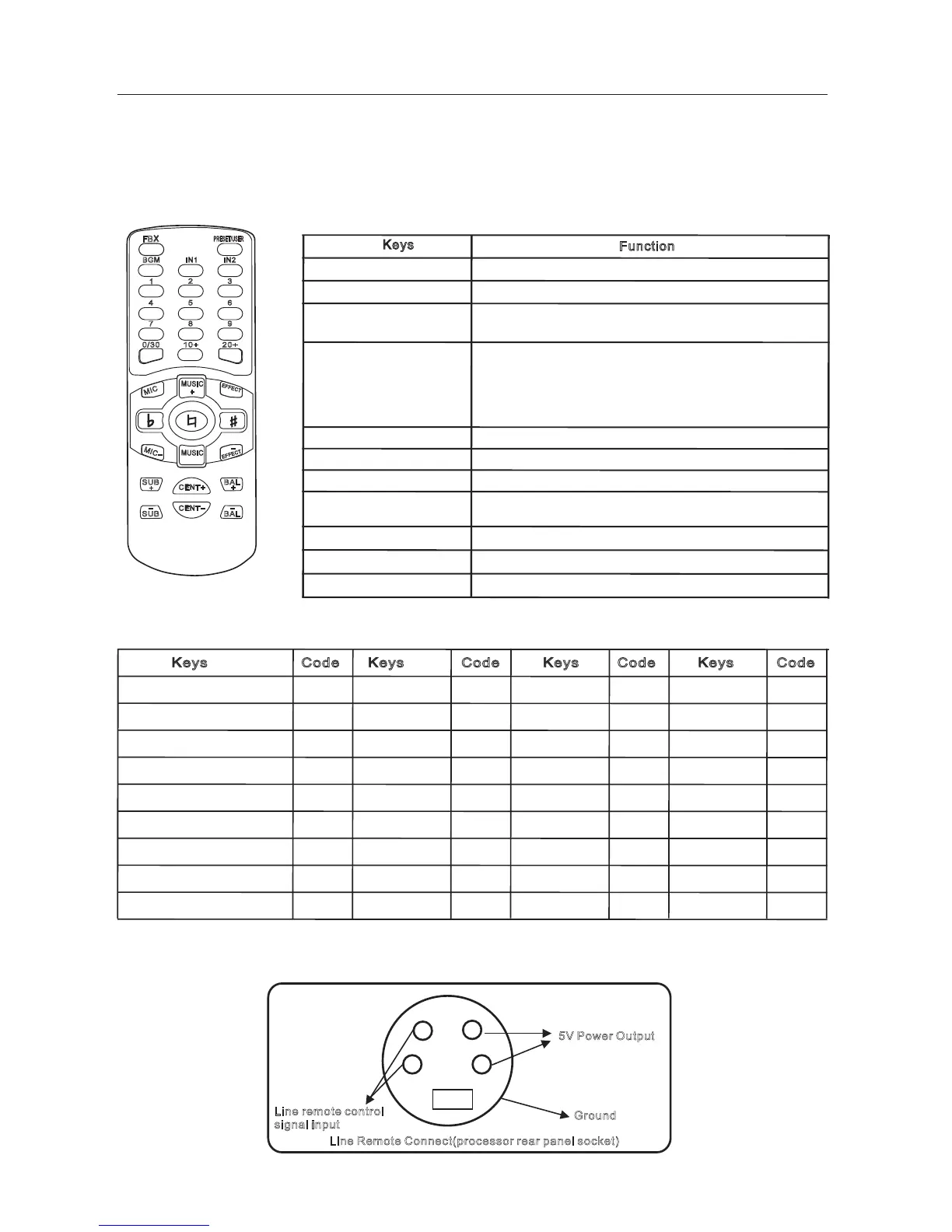
21、 the wireless remote control
The easy-to-use remote control function, eliminating the need for manual operation. Simple parameter adjustment makes
you to adjust the parameter settings used easily as picture shown below. :
Remote control keys function
Sheet 1 (the remote control code, data-digit hexadecimal)
Adjust the feedback elimination
Feedback eliminate
Digit keys
BGM(background music)
Input 1 Input 2
、
、
" "" " "
" " " "
0/30 1~ 9
10+ 20+
Press digit keys 1 ~ 9 can recall the memories 1 ~ 9 ;
Press the "10 +" firstly, within 3 seconds press "0" ~ "9"
can recall the memories 10 ~ 19
Press the 0 +" firstly, within 3 seconds press "0" ~ "9"
can recall the memories 20 ~ 299
Press key 0/30 can recall the memory 0 directly.
" "" " " " " " "
"
" " " "
Adjust the music input line
Press the digit keys to recall the memory directly
Keys
Function
Code CodeCode Code
Keys KeysKeys Keys
24
MIC+ MIC-、
MUSIC+ MUSIC-、
EFFECT+ EFFECT-、
Demote Tone Original
Tone Rise Tone
、
、
SUB+ SUB-、
Cent+ Cent-、
EQ+ EQ-、
Feedback Eliminate
Default / user
Background Music(BGM)
Input 1
Output 2
1
2
3
4
00
01
04
03
02
05
06
07
0A
5
6
7
8
9
0/30
10+
20+
MIC+
09
08
0B
0C
0D
10
0F
0E
11
MIC -
Music+
Music-
Effect+
Effect-
Reduce Tone
Original Tone
Rise Tone
SUB+
17
12
18
13
19
16
15
14
1B
SUB-
Center +
Center -
EQ+
EQ-
1D
1E
1F
1A
1C
21.1 line remote function
This function is an external remote control receiver. Line remote interface defines the following figure:
5V Power Output
Ground
Line Remote Connect(processor rear panel socket)
Line remote control
signal input
REM OTE CO N TROL
BGM
4
7
IN2
IN1
2
1
5
8
+
-
SUB BAL
CENT
+
SUB
-
CENT
-
BAL
PRESET/USER
-
MIC
MIC
+
MUSIC
EFFE CT
EFFE CT
3
6
9
-
+
-
+
+
FBX
0/30
10+ 20+
MUSIC
Microphone volume Adjust
Music volume Adjust
Effect volume Adjust
Music Tone Adjust
SUB volume Adjust
Center volume Adjust
Main Left/Right output volume Adjust



 To Next Page