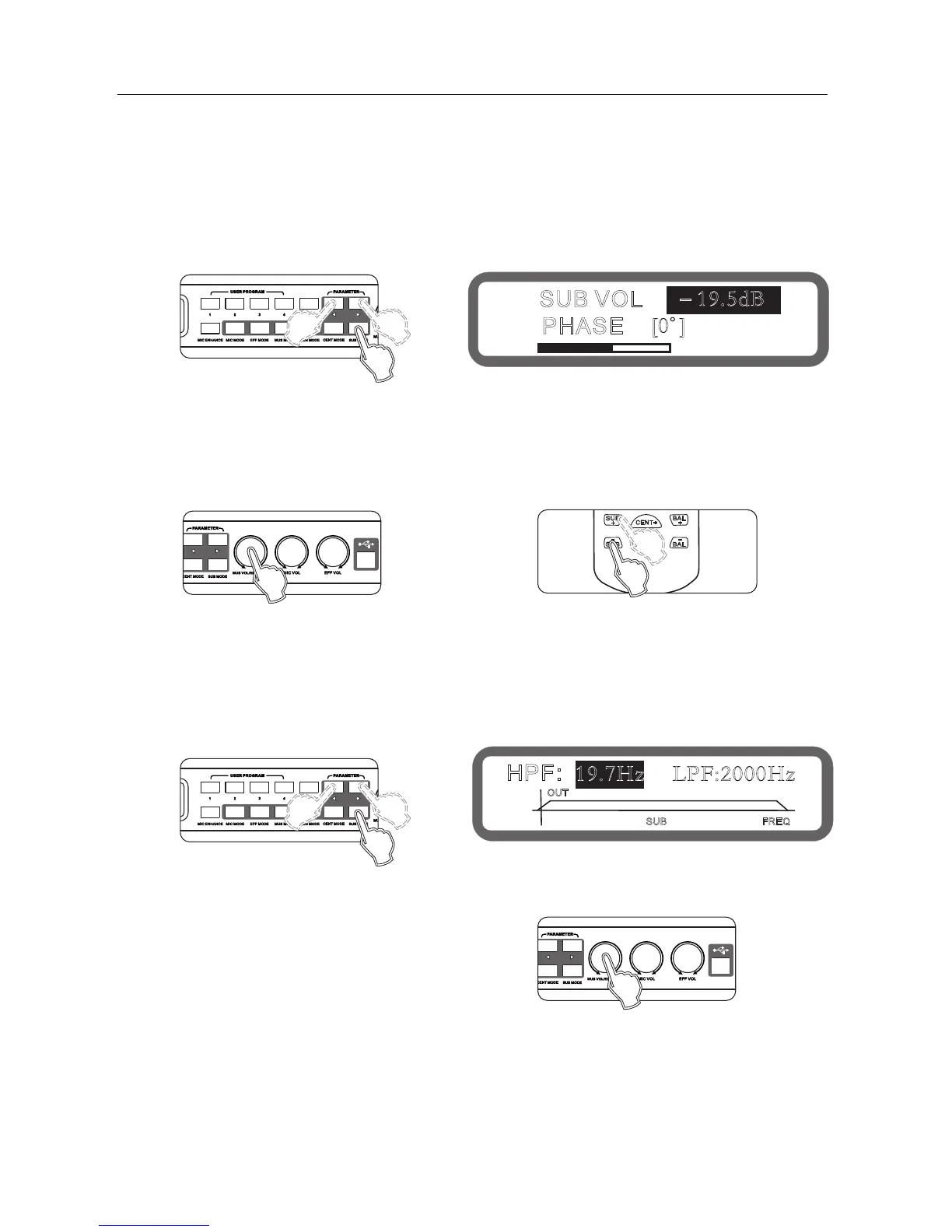
10.1 Sub woofer volume and phase settings
Volume range: mute,-30db ~ 0db, Stepping: 0.5db
Phase range: 0 , 180
Operation method 1: Press the buttons "Sub Woofer Mode" on the panel continuously into the Sub woofer volume and
phase, as shown below:
Keys "<" and ">" to switch the Sub woofer volume and phase
Turning knob "music volume / edit (press) "to set
Operation method 2: Press the keys "bass +" and "bass" on the remote control
Operating method 3: Operation from the interface software to set up
10.2 High-cut, Low-cut setting
Low-cut range: 19.7 ~ 1000hz,, 203 stepper
High-cut range: 35.1 ~ 2000hz, 209 stepper
Operation method 1: Press the buttons "Sub Woofer Mode" on the panel continuously into the Low-cut and High-cut,
as shown below:
Keys "<" and ">" to switch the High-cut and Low cut
Turning knob "music volume / edit (press) "to set
Operating method 2: Operation from the interface software to set up
° °
10、The Sub woofer part operating instructions
19
SUB VOL
-19.5dB
PHASE
[0 ]
HPF: 19.7Hz LPF:2000Hz
OUT
SUB
Panel



 To Next Page