1
USER PROGRAM
PARA ME TE R
1 2
MIC ENH AN CE
MIC MOD E
CENT MO DE
SUB MOD E
3
4
STO RE
MAIN MO DE
MUS MOD E
EFF MOD E
MUS VOL /E DI T(P US H)
EFF VOL
MIC VOL
MIC
2 3
2
4
1
3
4
5 6
7 8 9 10 11 12 13 14 15 16 17
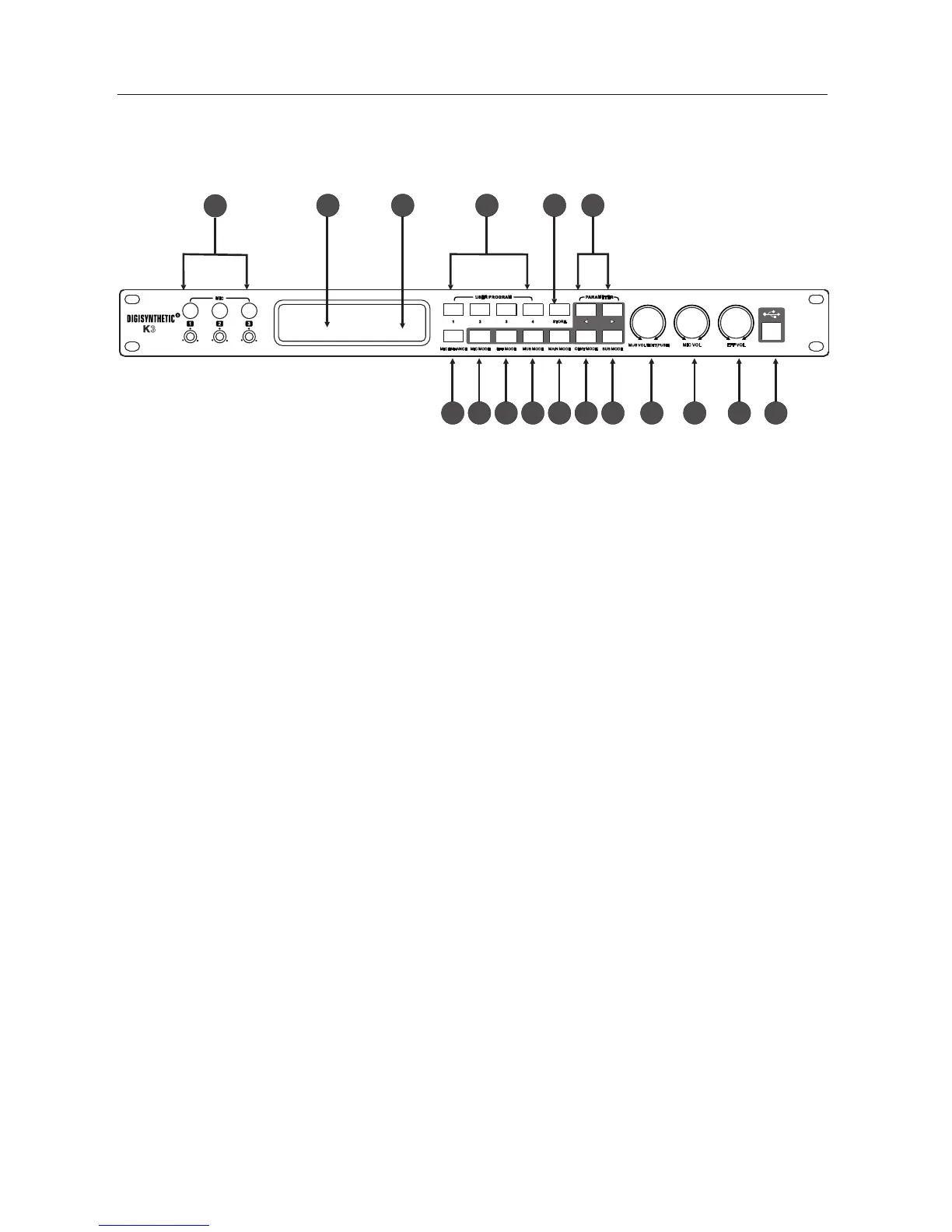
3、Front panel instruction
1 3-ways microphone input jack and volume control potentiometer
2 132 * 32 dot- matrix LCD display is used to display a variety of menus and parameter adjustment information.
3 Infrared remote control receiver window
4 User programming keys
5 Storage program key
6 Menu parameter switch key (in the start-up screen show the music rising tone, falling tone)
7 Microphone enhance keys
8 Microphone mode key
9 Effect mode key
10 Music mode key
11 Main output mode key
12 Center mode key
13 Subwoofer mode key
14 Music volume knob ("edit" function in the menu screen, adjust menu parameters, "ress " function is
switch other parameters in the same menu screen)
15 Microphone volume knob
16 effect volume knob
17 USB Connection
、
、
、
、
、
、
、
、
、
、
、
、
、
、
、
、
、
K3



 To Next Page