40
Assigning the Expression Pedal
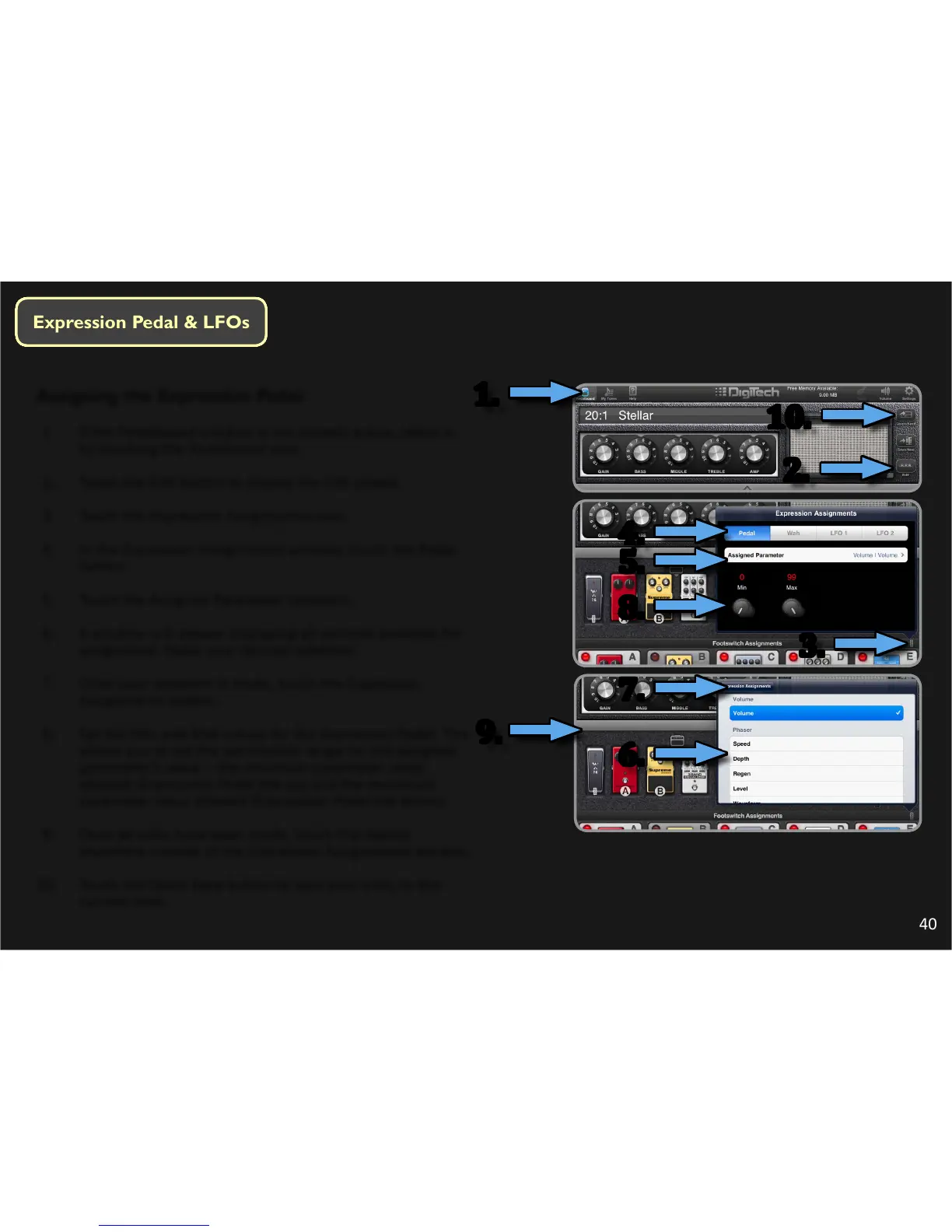
1. If the Pedalboard window is not already acve, select it
by touching the Pedalboard icon.
2. Touch the Edit buon to display the Edit screen.
3. Touch the Expression Assignments icon.
4. In the Expression Assignments window, touch the Pedal
buon.
5. Touch the Assigned Parameter selecon.
6. A window will appear displaying all controls available for
assignment. Make your desired selecon.
7. Once your selecon is made, touch the Expression
Assignments buon.
8. Set the Min and Max values for the Expression Pedal. This
allows you to set the permissible range for the assigned
parameter’s value – the minimum parameter value
allowed (Expression Pedal toe up) and the maximum
parameter value allowed (Expression Pedal toe down).
9. Once all edits have been made, touch the display
anywhere outside of the Expression Assignments window.
10. Touch the Quick Save buon to save your edits to the
current tone.
1.
2.
10.
3.
4.
5.
8.
9.
6.
7.




 To Next Page