8
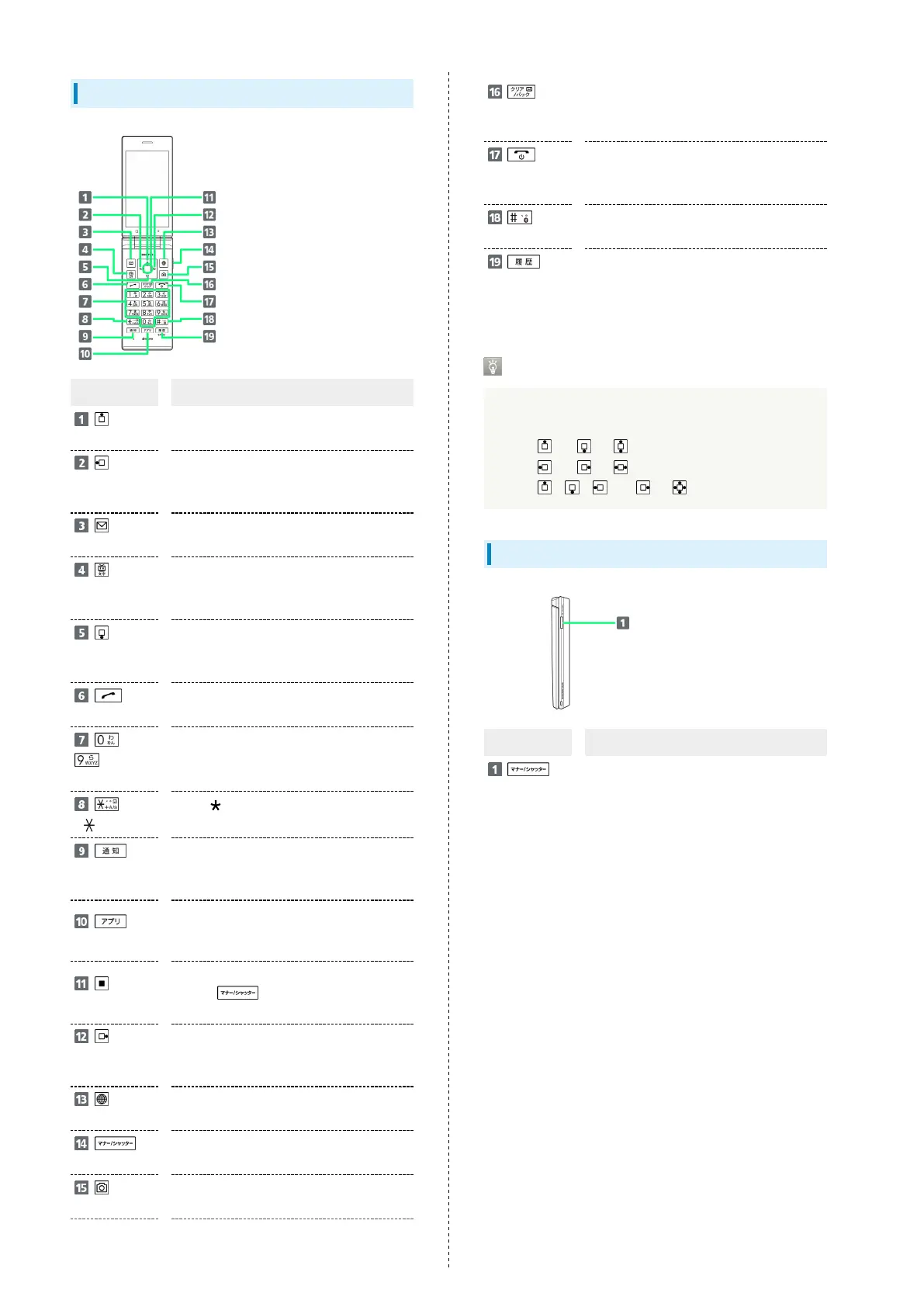
Handset Keys
Key (Name) Description
(Multi
Selector (up))
Show item selection cursor in Standby.
(Multi
Selector
(left))
Show incoming call history.
(Mail
Key)
Open mail menu. Long Press to open S!
Mail composition window.
(TV/
Character
Key)
Activate TV. Long Press to turn on
Flashlight.
(Multi
Selector
(down))
Open Phone Book. Long Press to save to
Phone Book.
(Start Key)
Activate Link Now. Long Press to activate
Fake call
1
.
-
(Dial
Keys)
Enter phone numbers. Activate Write
now
1
. Long Press to search Phone Book.
( Key)
Enter . Activate Write now
1
. Long Press
to enter int'l access number.
(Notification
Key)
Open Notifications Window. Long Press to
open Settings Window.
(App Key)
Open Application list. Long Press to
activate application set with "Custom
key"
1
.
(Center Key)
Open Main Menu. Long Press to lock/
unlock (Side Key) when handset
closed.
(Multi
Selector
(right))
Show outgoing call history.
(Browser Key)
Activate Browser. Long Press to open
browser menu.
(Side Key)
Activate manner mode menu. Long Press
to activate/cancel Manner mode.
(Camera Key)
Activate Camera (Video). Long Press to
open Data Folder.
(Clear/Back
Key)
Open Answer Memo List. Long Press to
toggle Auto answering on/off.
(Power/End
Key)
Show/hide information in Standby. Long
Press for Power Off screen.
(#
Key)
Activate Write now
1
. Long Press to toggle
Bluetooth
®
on/off.
(History Key)
Open application history.
1 Operates when setting enabled.
Multi Selector
In this User Guide, Multi Selector operations are indicated
as follows:
・
Press or .....
・
Press or .....
・
Press , , , or .....
Handset Keys (Handset Closed)
Key (Name) Description
(Side Key)
Show Sub-display. Long Press to enter/
exit Manner mode.



 To Next Page