15
Getting Started
DIGNO
®
ケータイ
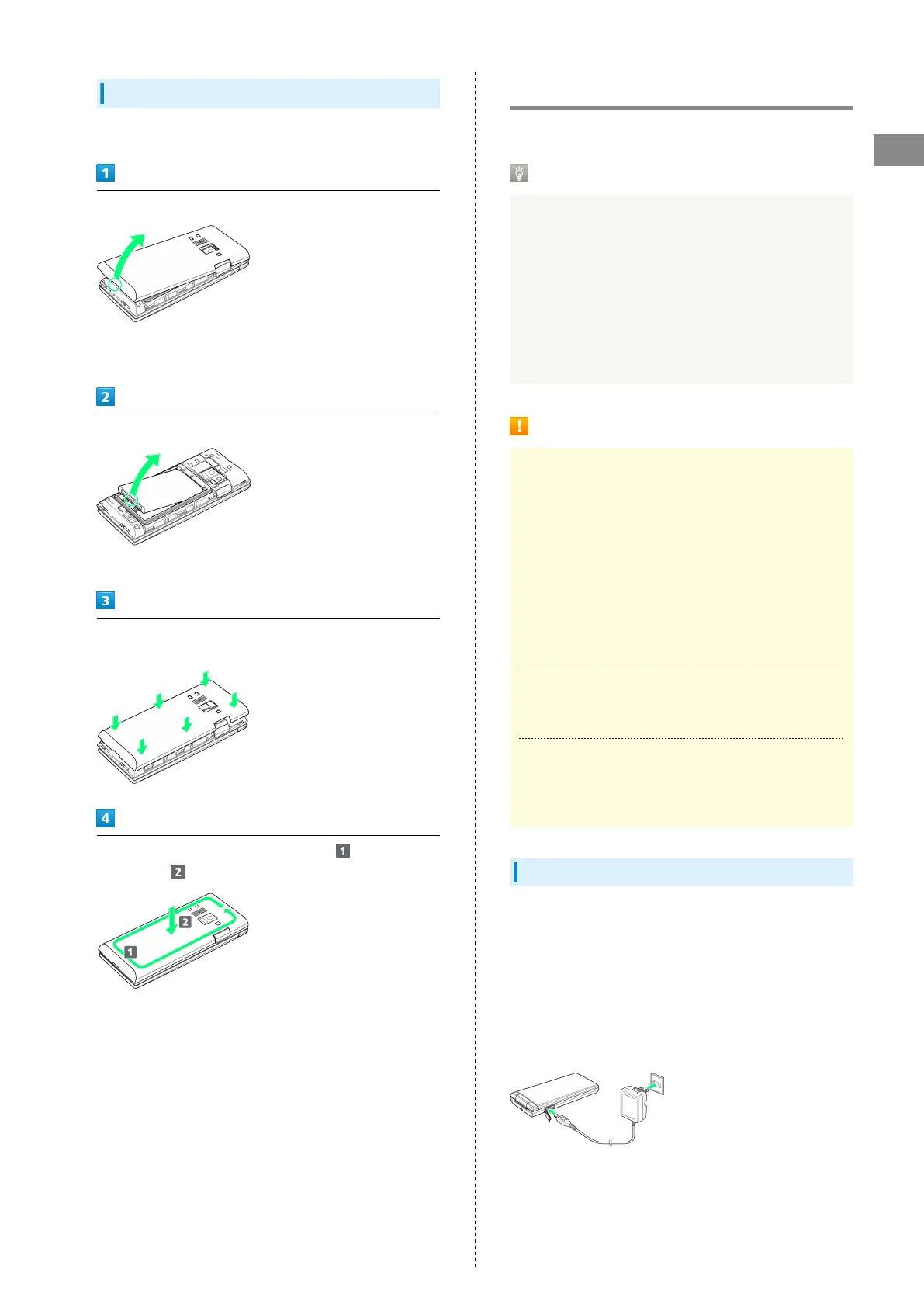
Removing
Always power off beforehand.
Remove Back Cover
・Gently lift Back Cover by notch in direction shown with
finger.
Remove Battery
・Gently lift Battery by bottom in direction shown.
Fit Back Cover on handset, and press Back Cover in directions
shown
Work way around Back Cover in directions holding down
in direction to install completely
Charging Battery
Charge Battery inserted in handset.
Incoming/Charging LED
Lights red during charging, and goes out once charging
completes.
・Incoming/Charging LED flashing while charging indicates
an abnormality with Charger, Battery, or that equipment
has reached the end of its service life, and that Battery
is not charging properly. Check that Charger and other
equipment are SoftBank-specified items. If you are using
specified products only, contact a SoftBank Shop or
SoftBank Customer Support, General Information.
Charging Cautions
Water Resistance
The optional AC Charger and Desktop Holder are not
waterproof. Never connect Micro USB plug while handset or
AC Charger is wet.
Handset is water resistant; however, if Micro USB plug
is inserted while it is wet, liquid (tap water, beverage,
sea water, pet urine, etc.) or a foreign object adhered to
handset or Micro USB plug may cause overheating, burnout,
fire, malfunction, burns, etc. due to electric shock, short-
circuiting, etc.
Handling Cables
Do not pull, bend, or twist cable; may damage the cable.
Charging Abroad
SoftBank Corp. is not liable for problems resulting from
charging handset abroad.
AC Charger
AC Charger is an optional accessory. Use a SoftBank-specified
AC Charger.
For details on AC Chargers and other peripheral equipment,
see SoftBank Website.
Charging with AC Charger SB-AC12-HDQC is described here.
・See User Guide for AC Charger SB-AC12-HDQC.
・Never connect Micro USB plug while handset or AC Charger
is wet.



 To Next Page