11
Getting Started
DIGNO
®
ケータイ
Handset Memory/SD Card
Handset supports SD Card up to 32 GB. Some SD Cards may
not operate properly.
Handset memory is available for saving system data,
applications, captured photos and movies, and other data.
Handset Memory/SD Card Cautions
Content Saved to Handset Memory/SD Card
Files
Content in handset memory/SD Card may be lost/altered
due to accidents, malfunctions, repairs, handset upgrade/
replacement, or other handling. Back up important content
regularly. SoftBank Corp. is not liable for any damages
resulting from loss/alteration of content.
・Do not forcefully install or remove SD Card.
・Do not touch terminals with hands or metal.
・Never power off while files are being accessed.
・Be careful that data does not become erased or
overwritten.
microSDHC Cards
Handset supports SDHC SD cards (microSDHC cards).
microSDHC cards can only be used with SDHC devices.
Save Location
By default, photos and videos captured with handset are
saved to handset memory.
SD Card Precaution
Keep SD Card away from infants; may cause choking if
swallowed.
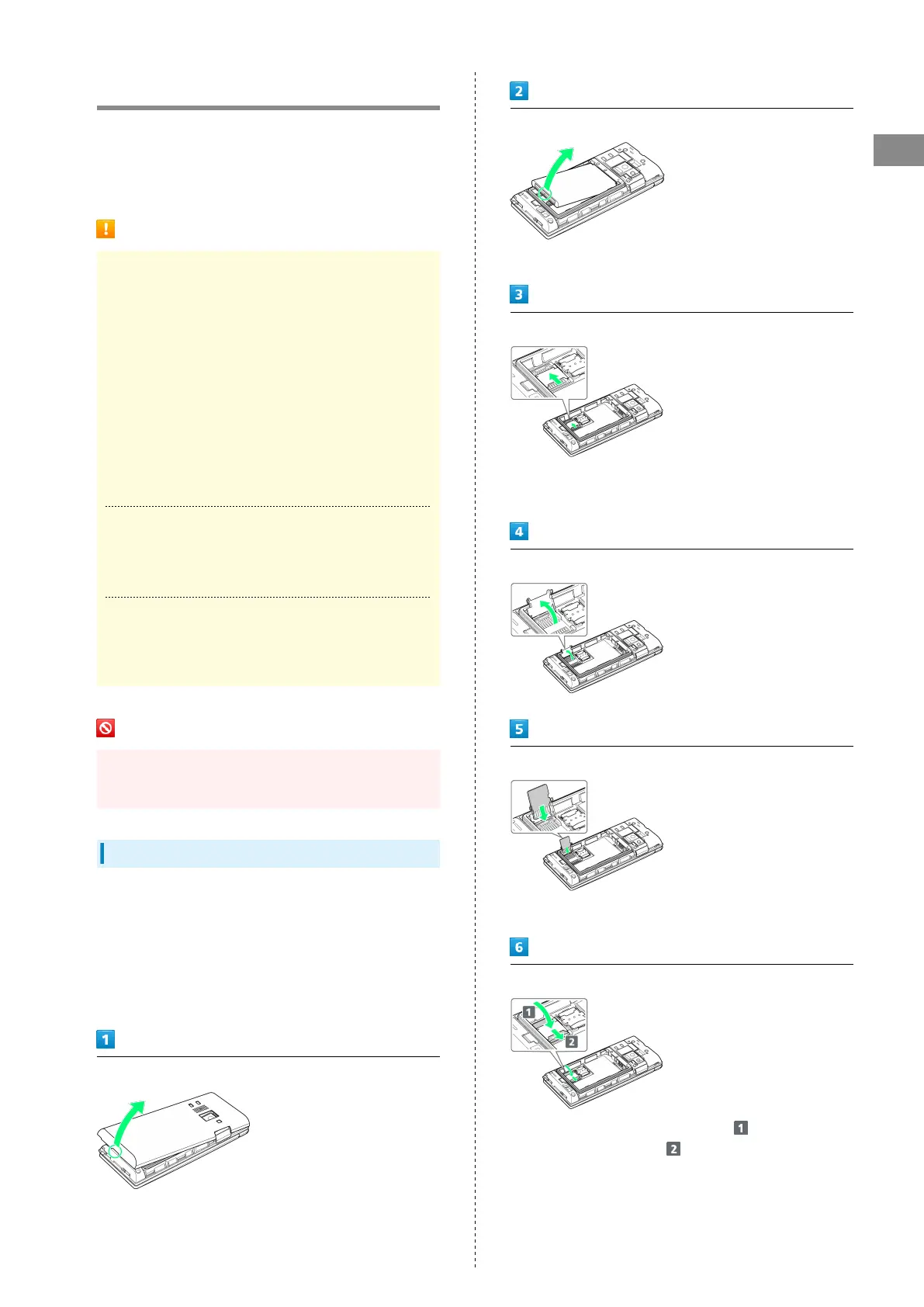
Inserting SD Card
Always power off beforehand.
At time of purchase, a protective card is inserted in SD Card
Slot. Remove before installing an SD Card.
Leave inserted if not using an SD Card to prevent rattling.
・While the protective card can be inserted when an SD Card
is not used, it is not necessary to insert the card.
Remove Back Cover
・Gently lift Back Cover by notch in direction shown with
finger.
Remove Battery
・Gently lift Battery by bottom in direction shown.
Unlock SD Card Slot Cover
・Slide SD Card Slot Cover with pad of finger in direction
shown until it clicks unlocked.
Lift SD Card Slot cover in direction shown
Slide SD Card in direction shown into SD Card Slot Cover
・Note orientation.
Lock SD Card Slot Cover
・
Lower SD Card Slot Cover in direction , and slide with
pad of finger in direction until it clicks locked.



 To Next Page