76
Using Infrared Transmission
Exchange data (profile, Phone Book entries, Notepad entries,
photos, videos, music, etc.) with mobile phones and other
devices.
Infrared Transmission Version
Handset infrared transmission conforms to IrMC version
1.1.
Troubleshooting
Q. Cannot exchange files
A. Are the infrared ports aligned? Make sure there are no
objects between the ports while transmitting. Do not
move the ports until files are received.
Infrared Transmission Notes
It may not be possible to use infrared transmission or to
transmit properly depending on the other device or on the
files. Another function activating during transmission will
also cause transmission to end.
Do Not Point Infrared Port at Eyes
Do not point Infrared Port at eyes while transmitting. May
affect vision.
Receiving Data
For details, see "Receiving Data by Infrared."
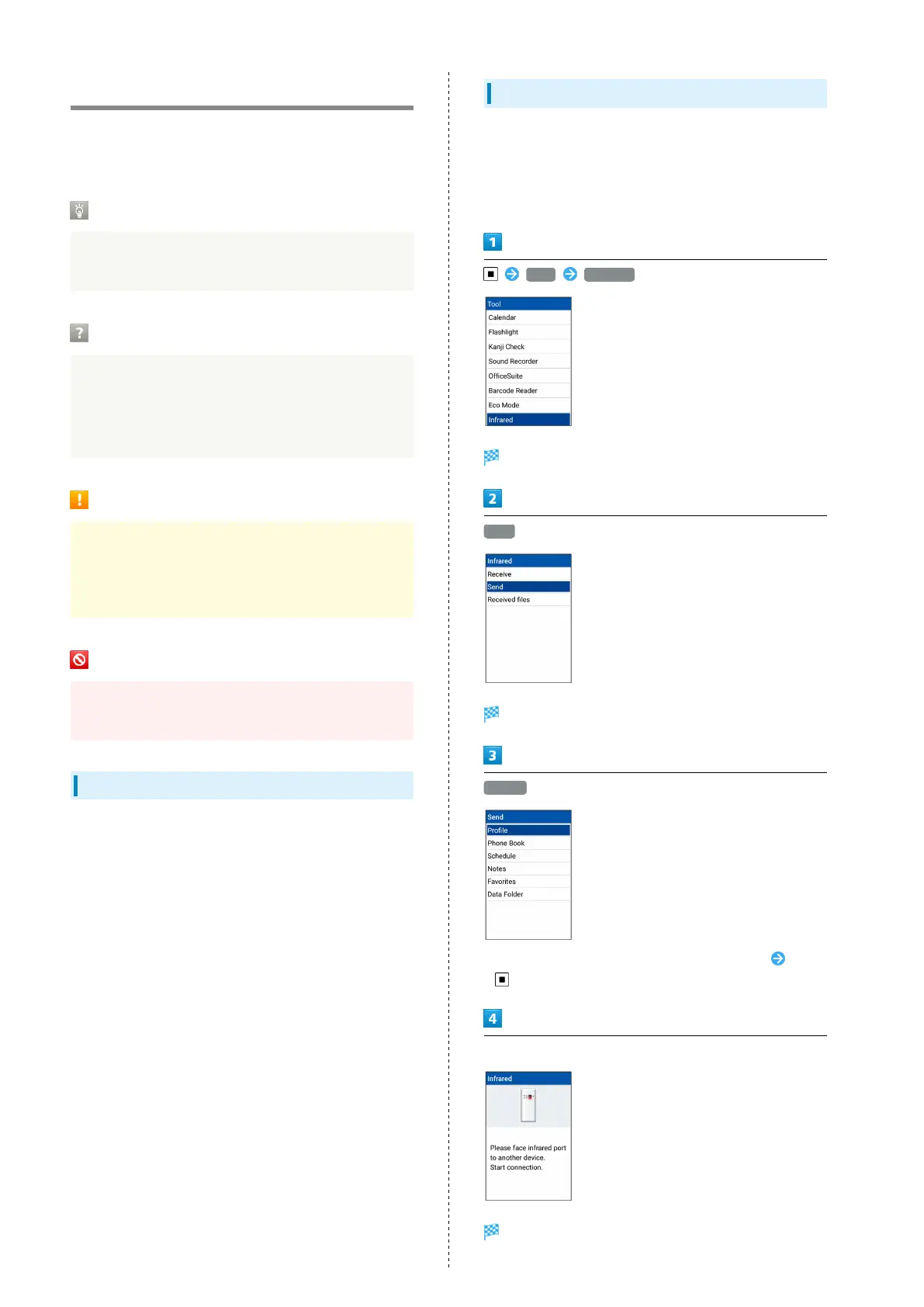
Sending Profile (Phone Number, Etc.)
With handset and other device close together, align their
infrared ports in a straight line.
・Also send image and music files (operation may differ
depending on the type of file being received).
Tool Infrared
Infrared window opens.
Send
Window for selecting file opens.
Profile
・
To send other files, select corresponding category Press
and follow onscreen prompts.
Align infrared ports on handset and receiving device
Screen for sending in progress appears.



 To Next Page