14
Surface mode
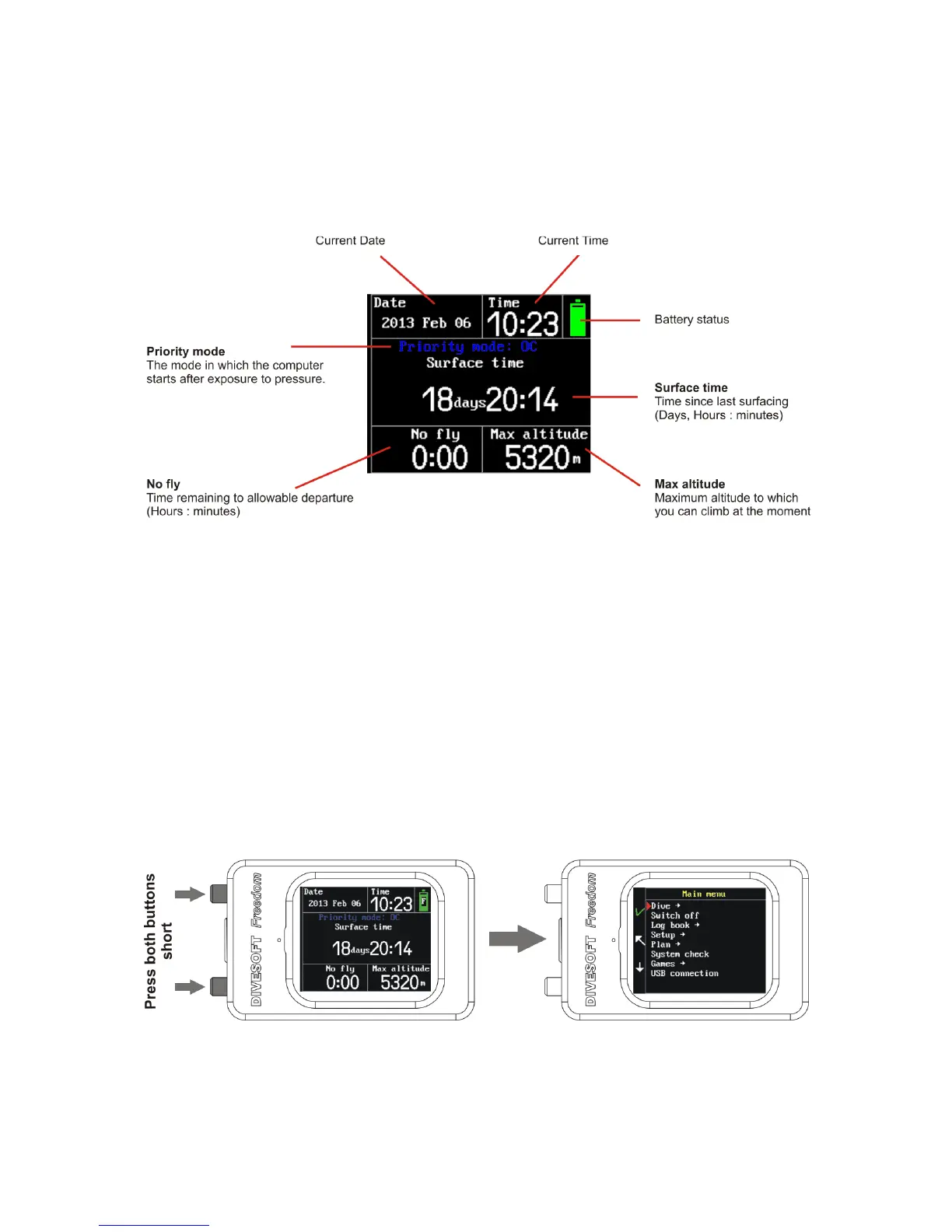
Surface mode displays the main information about your current inert gas saturation and implications
for next dive. Current time and date, surface time since the last dive (regardless of wether such dive
was OC, SCR or free diving), no fly time, and maximum altitude. In addition, priority mode
information is displayed. Surface mode uses a shadow frame.
Surface time is displayed in hours and minutes in the course of the first day. After 24 hours it is
displayed as days, hours and minutes.
No fly - Pressure in planes cabin is reduced to 76.1 kPa (0.761 bar) and to 58 kPa (0.58 bar) in an
emergency situation. The-no fly time is time when a diver’s tissues are still saturated with inertial
gases and a reduction of the pressure level to that of the plane’s cabin pressure could cause DCS.
DIVESOFT strictly recommends against flying before termination of the no-fly limit. Keep a sufficient
period of time between your last dive and flying!
Max. altitude – atmospheric pressure decreases as altitude increases. It is the same principle as
pressure reduction as a diver ascends. Maximum altitude information shows the diver the maximum
altitude that can be reached without DCS risks at this moment.
Priority mode information – shows which mode is set as the priority mode. The color of the
information corresponds to the color of the set priority mode frame.



 To Next Page