36
Decompression stops
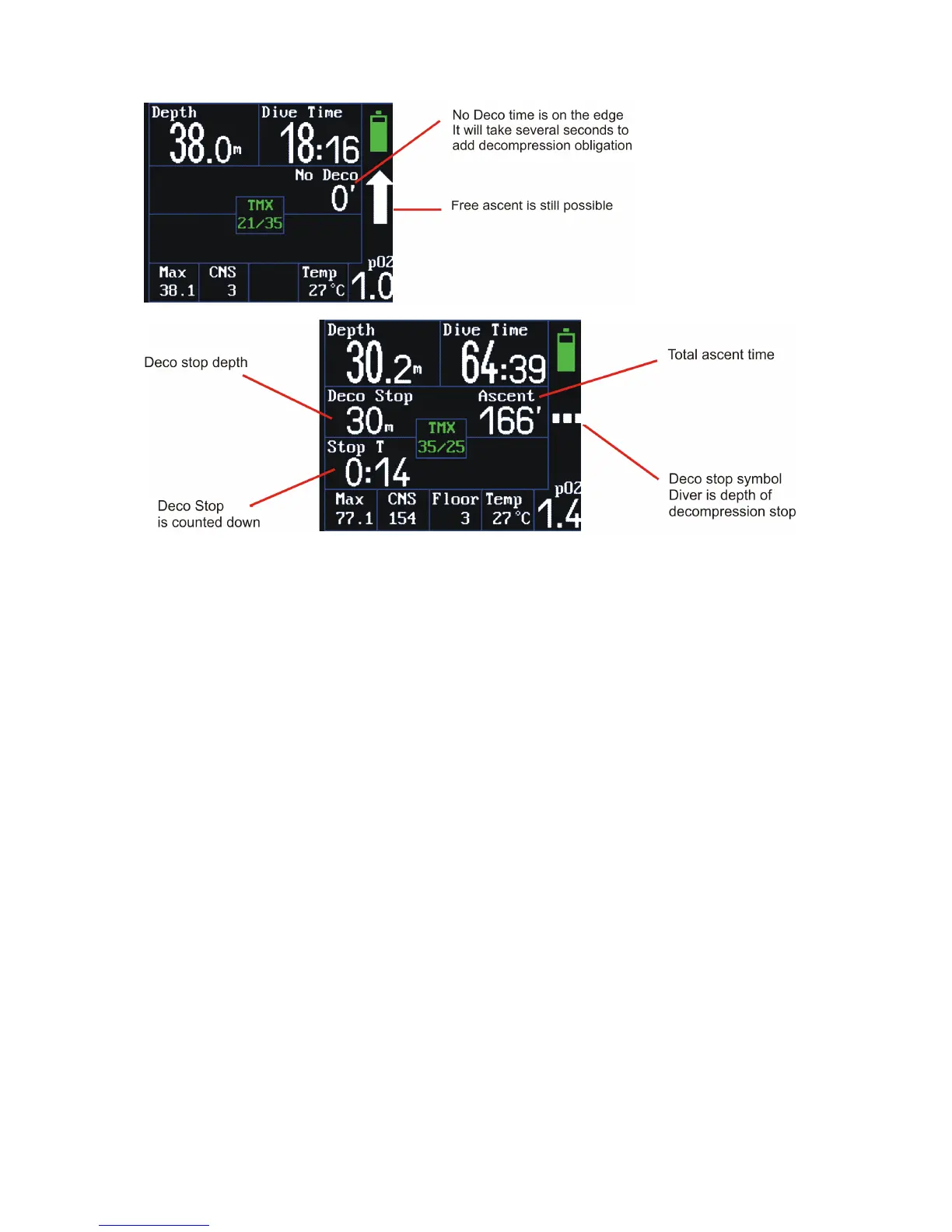
When the diver ascends to the decompression-stop depth, the decompression-status graphic symbol
changes to a white dashed line and the time in the lower left box starts to count down.
The ascent rate between decompression stops is set to 3 m/min (10ft/min). The ascent time is
counted in the length of the decompression stop. If the diver ascends at a higher rate, the stop will
be extended by the time required to ascend at the prescribed speed.
Tolerance at the decompression stop is +/- 0.5 m.
If the diver passes a decompression stop and the ceiling simultaneously, then a red arrow is
displayed. That is a serious and dangerous situation. The diver has to return below the ceiling
immediately! Exceeding the ceiling involves a huge risk!
When the diver falls deeper than 0.5 m below the current decompression stop, the time countdown
is interrupted and the FREEDOM continues with the decompression calculation.
After termination of the last stop, the deco information disappears and a white arrow for free ascent
is displayed in the right-side column.
In the case of missing a decompression stop, a new decompression procedure is calculated from the
current position. However, missing a decompression stop can lead to critical oversaturation and the
occurrence of decompression sickness.
Show plan
The current course of decompression can be displayed during the dive. If you are just under the
surface or you launch a demo dive, go to the menu (BOTH KEYS) and select the “Show plan” item.
The Freedom will display the list of decompression stops and the length thereof. Use of all set



 To Next Page