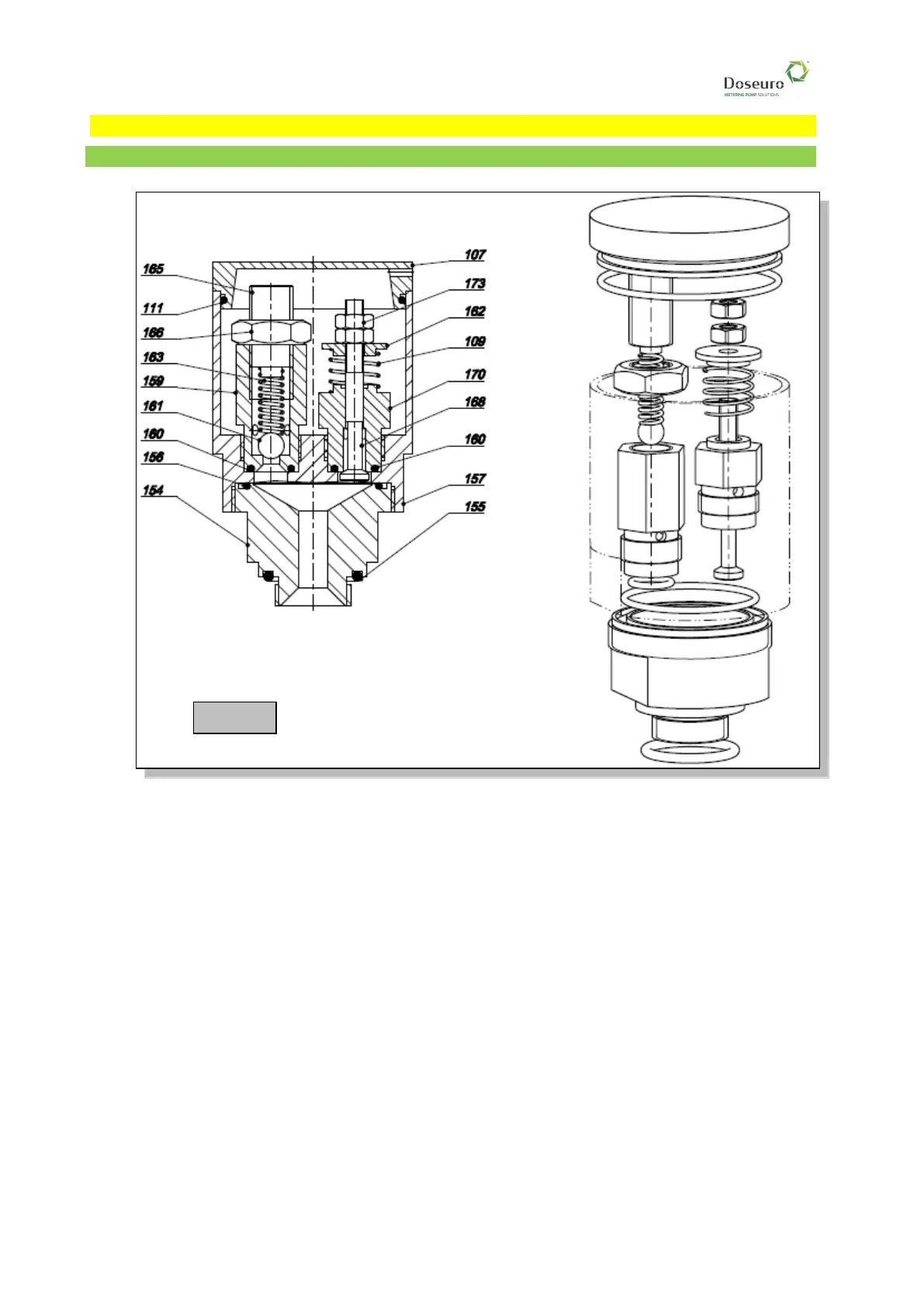
16 - BR-SD PUMP HEADS RECIRCULATION VESSEL CALIBRATION
16.1 - Recirculation vessel type VR 4 – 6 (VR 10 AP) calibration
1 Make sure that the drain plug located in the bottom part of the oil reservoir is tight.
2 Loosen the locking nut (pos 166) and unscrew the grub screw adjusting the RECIRCULATION
VALVE spring (pos. 165) while leaving a minimum compression level on the springs.
3 After loosening the lock nut, loosen the nut adjusting the RESET VALVE spring (pos. 173) while
keeping minimum compression on the springs.
4 Start the pump
5 Pour oil in the tank until it reaches the mark and press the RESET VALVE (pos. 168); the oil will
start flowing into the oil reservoir.
6 Repeat the operation until it is possible to see oil oscillating inside the tank. At this point, the oil
reservoir is full.
7 Slowly tighten the adjustment nut (pos.173) of the reset spring until the oil in the tank is still,
making the recirculation valve spring operate, thus preventing the oil from continuously oscillating.
This operation must be carried out in the effective system operating conditions but without
discharge pressure (opening valve "1" – closing valve "2"),
8 Pressurise the system by closing valve "1" and opening valve "2"; the oil in the tank will oscillate.
9 Slowly tighten the GRUB SCREW (pos. 165) of the recirculation spring until the oil goes back to
being still and pressure gauge "3" indicates the system’s pressure. Slowly tighten the locking nut
(pos. 166), which holds the grub screw in place (pos. 165)
❑ To check whether the operation was successful, proceed as follows:



 To Next Page