Horizon Compact Release 1.01.00 Wireless Ethernet Product User Manual – Volume 2
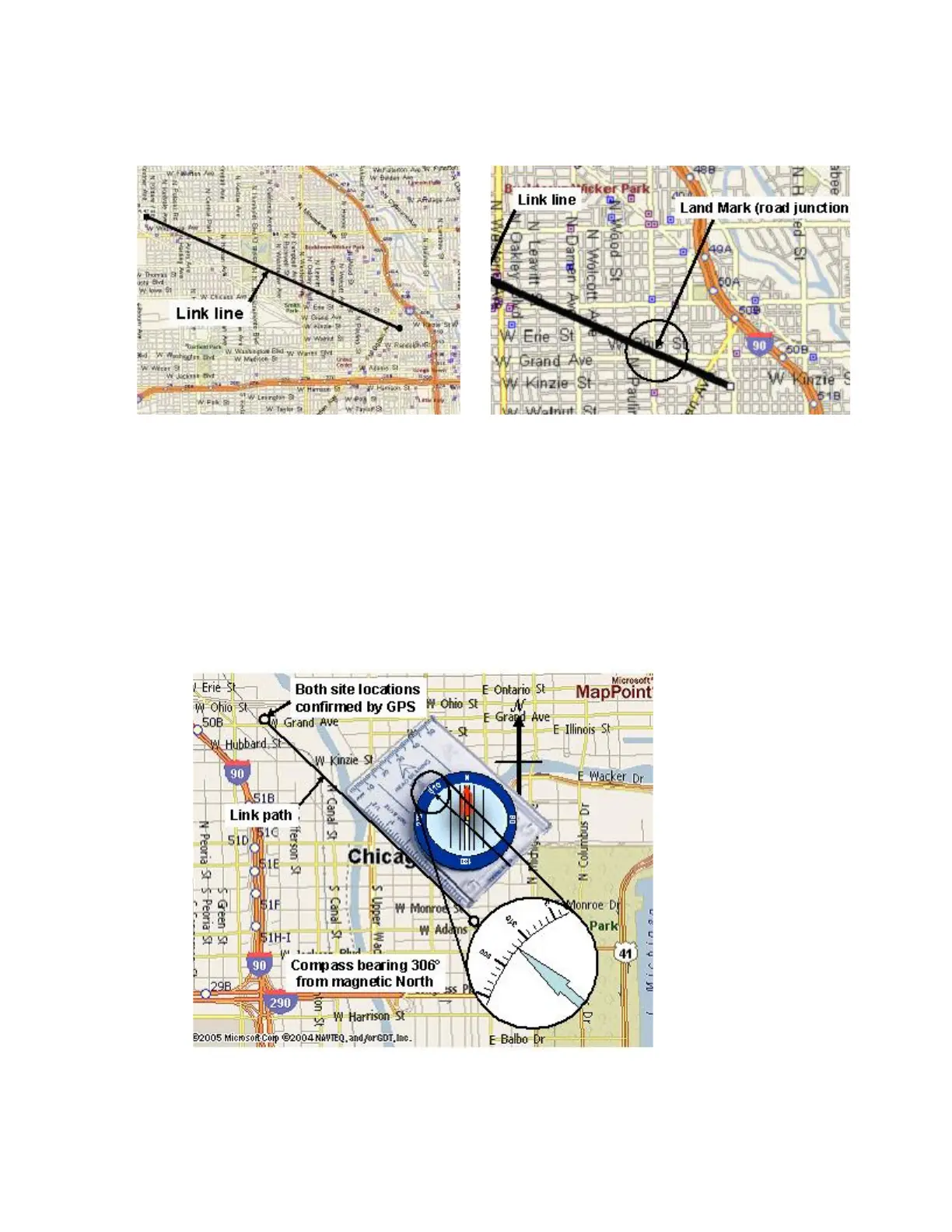
Figure 2-1
Aligning Antennas Using Local Landmarks
3. If the far end antenna site is NOT visible (due to poor visibility), and there are no visible
land marks, use a GPS unit to obtain accurate coordinates for each end of the link. Plot these on
a map of the area and draw a line between each site. Using a compass, physically align the map
so that the magnetic North compass bearing marked on the map coincides with actual magnetic
North shown on the compass. Use the compass to measure the bearing of the line drawn
between each site relative to magnetic North. At each end of the ink, use this compass bearing to
aim your antennas. Clamp the radio/antenna mounting brackets in place on the pole/tower
torquing the nuts to specification. See
Table 2-1 for torque values. The antennas should be
aligned sufficiently to obtain a signal strong enough to perform an accurate alignment later.
Figure 2-2
Using GPS and Compass Bearings to Align Antennas
This concludes the steps to align the radios visually.



 To Next Page