DragonWave Inc. 88
Horizon Compact Release 1.01.00 Wireless Ethernet Product User Manual – Volume 2
3.12.7 Two Wire Option Example
The “two wire” option is so named because two separate data feeds are required; one to each Horizon
system. One Horizon system is configured as the primary and the other as the secondary. Management
has to be via Port 2, so each Horizon will be configured for out-of-band management and have its Port 2
connected to the overlay management network.
Data re-routing, between the Horizon systems, is dependant upon a connected Ethernet switch. Ethernet
switch settings are used to reroute the traffic from one Horizon unit to the other, when a failure occurs.
Protocols such as RSTP, LACP and routing protocols are able to determine that the Horizon units have
switched between primary and secondary units, or vice-versa, and will reroute the data traffic through the
active link.
In Omni Release 1.1 of Horizon Compact, the protection schemes result in an average of 50 msec switch
time from active to standby link. The data traffic will revert to the previously active link if there is a failure
on the currently active link or if the user intervenes.
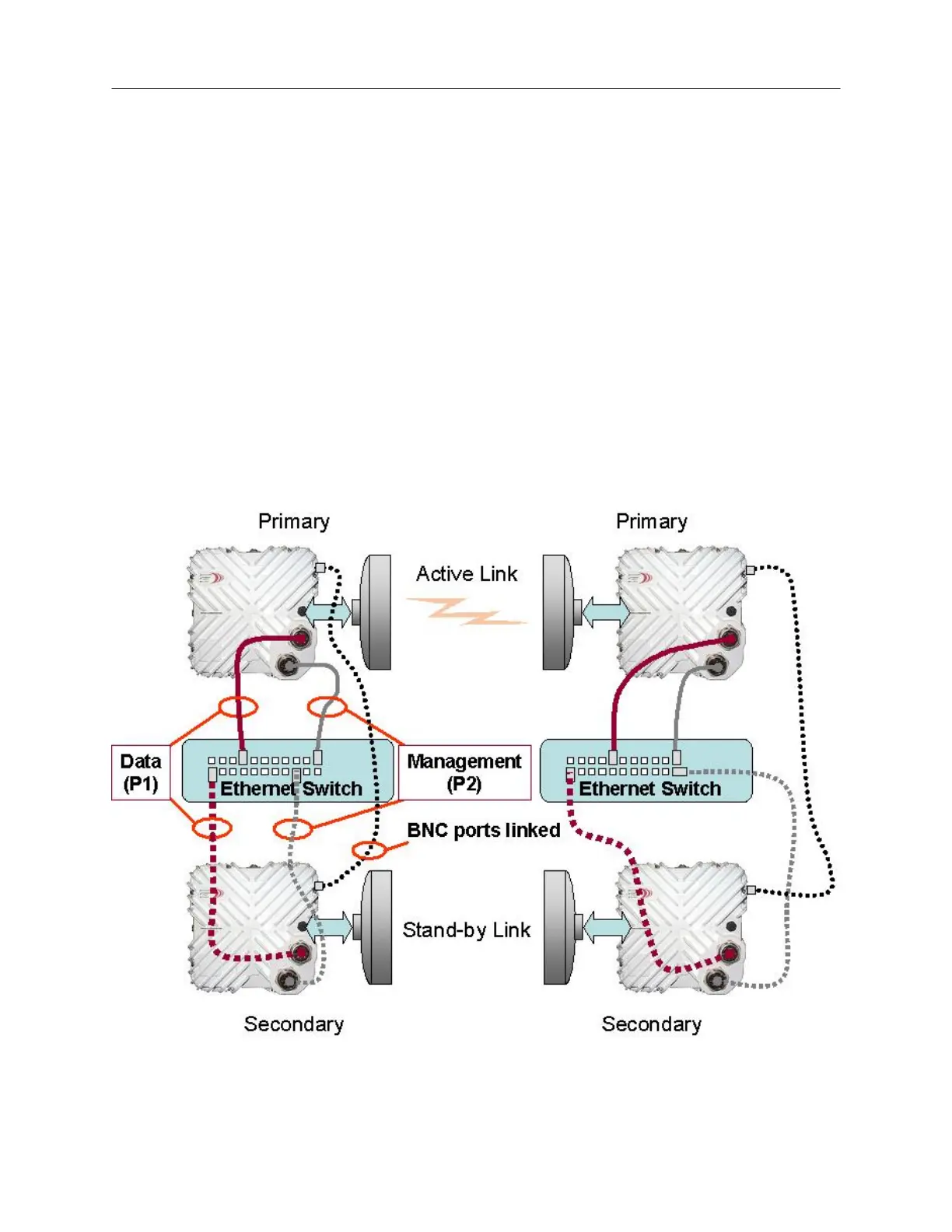
The Horizon Compact system with copper interface is connected as shown in
Figure 3-3. Each end of the
link is connected the same way.
NOTE: For clarity, the PonE power adapter and surge arrestor have been omitted from the
diagrams. Both the Port 1 and Port 2 Ethernet connections and the power feed via Port 1 must be
protected from transients.
Figure 3-3 Redundancy Connections – 2 wire option – copper interface
Data is connected via Port 1 (P1) of both units and management access is via port 2 (P2) of both units.
Management is, therefore, out-of-band.
The Ethernet cable length must not be greater than 100 m.



 To Next Page