53
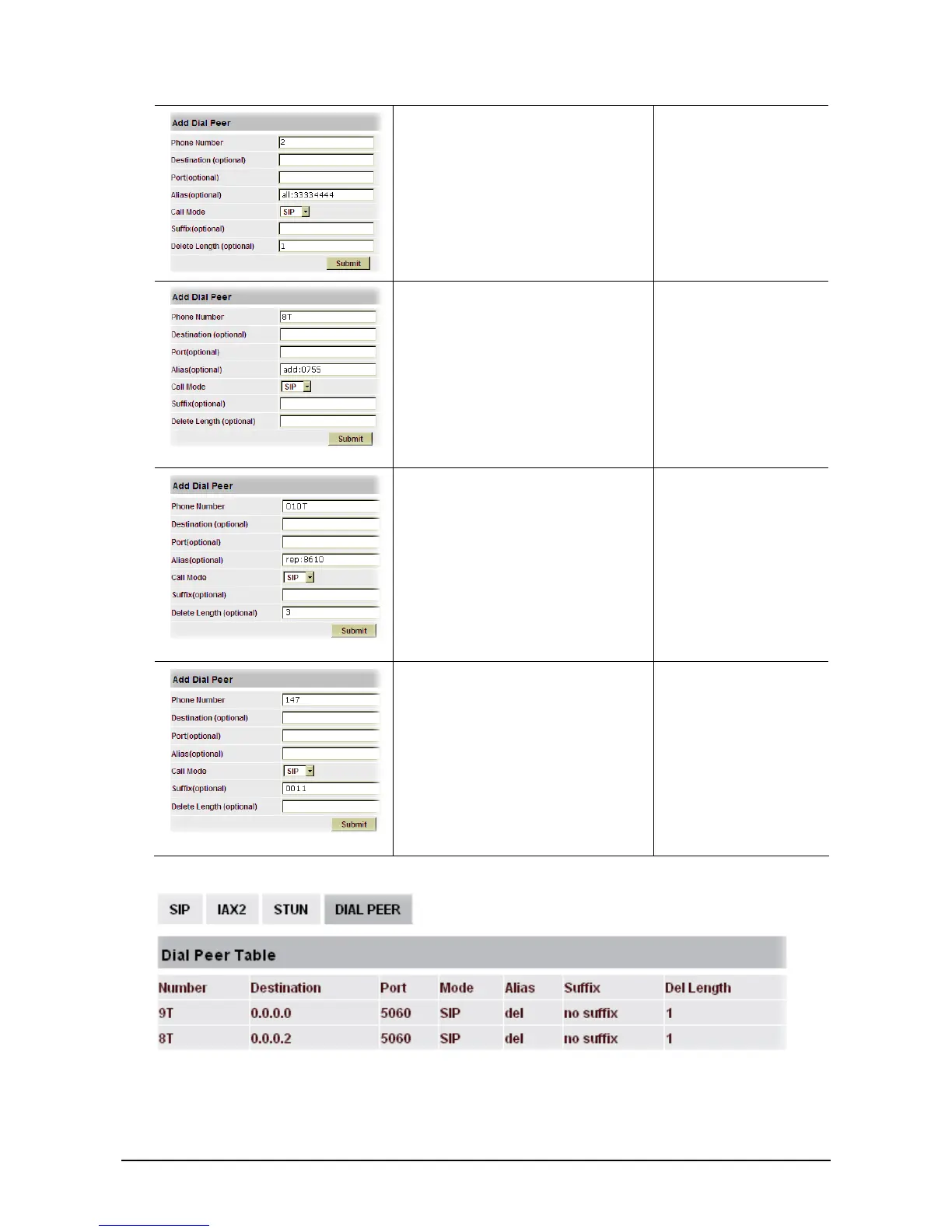
This setting will realize speed dial
function, after you dialing the
numeric key “2”, the number after all
will be sent out.
When you dial “2”, the
SIP1 server will receive
33334444
The phone will automatically send
out alias number adding your dialed
number, if your dialed number starts
with your set phone number.
When you dial “8309“,
the SIP1 server will
receive “07558309”
You need set Phone Number, Alias
and Delete Length. Phone number is
XXXT and Alias is rep:xxx
If your dialed phone number starts
with your set phone number, the first
digits same as your set phone number
will be replaced by the alias number
specified and New phone number
will be send out.
When you dial
“0106228”, the SIP1
server will receive
“86106228”
If your dialed phone number starts
with your set phone number. The
phone will send out your dialed
phone number adding suffix number.
When you dial “147”,
the SIP1 server will
receive “1470011”
Introduction of how to set up dial-peer to implement switch between multi- SIP lines
9T mapping: If you have registered a SIP1 server and set dial-peer according to the above table, all
calls will be sent via SIP1 server when you press the numeric key “9” in front of dialing destination
phone numbers.



 To Next Page