90
4
4
.
.
1
1
2
2
R
R
e
e
d
d
i
i
a
a
l
l
/
/
U
U
n
n
-
-
r
r
e
e
d
d
i
i
a
a
l
l
If B is in busy line when A calls B, A will get notice: busy, please hang up. If A want to connect B as
soon as B is in idle, he can use redial function at the moment and he can dials an appointed prefix
number plus B’s number to realize redial function.
What is redial function? A can’t not build a call with B when B is in busy, then A will subscribe B’s
calling mode at 60 second intervals. Once B is available, A will get reminder of rings to hook off, while
A hooks off, A will call B automatically. If at this time A is occupied temporarily and unwilling to
contact B, A also can cancel the redial function by dialing an appointed prefix plus B’s number before
making the redial function.
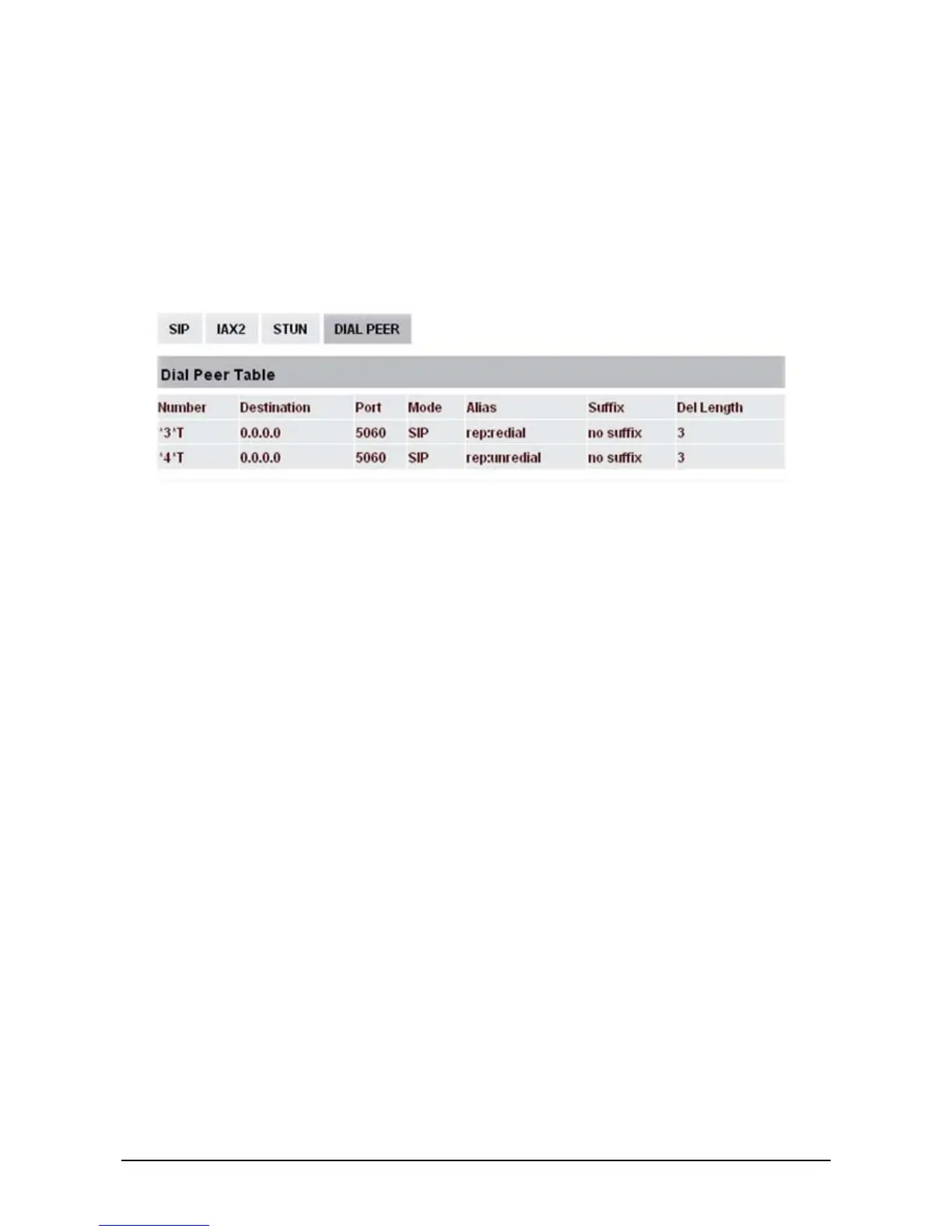
*3* is appointed prefix code. After making the above configuration, A can dial
*3* plus B’s phone number to make the redial function.
*4* is appointed prefix code. After configuration, A can dial *4* to cancel redial function.
User can set prefix in random, in the case of no affecting current dialing rules.
4
4
.
.
1
1
3
3
C
C
l
l
i
i
c
c
k
k
t
t
o
o
D
D
i
i
a
a
l
l
When the user A browses in an appointed Web page, user A can click to call user B via a link, then user
A’s phone will ring. After user A hooks off, the phone will dial to user B.



 To Next Page