58
3
3
.
.
4
4
.
.
2
2
C
C
a
a
l
l
l
l
S
S
e
e
r
r
v
v
i
i
c
c
e
e
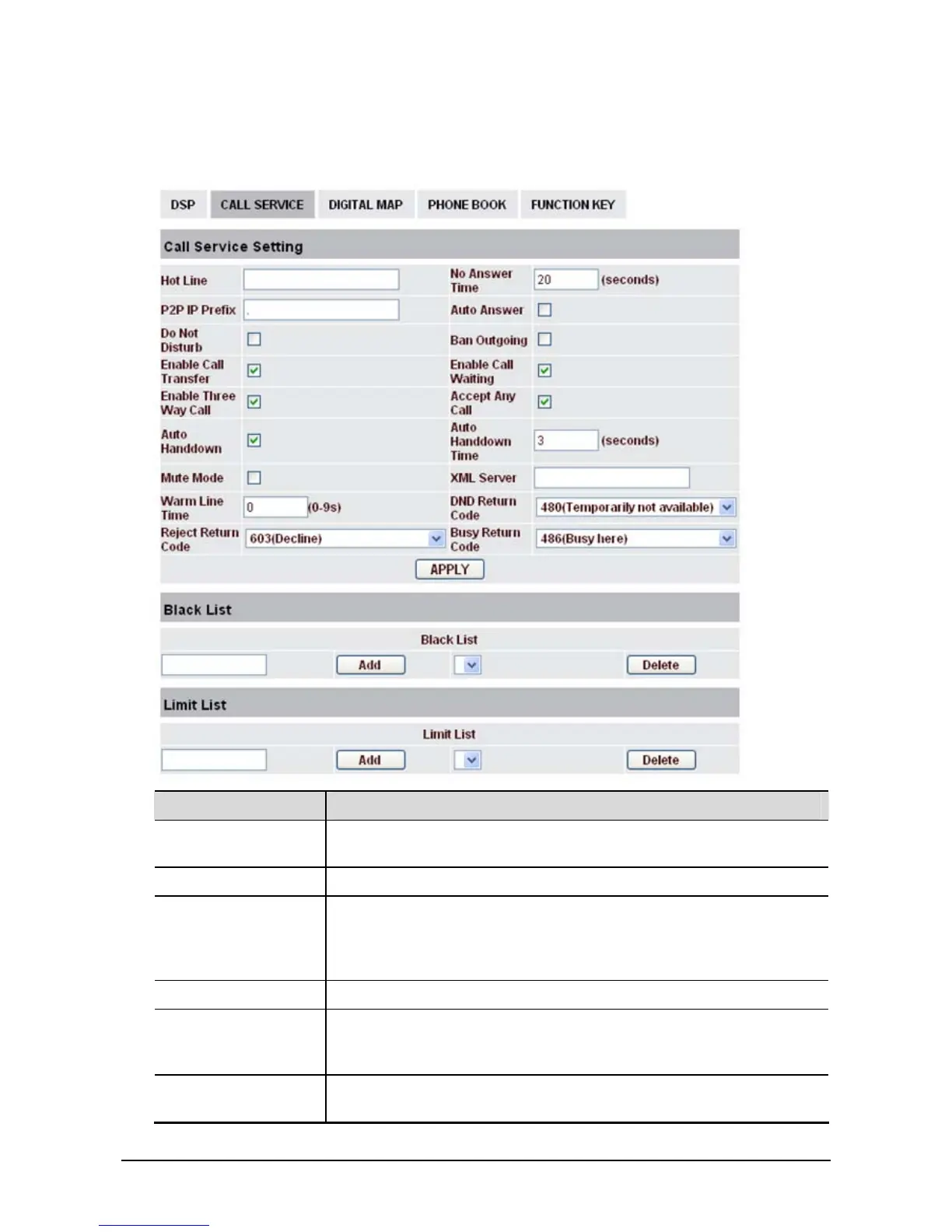
In this web page, you can configure Hotline, Call Transfer, Call Waiting, 3 Ways Call, Black List, white
list Limit List and so on.
Field name Explanation
Hotline
Specify Hotline number. If you set the number, you can not dial any
other numbers.
No Answer Time Specify No Answer Time
P2P IP Prefix
Set Prefix in peer to peer IP call. For example: what you want to dial is
192.168.1.119, If you define P2P IP Prefix as 192.168.1., you dial only
#119 to reach 192.168.1.119. Default is “.”. If there is no “.” Set, it
means to disable dialing IP.
Auto Answer If select it, the phone will auto answer when there is an incoming call.
Do Not Disturb
Select NO Disturb, the phone will reject any incoming call, the callers
will be reminded by busy, but any outgoing call from the phone will
work well.
Ban Outgoing
If you select Ban Outgoing to enable it, and you can not dial out any
number.



 To Next Page