8
1
1
.
.
2
2
P
P
r
r
o
o
d
d
u
u
c
c
t
t
D
D
e
e
s
s
c
c
r
r
i
i
p
p
t
t
i
i
o
o
n
n
This VoIP Phone features based on SIP (RFC 3261). Please familiarize yourself with the functions of
the VoIP phone.
1
1
.
.
2
2
.
.
1
1
F
F
r
r
o
o
n
n
t
t
V
V
i
i
e
e
w
w
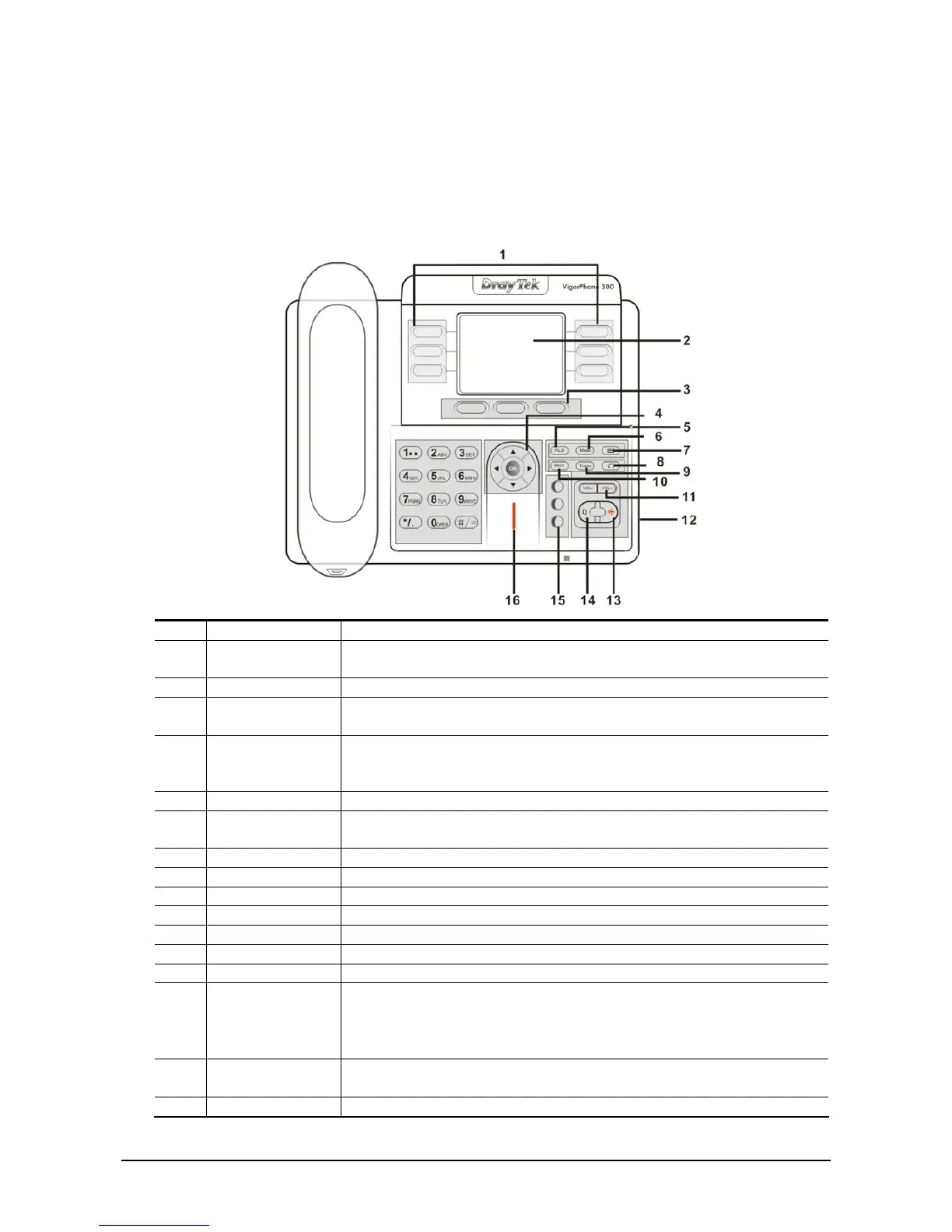
Item Name Description
1 Memory key (1-6) Users could store their commonly used number in these keys, and call
for them as speed dial.
2 Display Screen Displays calls and status information.
3 Soft key 1/2/3 Keys combination, include functions such as SMS / SDial /PBook
/Answer /Conf /Enter /Save /Quit /Edit /Redial and so on.
4 Navigation Left: Checking Incoming call / Up: Checking Missed Call
Right: Checking line status / Down: Checking IP info
OK: Enter into the phone's menu
5 Release key Skip to stand-by mode.
6 Mute Press this key in calling mode, you can hear the other side, and the other
side can not hear you.
7 Envelope LED inside, if blinks remind user have new voicemail.
8 HeadSet Button Place and receive calls through an optionally connected headset.
9 Transfer Use the key to realize blind transfer or attended transfer.
10 Hold Temporarily hold the active call during the talking.
11 Volume -/+ Turn down or turn up the volume by pressing these two keys
12 Headset Jack Allow to connect another headset optionally. (Port type: 3.5mm jack)
13 Hands-free Make the phone into hands-free mode.
14 Redial
z In the hook off /hands-free mode, use the key to dial the last call
number.
z In stand-by mode, it has a function to check the OUTGOING
CALL.
15 Line1/2/3 Three SIP lines allow you to select any one to make the call, if it has
been registered.
16 Indicator light If the light blinking, indicate the phone has missed call(s).



 To Next Page