VigorSwitch G2240 User’s Guide
97
Add: Input MAC, IP, Port and VID, then click on <Add> to create
a new entry into the IP MAC Binding table
Delete: Select one of entry from the table, then click on <Delete> to
delete this entry.
2
2
.
.
9
9
.
.
2
2
I
I
P
P
M
M
A
A
C
C
B
B
i
i
n
n
d
d
i
i
n
n
g
g
D
D
y
y
n
n
a
a
m
m
i
i
c
c
E
E
n
n
t
t
r
r
y
y
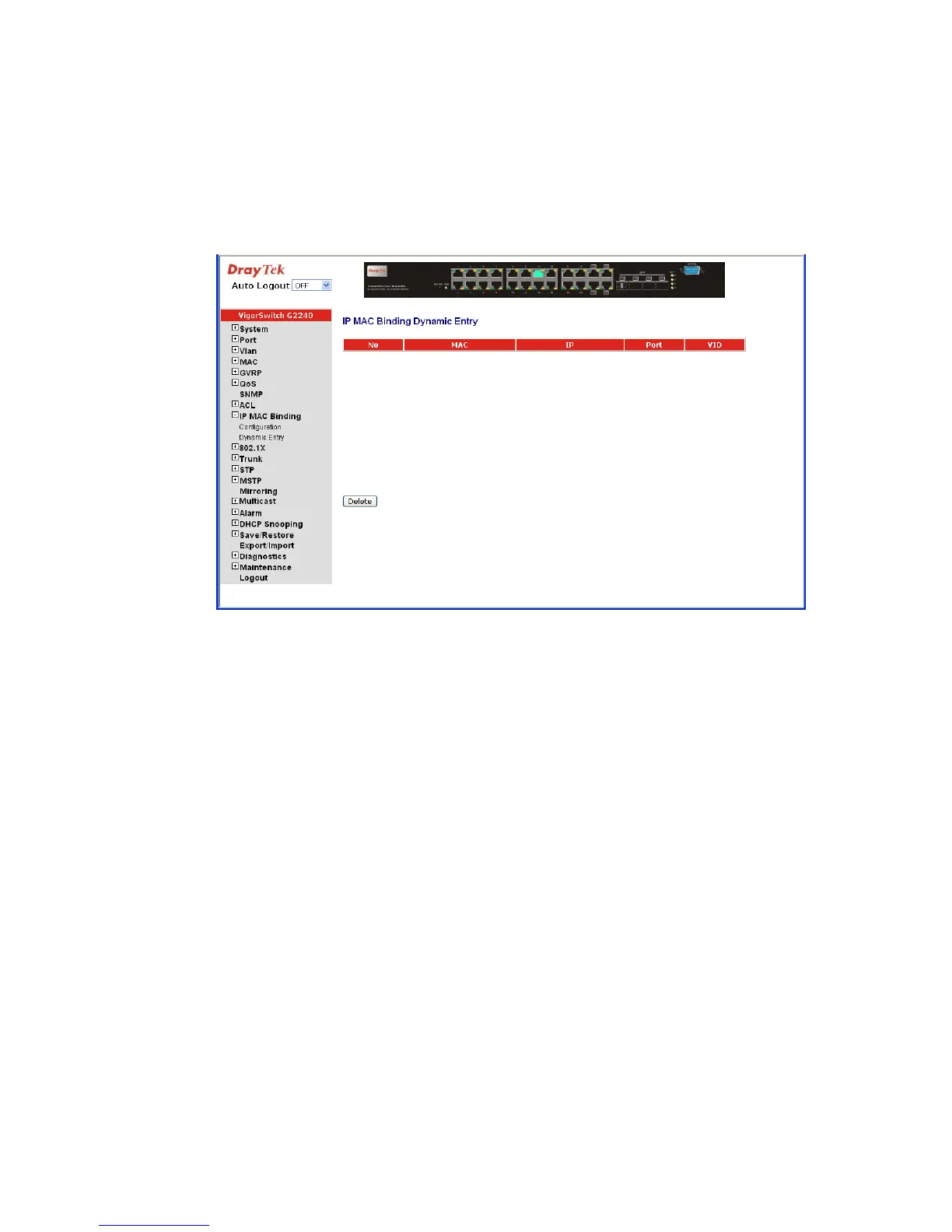
The function must combine with IP-MAC Binding and DHCP Snooping Enable.
No: The IP-MAC Binding entry Index
MAC: Six-byte MAC Address: xx-xx-xx-xx-xx-xx
For example: 00-40-c7-00-00-01
IP: Four-byte IP Address: xxx.xxx.xxx.xxx
For example: 192.168.1.100
Port No: Port no.: 1-24
VID: VLAN ID: 1-4094
Add: Input MAC, IP, Port and VID, then click on <Add> to create
a new entry into the IP MAC Binding table
Delete: Select one of entry from the table, then click on <Delete> to
delete this entry.





 To Next Page