VigorSwitch G2240 User’s Guide
27
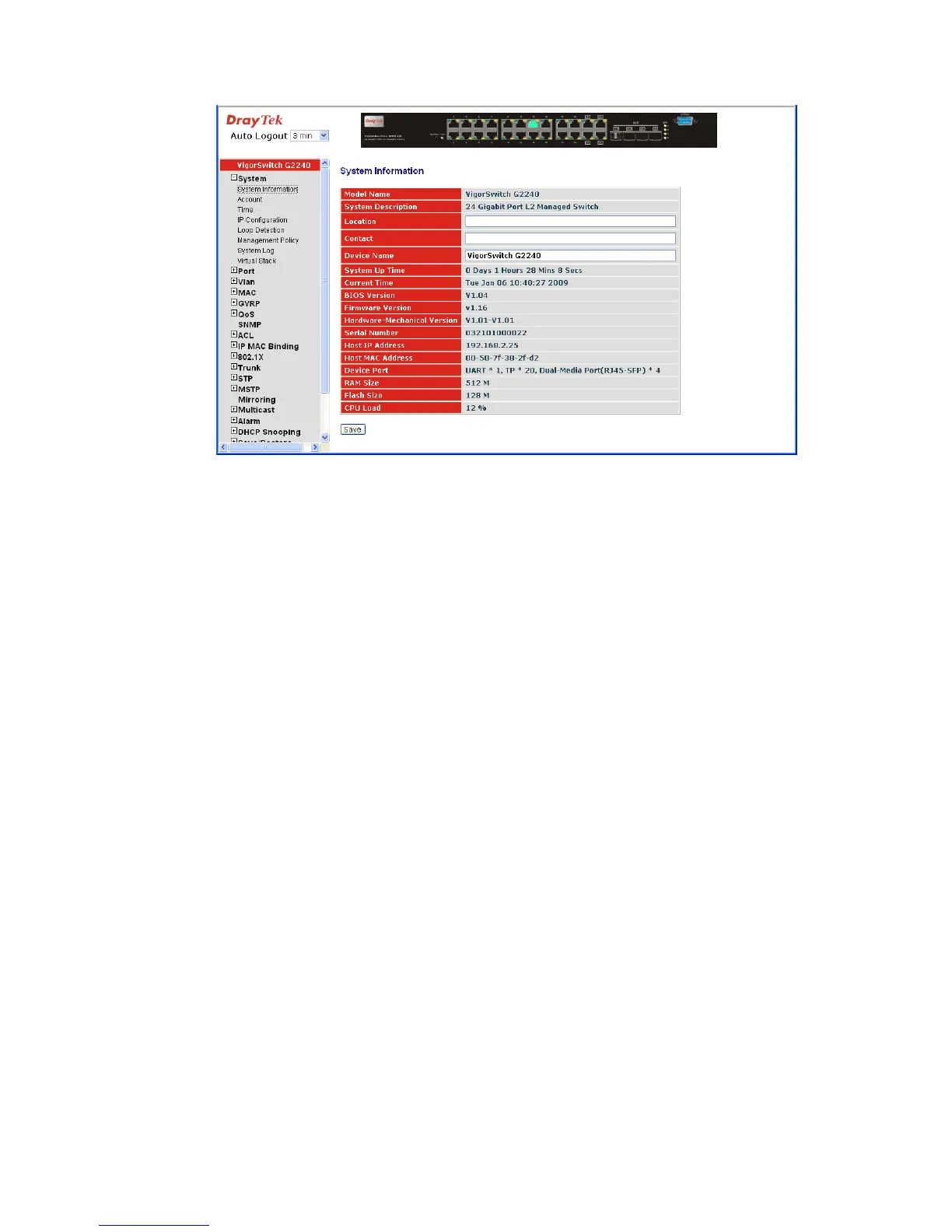
Parameter description:
Model name: The model name of this device.
System description: Display what the device’s description.
Location: Set the location of the switch where it was located.
Contact: For easily managing and maintaining device, you may write
down the contact person and phone here for getting help
soon. You can configure this parameter through the device’s
user interface or SNMP.
Device name: The name of the switch, User-defined. Default is
VigorSwitch G2240.
System up time: The time accumulated since this switch is powered up. Its
format is day, hour, minute, second.
Current time: Show the system time of the switch. Its format: day of week,
month, day, hours: minutes: seconds, year. For instance,
Wed, Apr. 23, 12:10:10, 2004.
BIOS version: The version of the BIOS in this switch.
Firmware version: The firmware version in this switch.
Hardware-Mechanical version: The version of Hardware and Mechanical. The figure before
the hyphen is the version of electronic hardware; the one
after the hyphen is the version of mechanical.
Serial number: The serial number is assigned by the manufacturer.
Host IP address: The IP address of the switch.
Host MAC address: It is the Ethernet MAC address of the management agent in
this switch.
Device Port: Show all types and numbers of the port in the switch.
RAM size: The size of the DRAM in this switch.
Flash size: The size of the flash memory in this switch.





 To Next Page