VigorSwitch G2240 User’s Guide
41
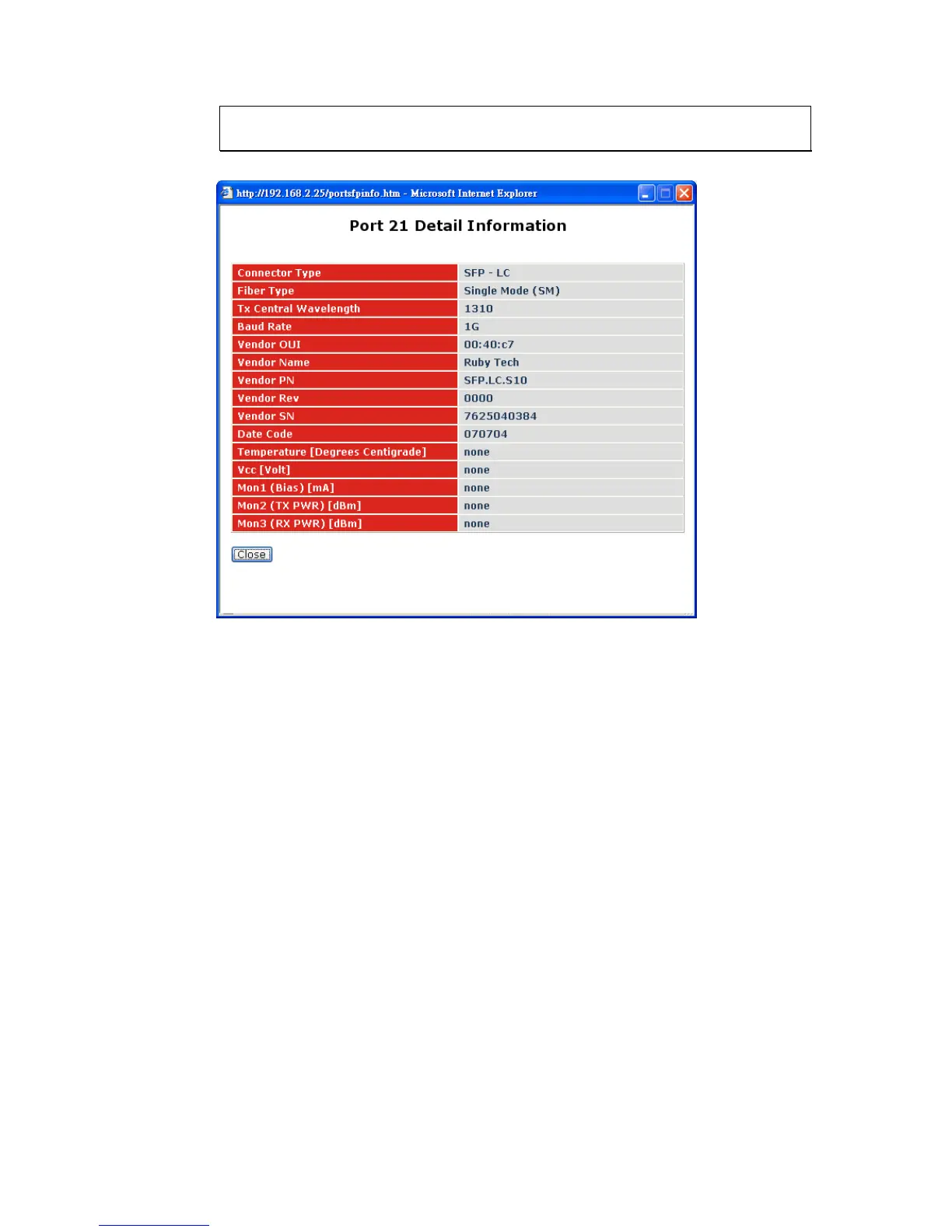
Note: If you want to get the below detail information then you need to click right
button of mouse on SFP icon.
Connector Type: Display the connector type, for instance, UTP, SC, ST, LC
and so on.
Fiber Type: Display the fiber mode, for instance, Multi-Mode,
Single-Mode.
Tx Central Wavelength: Display the fiber optical transmitting central wavelength, for
instance, 850nm, 1310nm, 1550nm and so on.
Baud Rate: Display the maximum baud rate of the fiber module
supported, for instance, 10M, 100M, 1G and so on.
Vendor OUI: Display the Manufacturer's OUI code which is assigned by
IEEE.
Vendor Name: Display the company name of the module manufacturer.
Vendor P/N: Display the product name of the naming by module
manufacturer.
Vendor Rev (Revision): Display the module revision.
Vendor SN (Serial Number): Show the serial number assigned by the manufacturer.
Date Code: Show the date this SFP module was made.
Temperature: Show the current temperature of SFP module.
Vcc: Show the working DC voltage of SFP module.
Mon1(Bias) mA: Show the Bias current of SFP module.
Mon2(TX PWR): Show the transmit power of SFP module.















 To Next Page