6
VAPOR-LOGIC
®
VERSION 6 INSTALLATION AND OPERATION MANUAL
Display
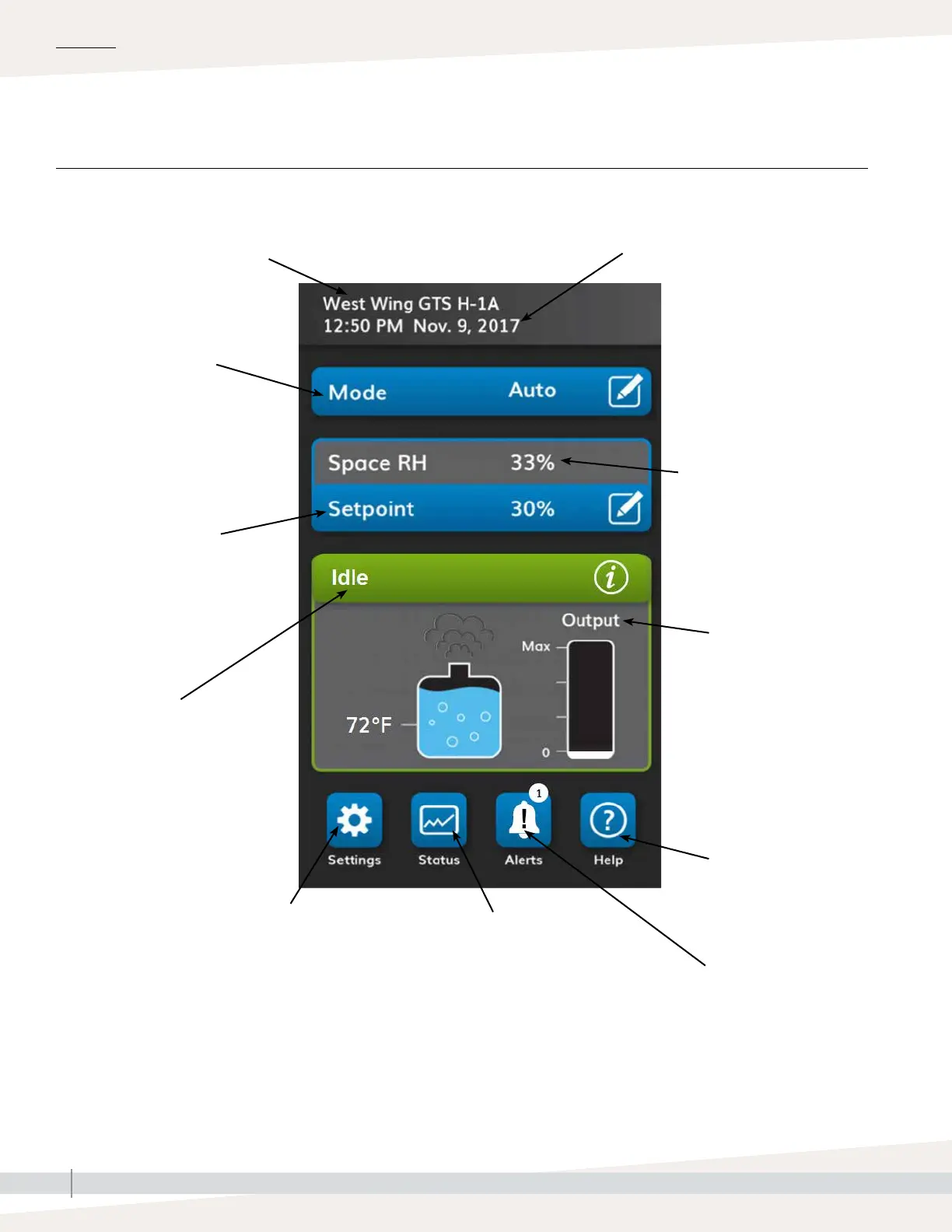
Help: Touch the question
mark icon to display help
information about the items
on that screen.
Output indicates graphically the
current humidity production of the
humidifier. Maximum=humidifier
operating at full capacity. For more
information touch the output graphic
to see the steam production in lbs/
hr and as a percentage of the tanks
capacity.
Typical Home screen
View tank activities
information: humidifying,
filling, skimming, flushing, etc.
Space RH is the relative humidity
reading in the space that the
humidifier serves.
Access all the active alerts that affect the
operation of the humidifier.
View the current mode
of the humidifier via the
color indicator. Change
the mode by touching the
edit icon.
OVERVIEW
FIGURE 6-1: USING THE VAPOR-LOGIC DISPLAY
Setpoint is the relative
humidity percentage that the
humidifier tries to maintain
in the controlled space.
Default: 35%
Range: 0-100%
View all current
and past humidifier
parameters.
The time and the date as stored on the
Vapor-logic control board.
The banner at the top of the home
screen displays the model number
or name of the humidifier. Go to the
settings menu to give the humidifier
a name and view the serial number.
Change the security
of the humidifier,
backup or restore,
access test mode, and
other custom settings.



 To Next Page