66
VAPOR-LOGIC
®
VERSION 6 INSTALLATION AND OPERATION MANUAL
Modbus, BACnet, LonTalk interoperability
Vapor-logic comes standard with Modbus or BACnet, or with LonTalk if
ordered. Vapor-logic can connect to building automation systems using these
protocols. Variables are defined in the tables on the following pages.
Note: For LonTalk installations, contact your local DriSteem representative to
purchase a LonTalk upgrade.
CONNECTIONS
1. If connecting to a Modbus or BACnet MS/TP system, connect Modbus or
BACnet system wiring to terminal P7 on the Vapor-logic board (positive to
positive, negative to negative).
If connecting to a BACnet/IP system, connect BACnet system wiring to the
Ethernet connection.
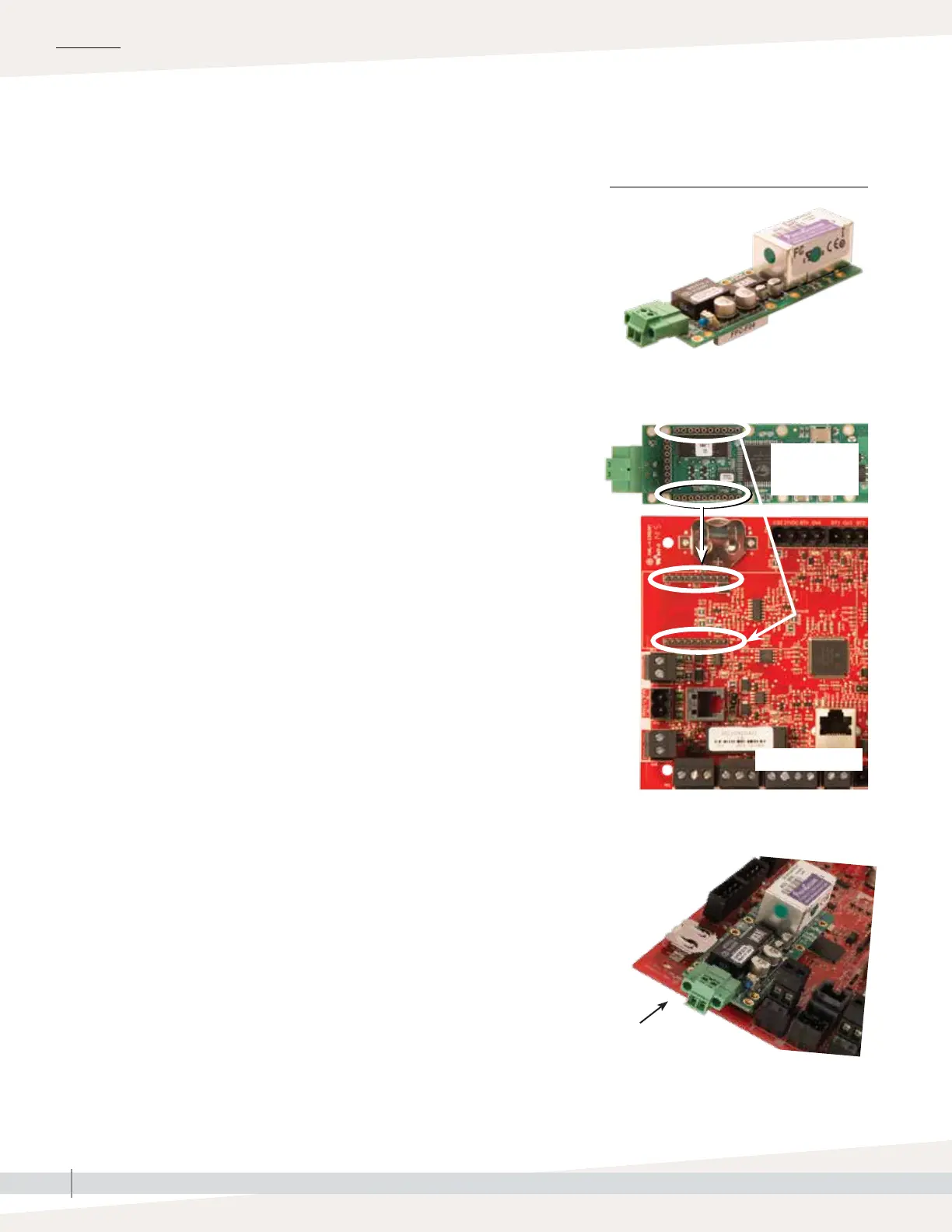
2. If connecting to a LonTalk system, connect the LON ProtoCessor module
per Step 3 in Figure 66-1.
3. Disconnect power to the Vapor-logic board, wait 5 seconds, and reconnect
power.
4. Set up communication with Vapor-logic using your Modbus, BACnet, or
LonTalk network manager, referencing Table 67-1.
INSTALLING LONTALK AS A RETROFIT
1. Turn off power to the unit.
2. Touch the unit’s bare metal frame before handling the LON ProtoCessor
module, and hold onto frame while handling the module.
3. While handling the module, hold it by the edge. Avoid touching the
components or circuit board.
4. Plug LON ProtoCessor module into mounting pins (as shown in Figure
66-1) with LonTalk connector at the edge of the board. Make sure all
pins are seated in the connector.
5. Connect LonTalk system wires to LON ProtoCessor module as shown in
Step 3 at right.
6. Turn on power to the unit.
7. Using either the touchscreen or Web interface go to the Communications
section of the Settings menu to enable LonTalk communication.
8. Set up communication with Vapor-logic using your LonTalk network
manager, referencing Table 67-1.
1. Remove LON ProtoCessor
module from box.
Vapor-logic board
Bottom of LON
ProtoCessor
module
2. Insert LON ProtoCessor module into
pins on Vapor-logic board.
NOTE: Orient the LON ProtoCessor module as
shown, with wire connectors end at the side of
the Vapor-logic board.
Connect LonTalk
system wires to LON
ProtoCessor module here.
FIGURE 66-1: LON PROTOCESSOR
MODULE INSTALLATION
3. Connect wiring from LonTalk system to
LON ProtoCessor module on
Vapor-logic board.
OPERATION



 To Next Page