37
VAPOR-LOGIC
®
VERSION 6 INSTALLATION AND OPERATION MANUAL
Home screen (touchscreen display)
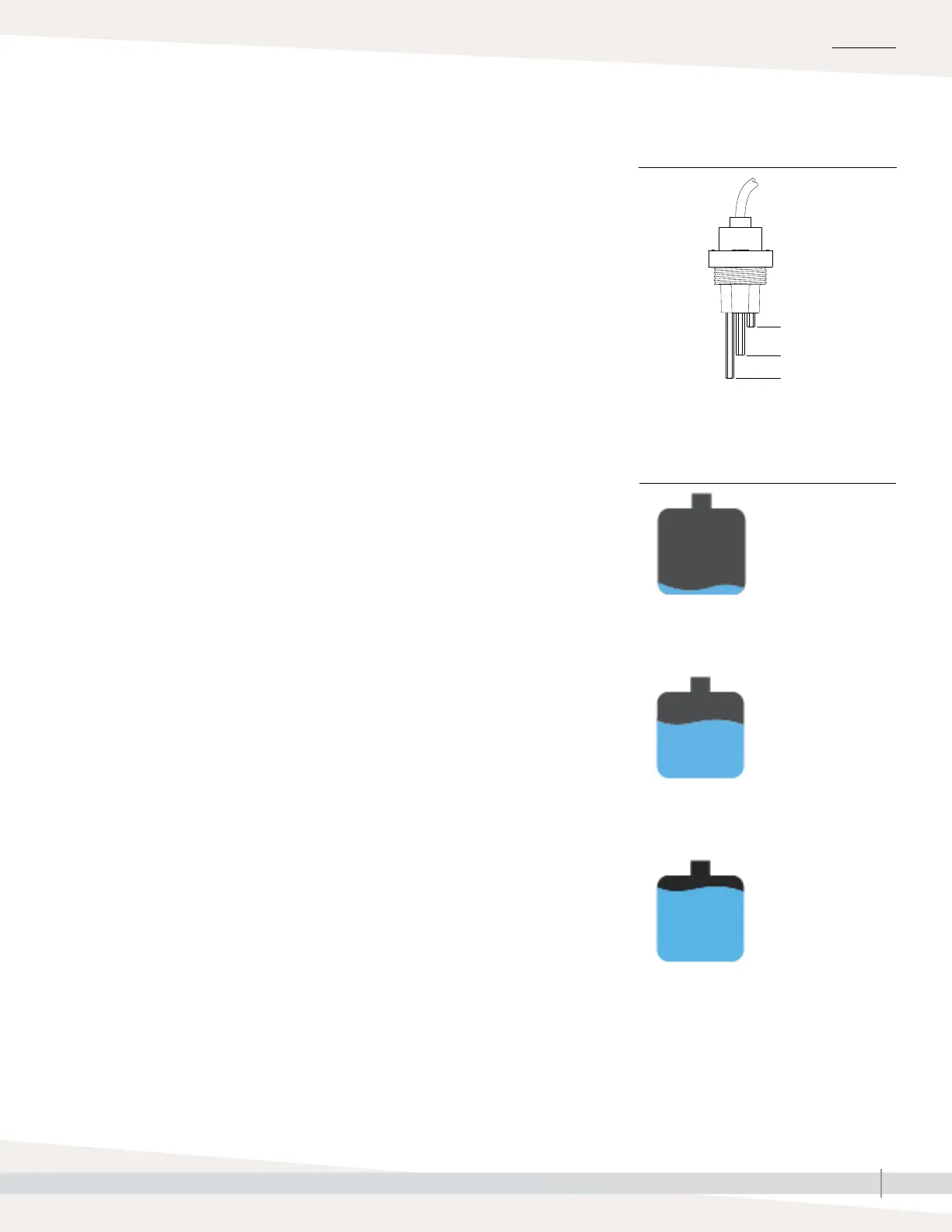
Tank-level icons indicate water level at the
water level control probe. See “Water level
control” on Page 53.
Top probe
Mid probe
Low probe
VLC-OM-030
OPERATION
FIGURE 37-1: WATER LEVEL CONTROL
Vapor-logic returns to the Home screen on the touchscreen display after a user-
defined period of idleness. The Home screen displays the items most frequently
viewed: Actual space RH or dew point, RH or dew point set point, tank/system
output or steam demand, humidifier mode, and tank activities such as starting
up, humidifying, heating, and auto drain.
There is a tank level indicator on the left side of the screen. See the table below
for a description of tank level indicators.
To the left of the tank level indicator is a tank temperature display showing
actual tank temperature.
CHANGING MODE AND SET POINT
Mode and Setpoint can be changed from the Home screen. Use the edit icons
to the right of the value to change the Mode or Setpoint. All other parameters
shown on the Home screen are for viewing only and cannot be changed. Go
to the Settings menu to change these items.
TANK ACTIVITIES DEFINED
• Disabled: Mode is Standby, waiting for user to change the mode to Auto.
• Probe check: The Vapor-logic control is verifying water probe operation and
checking water quality.
• Starting up: The Vapor-logic controller is turning on the heating source.
• Heating: The heating source is ON, but water is not yet boiling.
• Humidifying: There is a demand for humidity and water in tank is boiling;
humidifier has output.
• Filling: Fill valve remains open until water reaches operating level.
• Skimming: Fill valve is open to allow water to flow through the overflow port,
skimming off precipitated minerals.
• Flushing: Fill and drain valve are open to flush tank.
• Idle: Humidifier is waiting for demand.
• Auto Drain: Humidifier is doing a periodic drain to get excess minerals out
of the tank.
• Tempering: Fill valve is open during a drain to decrease drain water
temperature.
• Draining: User has changed the mode to Drain.
• Stopped: There is an active Red Alert, indicating a fault condition or the
humidifier is in Standby mode.
• End of Season Drain: Tank is draining because there has been no demand
for a user-definable time period.
• Foam Drain: Humidifier is doing an immediate drain to get foam out of the
tank.
• Keep Cool: Fill and drain cycles operate to cool an overheated humidifier.
FIGURE 37-3: FILL ICON
Empty: Water is
below low probe.
Two thirds full: Water
is between mid and
top probes.
Full: Water is above
the mid probe.



 To Next Page