27
VAPOR-LOGIC
®
VERSION 6 INSTALLATION AND OPERATION MANUAL
To simplify the field-installation process, humidifiers are sent from the factory
configured as ordered. However, some settings are unknown at the factory
and need to be defined during the setup process using the Settings menu. The
Settings menu is also where you make future system setting changes.
To begin the field setup process, go to the Settings menu on either the
touchscreen display or Setup on the Web interface. Settings menu parameters
are listed in Table 29-1. Options and defaults are the same whether viewed
from the touchscreen display or Web interface. However, labels may be
different on the Web interface.
USING THE TOUCHSCREEN DISPLAY
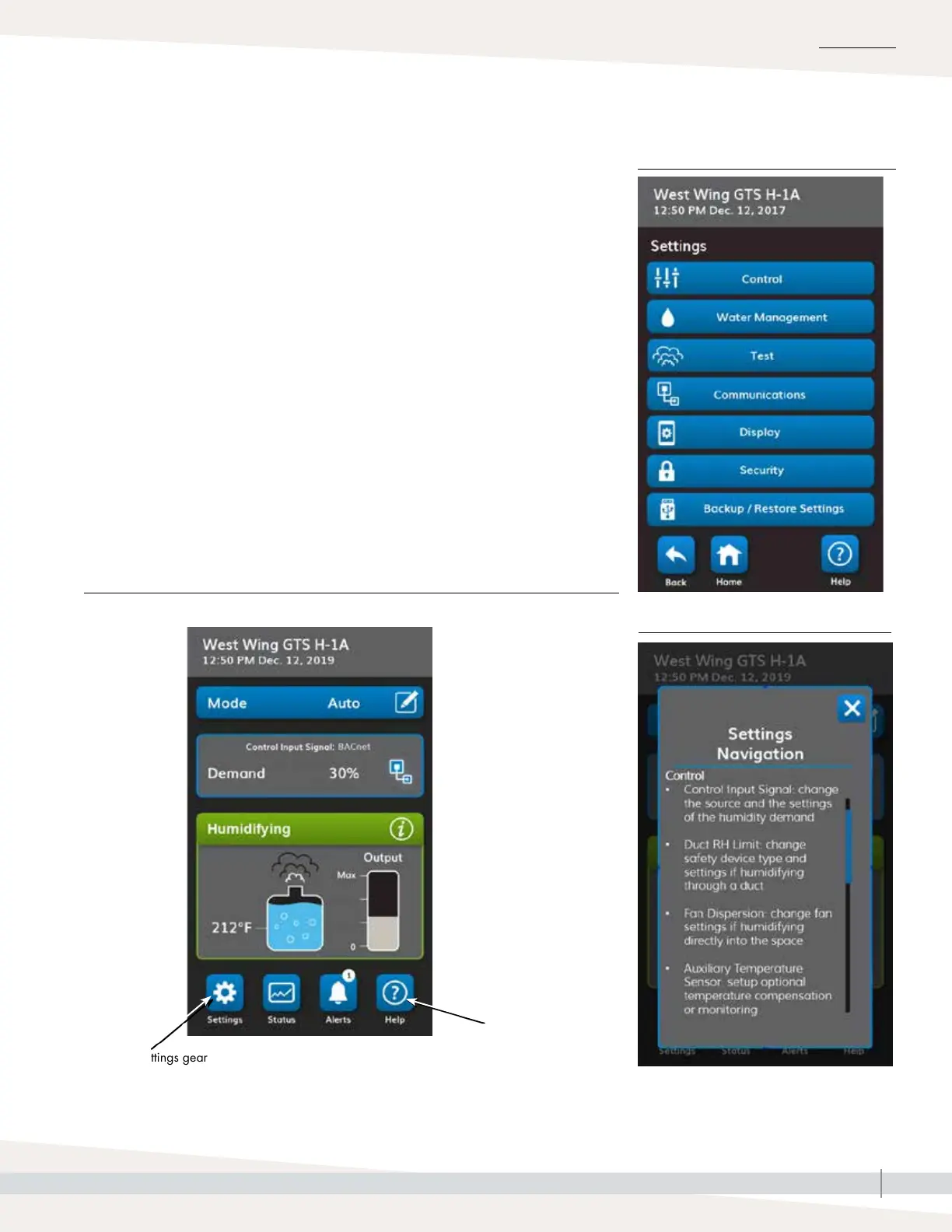
To access the Settings on the touchscreen display, press the gear icon labeled
Settings.
After entering the settings menu, touch a title bar to choose a category. Use
the Help icon in the lower right corner to get a description of all the Settings
categories.
Press the Help
question mark for a
complete description
of everything on a
screen.
Typical Home screen
INSTALLATION
FIGURE 27-2: SETTINGS
FIGURE 27-1: USING THE VAPOR-LOGIC TOUCHSCREEN DISPLAY
Step 2 – Setup
FIGURE 27-3: SETTINGS HELP
Press the Settings gear
icon to access a list of
all changeable system
parameters.



 To Next Page