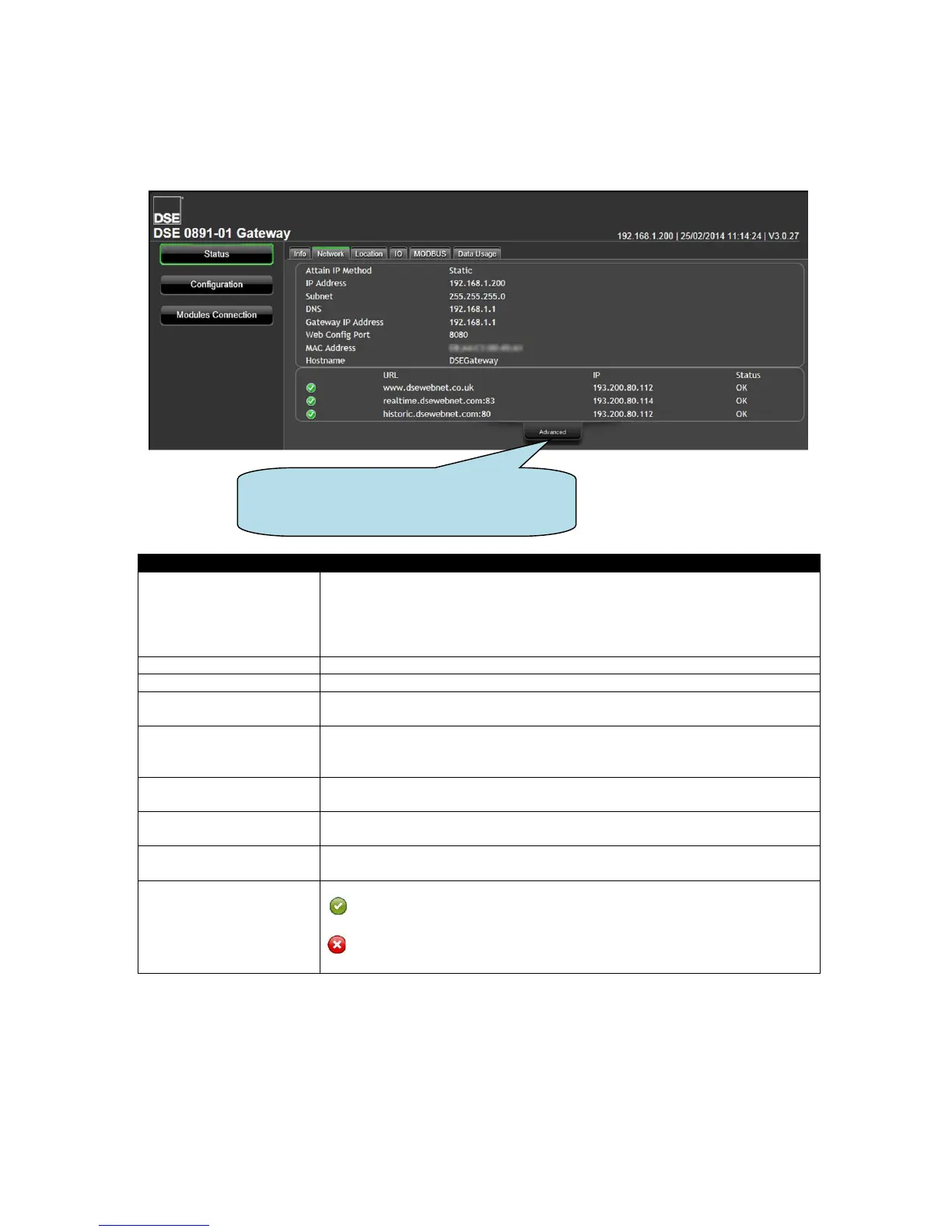
5.3.2 NETWORK
Shows the current network settings in use on the DSEGateway
®
and a status of the connection to the
DSEWebNet
®
Services.
Shows the type of IP address assigned to the DSEGateway
®
Ethernet
Port.
Static: Static IP address, manually entered.
DHCP: IP address assigned by the network DHCP server.
IP address currently being used by the DSEGateway
®
’s Ethernet Port.
Subnet Mask for the DSEGateway
®
’s Ethernet Port.
DNS (Domain Name Service) setting for the DSEGateway
®
’s Ethernet
Port.
The IP address location of the internet router currently used by the
DSEGateway
®
’s Ethernet Port to communicate with the DSEWebNet
®
Server.
The TCP Port Number currently in use by the DSEGateway
®
’s Ethernet
Port to serve the Web Management Pages.
Unique Hardware Identification number of the DSEGateway
®
’s Ethernet
Port.
Shows the currently configured Hostname of the DSEGateway
®
’s Ethernet
Port.
Shows the status of connection to the DSEWebNet
®
Server.
= The connection is made to the respective port of the DSEWebNet
®
Server.
= The respective port of the DSEWebNet
®
Server cannot be reached.
This may be a local firewall issue (see below)
Click Advanced to open and close a
diagnostic window to help troubleshoot
network connection issues.



 To Next Page