Interactive menu and Info display
The Interactive Menu contains a series of functions
that can be activated by the rider using the joystick.
When a function is activated, a corresponding
window is displayed with which you can interact. The
list of functions in the Interactive Menu varies
depending on the Riding Mode currently in use.
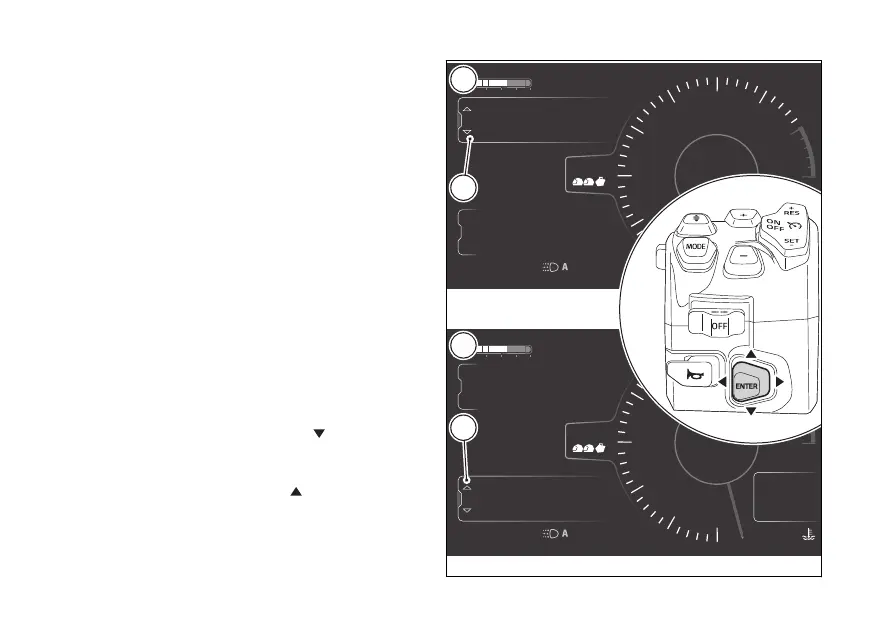
Available functions are displayed on 3 lines. The
selected function is the one indicated in the central
line.
The "Info display" menu includes all counters
referred to available trip information (see page 123)
When one of the menus is selected, it is indicated
with the active frame (A, Fig 95) and the joystick is
used for menu navigation and interaction.
To toggle the selection between "Interactive menu"
and "Info display" and vice versa:
- if "Interactive menu" is currently selected, hold
the joystick pressed in position
for a long time
to move the selection to "Info display (C, Fig 95);
- if "Info display" is currently selected, hold the
joystick pressed in position
for a long time to
move the selection to "Interactive menu
(B, Fig 95).
4
1
2
3
5
6
7
8
10
12
Air
24
°C
0
km/h
90
°C
10:34
pm
N
Gear
rpm X1000
Total
Range
Trip 1
km
km
km
2017
250
52.3
ABS
Setting menu
Trip master
ENDURO
DTC
DQS
ABS
DWC
3
3
5
On
4
1
2
3
5
6
7
8
10
12
Air
24
°C
0
km/h
90
°C
10:34
pm
N
Gear
rpm X1000
Total
Range
Trip 1
km
km
km
2017
250
52.3
ABS
Setting menu
Trip master
ENDURO
DTC
DQS
ABS
DWC
3
3
5
On
A
A
B
C
Fig 95
113











 To Next Page