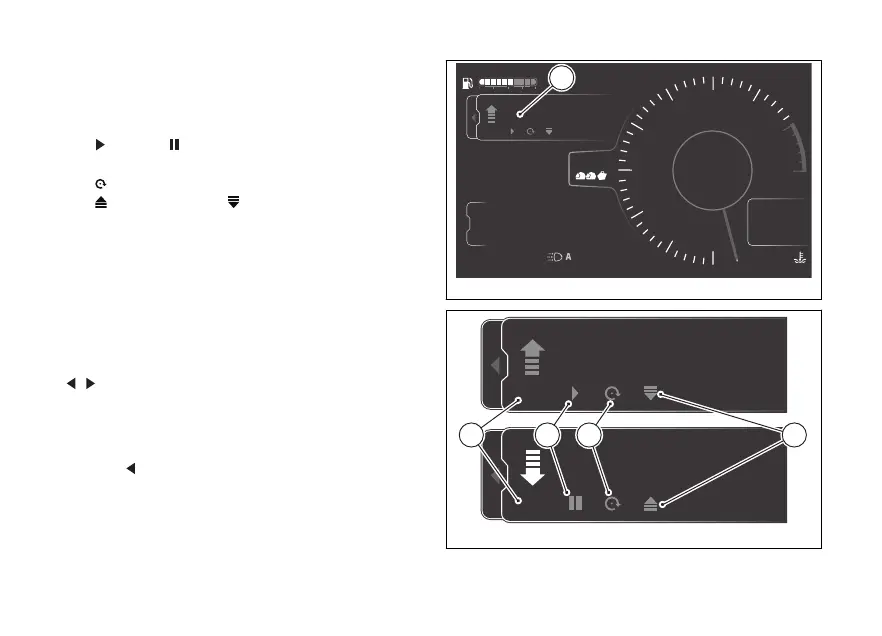
The relevant window (C, Fig 143) is displayed with the
following controls available:
- On or to activate or deactivate the meter
(D, Fig 144)
- play or pause to or stop the distance
calculation (E, Fig 144)
-
reset to reset the meter (F, Fig 144)
-
incremental or to change the
distance calculation mode (G, Fig 144)
The meter is displayed in km or miles and with the
arrow indicating the counting mode of the distance
travelled (incremental or
If the function is disabled, only the On control is
active: press ENTER to activate the function and
enable all controls.
The single controls can be selected using the joystick
: when a control is selected, it is displayed in
white; press ENTER to activate it.
When the Trip master is paused, the number flashes.
To close the window, press and hold the joystick in
position
for a long time. The window can be closed
keeping the function and count active.
4
1
2
3
5
6
7
8
10
12
Air
24
°C
0
km/h
90
°C
10:34
pm
N
Gear
rpm X1000
km
km
km
2017
250
52.3
ABS
Impostazioni
Trip master
ENDURO
0.0
On
km
DTC
DQS
ABS
DWC
3
3
5
On
Total
Range
Trip 1
C
Fig 143
Fig 144
174











 To Next Page