45
Chapter3AdvancedOperation
Copyright © 2019 Duplo Corporation All Rights Reserved
Folding plate 1 Folding plate 2
Folding mode State of
folded
plane A
Folding A
position
adjustment
key
Folding mode State of
folded
plane B
Folding B
position
adjustment
key
Accordion
fold
A is long
key
Accordion
fold
B is long
key
A is short
key
B is short
key
Gate fold
A
A is long
key
Gate fold
B is long
key
A is short
key
B is short
key
Adjustment method
AdjustthepositionofthefoldingstopperusingthefoldingpositionAadjustmentkey/foldingpositionB
adjustmentkeyonthe[FoldPosition]screen.
Touch the key on the [Ready] screen.
The[FoldPosition]screenisdisplayed.
c
d
b
a
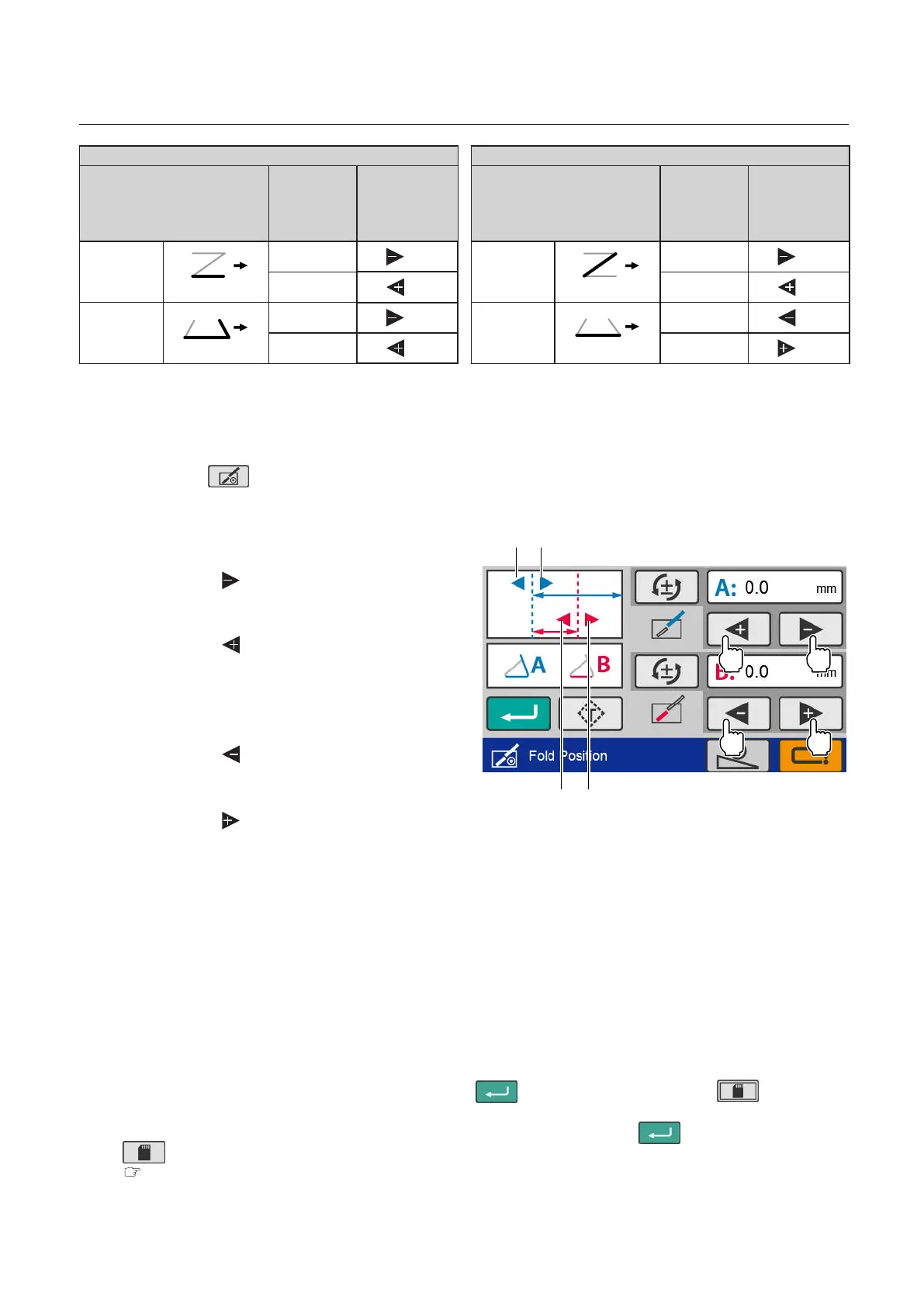
[a][b]
[d][c]
Folding stopper of folding plate 1:
• Tomoveinthedirectionof[a]
Touch the key of the folding A position
adjustmentkey.
• Tomoveinthedirectionof[b]
Touch the key of the folding A position
adjustmentkey.
Folding stopper of folding plate 2:
• Tomoveinthedirectionof[c]
Touch the key of the folding B position
adjustmentkey.
• Tomoveinthedirectionof[d]
Touch the key of the folding B position
adjustmentkey.
• Thefoldingstoppermoves0.1mm/0.004incheachtimeyoupresstheadjustmentkey.
Also,whenyoupressandholdthepositionadjustmentkey,thevaluecontinuestochangewithinthe
setting range of the folding stopper.
• Whenyouinputthevaluemanually,touch[A:x.xmm]or[B:x.xmm].Thenumerickeypadisdisplayed.
• Thechangedvalueisclearedwhenpoweristurnedo.Tosavethechangedvalue,see“Savingthe
adjustedvalue”(p.45).
Saving the adjusted value
Ifyousavetheadjustmentvalueforthenexttimeyouusethesamepaper,youcanperformfolding
operationunderthesameadjustmentvalueastheonethatissavedatthistime.
• Forstandardfoldingofstandardpaper,touchthe key. —> Press and hold the key to save
theadjustmentvalue.
• Forstandardfoldingorcustomfoldingofnon-standardpaper,touchthe key. —> Touch the
key. —> Select and save the saved data number of custom folding.
“3. Custom Folding” (p.47)



 To Next Page