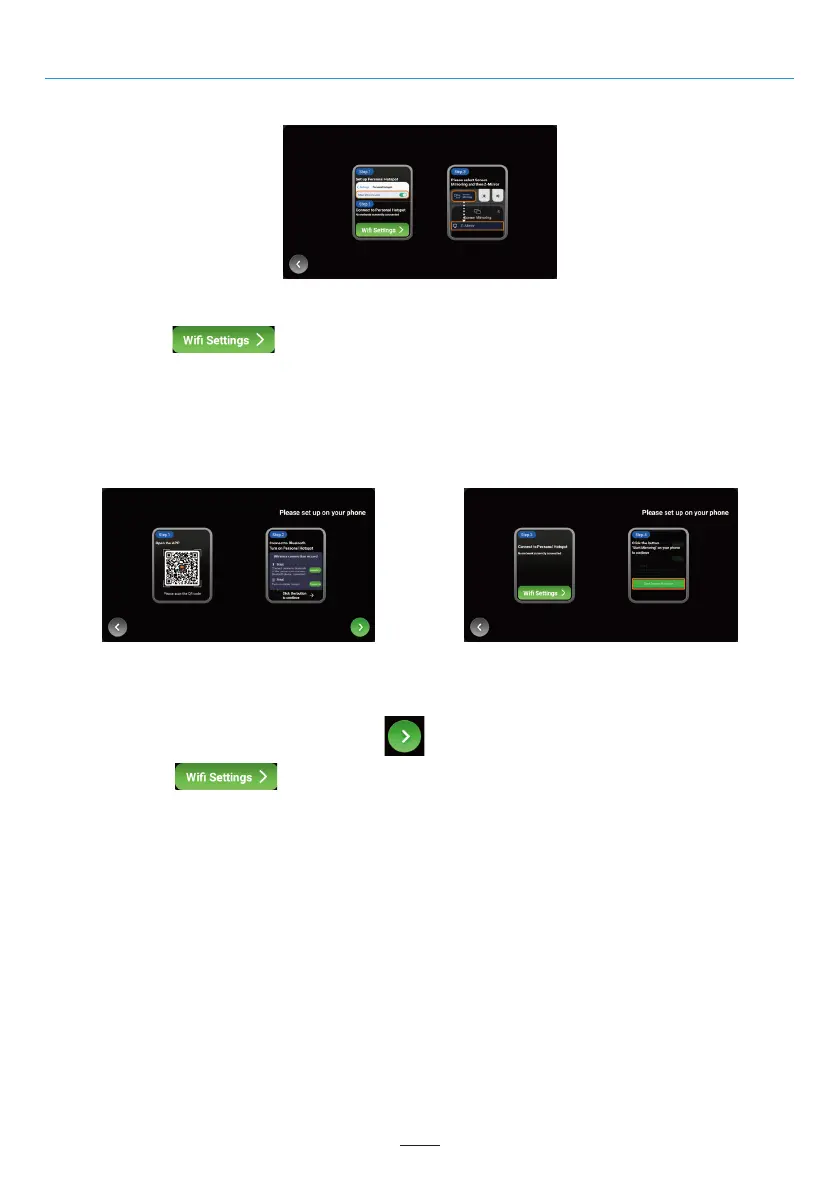
For iPhone users, please refer to the following steps:
Z-Link (Car-smartphone connectivity)
Step1 : Turn on the hotspot on your iPhone.
Step2 : Click the “ ” button on the Dynavin unit. The unit will jump to the WiFi menu. Find your
phone’s Hotspot in the WiFi menu and connect.
Step3 : Click “Screen Mirroring” on your iPhone and select “Z-Mirror”.
For Android smartphone users, please refer to the following steps:
Step3 : Click the “ ” button on the unit. The unit will jump to the WiFi menu. Find your phone’s
Hotspot in the WiFi menu and connect.
Step4 : Click the "Start Screen Projection" button on your Android phone.
02 03 04 05 06 07 08 09 10 11 12
13 14 15 16 17 18 19 20 21 22 23 24
25 26 27 28 29 30 31 32 33 34 35
37 38 39 40 41 42 43 44 45 46
Step1: Use your Android smartphone to scan the QR code on the menu to download the necessary app.
Step2
: Pair your smartphone with Dynavin unit via Bluetooth(Operation see page 14), and turn on your
phone’s
hotspot on your Android phone.Click the “ ” button on the unit to continue.
34



 To Next Page