10 © e.Digital Corporation Silhouette User’s Guide
Scroll up to increase Volume.
Scroll down to decrease Volume.
REP/SEL Press to Repeat, Select or Bookmark.
O
PTIONAL
REMOTE
CONTROL
WITH
LCD
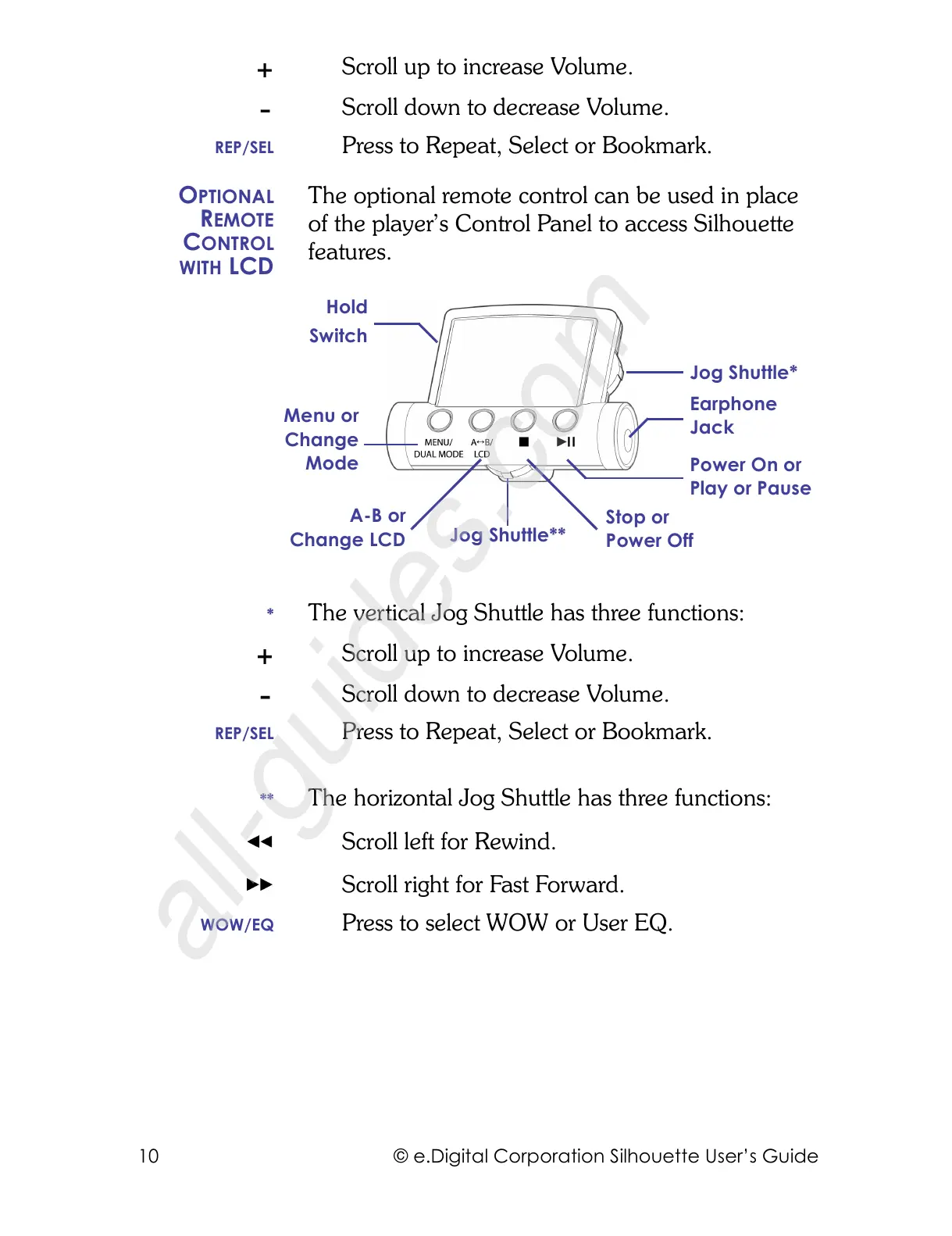
The optional remote control can be used in place
of the player’s Control Panel to access Silhouette
features.
* The vertical Jog Shuttle has three functions:
Scroll up to increase Volume.
Scroll down to decrease Volume.
REP/SEL Press to Repeat, Select or Bookmark.
** The horizontal Jog Shuttle has three functions:
Scroll left for Rewind.
Scroll right for Fast Forward.
WOW/EQ Press to select WOW or User EQ.
Earphone
Jack
Jog Shuttle*
Stop or
Power Off
Power On or
Play or Pause
Hold
Switch
Jog Shuttle**
Menu or
Change
Mode
A-B or
Change LCD



 To Next Page