Chapter 3: Menu Functions 37
Note, at anytime during selection, you can press
the Menu button to cancel menu mode. Or, you
can press the button to return to the previous
menu.
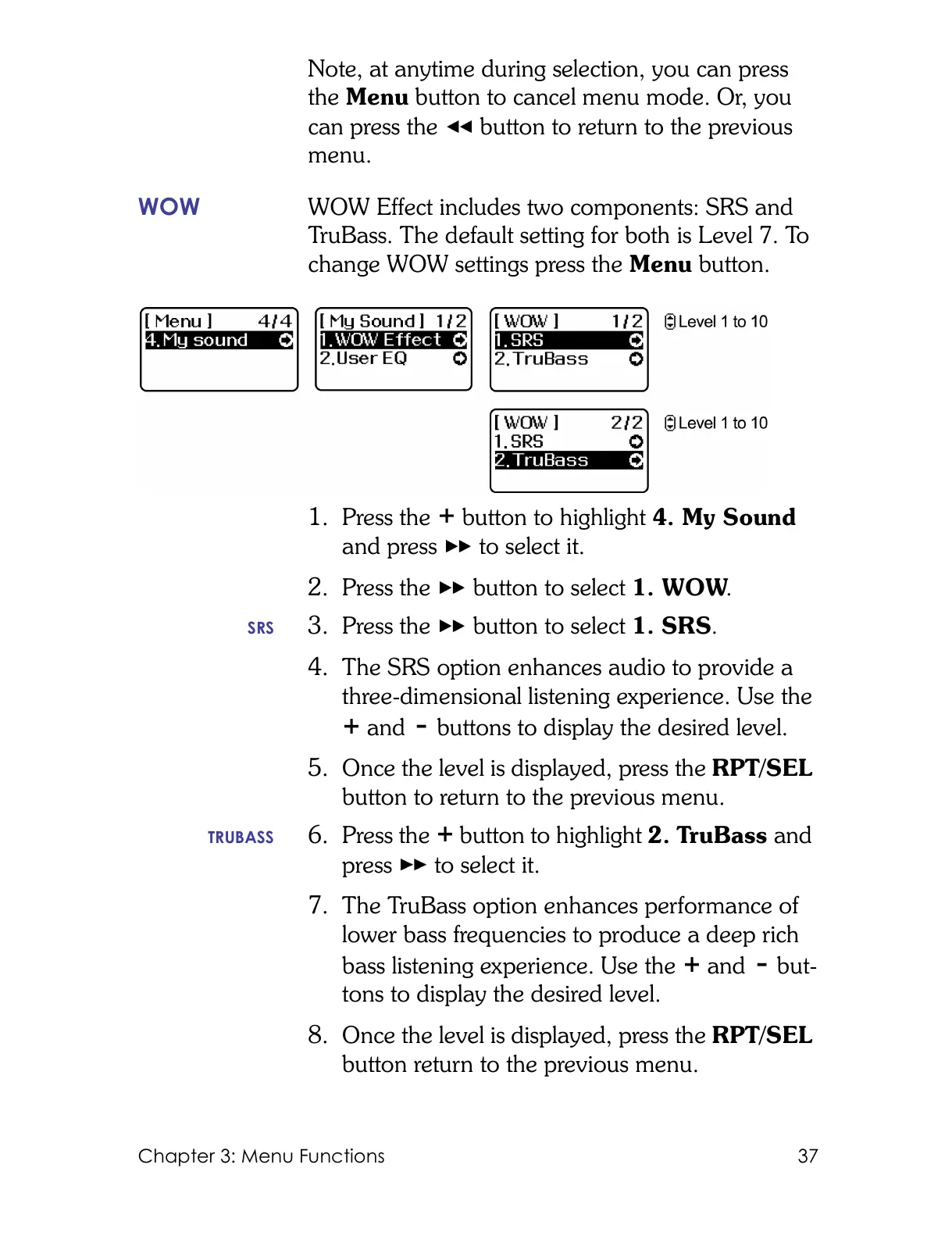
WOW WOW Effect includes two components: SRS and
TruBass. The default setting for both is Level 7. To
change WOW settings press the Menu button.
1. Press the button to highlight 4. My Sound
and press to select it.
2. Press the button to select 1. WOW.
SRS 3. Press the button to select 1. SRS.
4. The SRS option enhances audio to provide a
three-dimensional listening experience. Use the
and buttons to display the desired level.
5. Once the level is displayed, press the RPT/SEL
button to return to the previous menu.
TRUBASS 6. Press the button to highlight 2. TruBass and
press to select it.
7. The TruBass option enhances performance of
lower bass frequencies to produce a deep rich
bass listening experience. Use the and but-
tons to display the desired level.
8. Once the level is displayed, press the RPT/SEL
button return to the previous menu.



 To Next Page