Installation
Eaton 9130 700/3000 VA UPS User’s Guide 164201718—Rev 7 www.eaton.com/powerquality 17
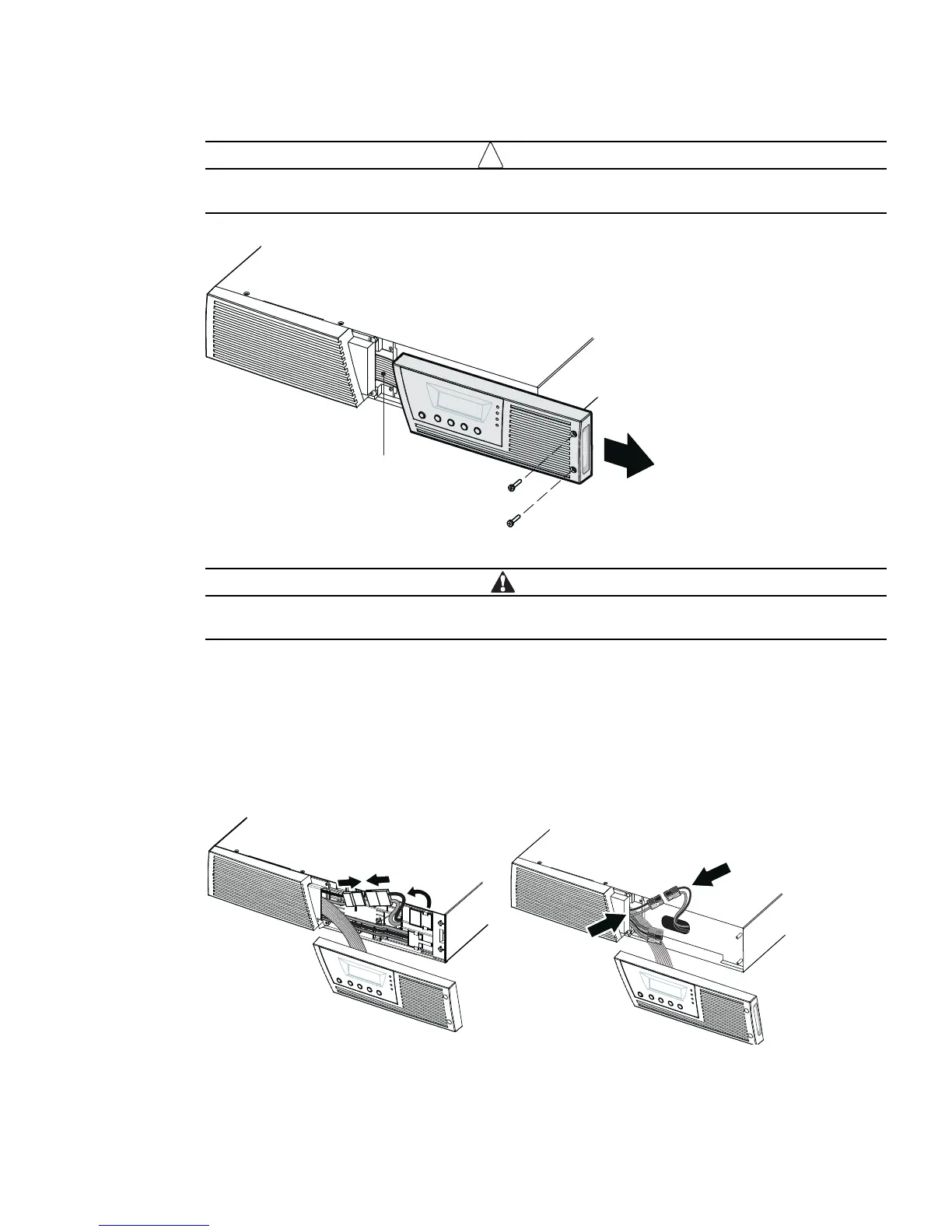
A ribbon cable connects the LCD control panel to the UPS. Do not pull on the cable or disconnect
it.
NOTE Leave
ribbon cable
connected.
Figure 9. Removing the UPS Right Front Cover
A small amount of arcing may occur when connecting the internal batteries. This is normal and will
not harm personnel. Connect the cables quickly and firmly.
2. Connect the internal battery connector (see Figure 10).
Up to 1500 VA models .
Unclip the top rightmost white connector from the battery panel and move it to
the left to connect to the white connector at the top left. Connect red to red, and black to black. Press the
two parts tightly together to ensure a proper connection. Clip the wires of the rightmost connector to the
battery panel in its new position.
2000–3000 VA models.
Connect red to red, and black to black. Press the two parts tightly together to
ensure a proper connection.
sledoM AV 0003–0002sledoM AV 0051 ot pU
Figure 10. Connecting the UPS Internal Batteries



 To Next Page