50
Active Track (beta version)
© 2013 EBS
9.2.3.6 Restrictions
9.2.3.6.1 Phone numbers...
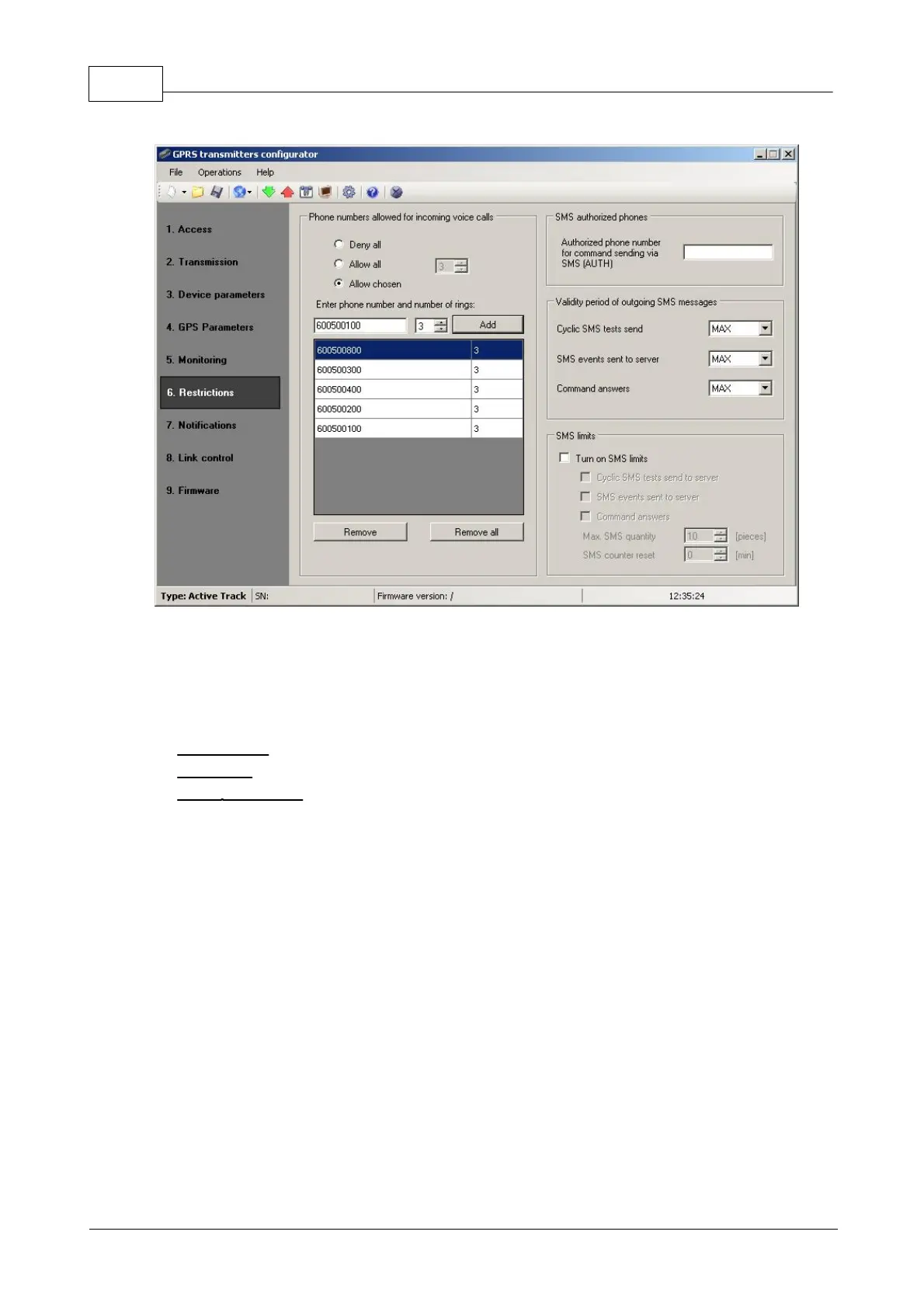
The user can specify here the phone numbers for incoming calls to be automatically
answered by the Active Track, as well as the number of rings.
Decline all: No connection possible.
Allow all: Connection possible from any phone number.
Allow selected: Connection possible only from the phone numbers on the list.
Up to 8 numbers can be defined.
The edit box becomes active after choosing Allow selected. The subsequent numbers
entered into the field can be added to the table below by clicking the [Add] button.
Placing the cursor in a selected line containing the number and clicking “Delete”
removes the number from the table.
The “Delete all” option removes the content of the whole table.
Note:
Authorization of incoming call consists of comparing the number with that on
the list. It is possible to put only a fragment of the number on the list, e.g. 1234.
Authorized then are all numbers containing the sequence, e.g. 600123456 or 60
1234567.


 To Next Page