69
Operation rules
© 2013 EBS
parallel to the axis of gravitational field going exactly through the middle of the small
sensor placed asymmetrically in the device. Consequently, it can be assumed
that the device can detect motion (or lack thereof) of any type.
12 Indicating work mode
Each work mode currently in use will be signalled with adequate flashing
combination of buttons.
Registration at GSM network
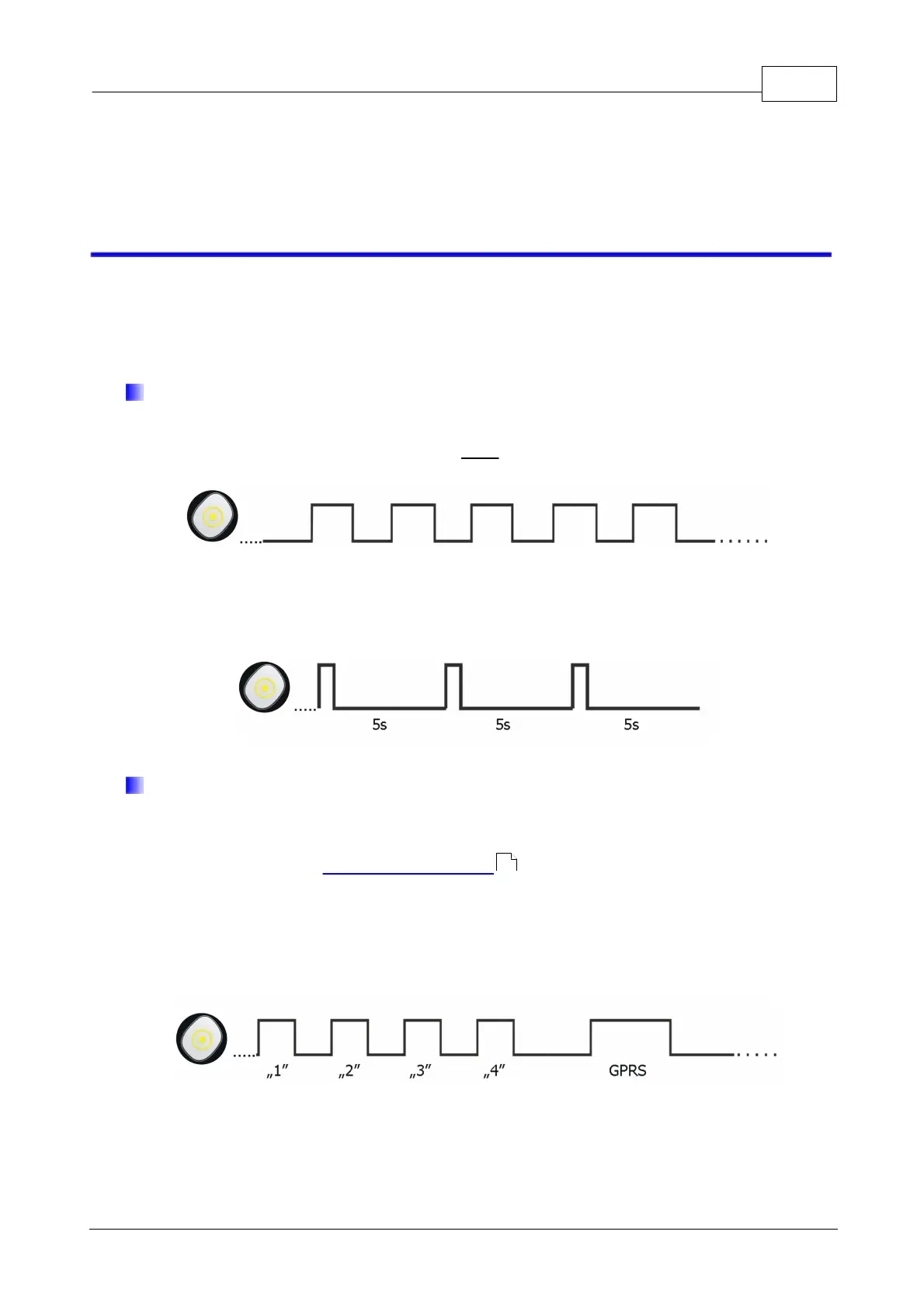
Registering is being signalled with slow flashing of “Checkpoint” button.
During normal work, the device signals correct operation with short flashes of
“Checkpoint” button every 5 seconds.
GSM range
Once GSM range checking is started, the device displays GSM signal power (for
more information, go to Checking GSM range ). Additionally, after each display work
mode is shown (GPRS or GSM). The display consists of flashes of “Checkpoint” button
in amount proportional to GSM signal power. Whole sequence is being repeated three
times after which the device returns to normal work mode.
Example of single sequence: 4/8 reach, GPRS mode:
Example of single sequence: 3/8 reach, SMS mode:
66



 To Next Page