Configuration
8/05 UDC2500 Universal Digital Limit ControllerProduct Manual 39
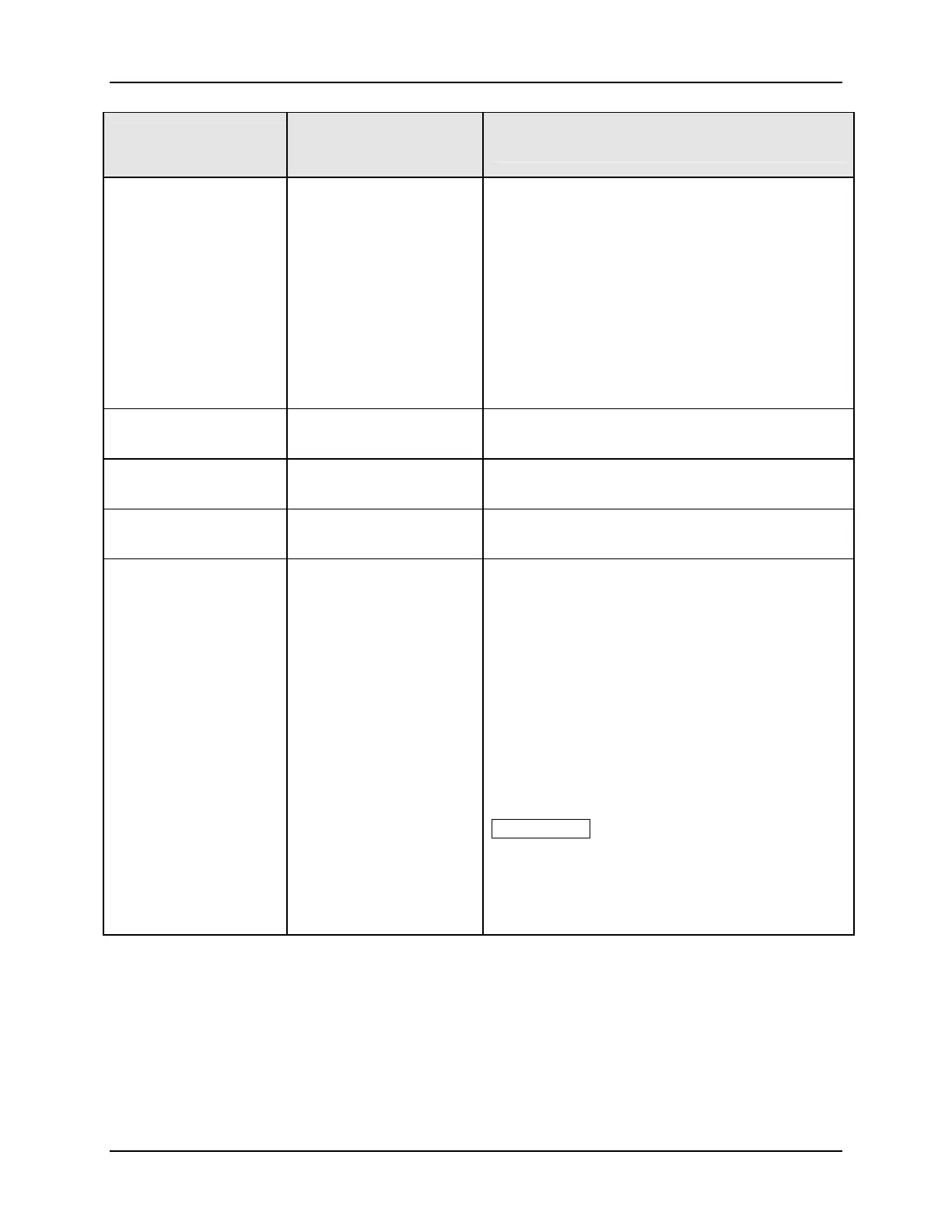
Function Prompt
Lower Display
Selection or Range of
Setting
Upper Display
Parameter
Definition
SHD_SP
LSP
CSP
SHED SETPOINT RECALL
Note: If SHEDENAB=DISABLE, this prompt will not
be configurable.
TO LSP—Controller will use last local or remote
setpoint used.
TO CSP—When in “slave” mode, the controller will
store the last host computer setpoint and use it at
the Local setpoint. When in “monitor” mode, the
controller will shed to the last UDC Local or
Remote setpoint used, and the LSP is unchanged.
UNITS
PCT
EGR
PERCENT
ENGINEERING UNITS
CSRATIO
-20.0 to 20.0
COMPUTER SETPOINT RATIO—Computer
setpoint ratio.
CSP_BI
-999 to 9999
COMPUTER SETPOINT RATIO—Computer
setpoint ratio in Engineering Units.
LOOPBK
DIS
ENAB
LOCAL LOOPBACK tests the communications
hardware.
DISABLE—Disables the Loopback test.
ENABLE—Allows loopback test. The UDC goes
into Loopback mode in which it sends and receives
its own message. The UDC displays PASS or FAIL
status in the upper display and LOOPBACK in the
lower display while the test is running. The UDC
will go into manual mode when LOOPBACK is
enabled with the output at the Failsafe value. The
test will run until the operator disables it here, or
until power is turned off and on.
ATTENTION The instrument does not have to be
connected to the external communications link in
order to perform this test. If it is connected, only
one instrument should run the loopback test at a
time. The host computer should not be transmitting
on the link while the loopback test is active.



 To Next Page