5 Configuring System
ED-HMI2120-101C User Manual 5-19
5.5 Configuring WiFi (Optional)
User can choose the ED-HMI2120-101C with WiFi version, which needs to be configured before using
WiFi.
5.5.1 Enabling WiFi Function
The WiFi function is blocked by default, and you need to set the country region to enable it.
5.5.1.1 Raspberry Pi OS(Desktop)
In the Desktop version of the operating system, you can use the desktop icon to open the configuration
window for setting.
Steps:
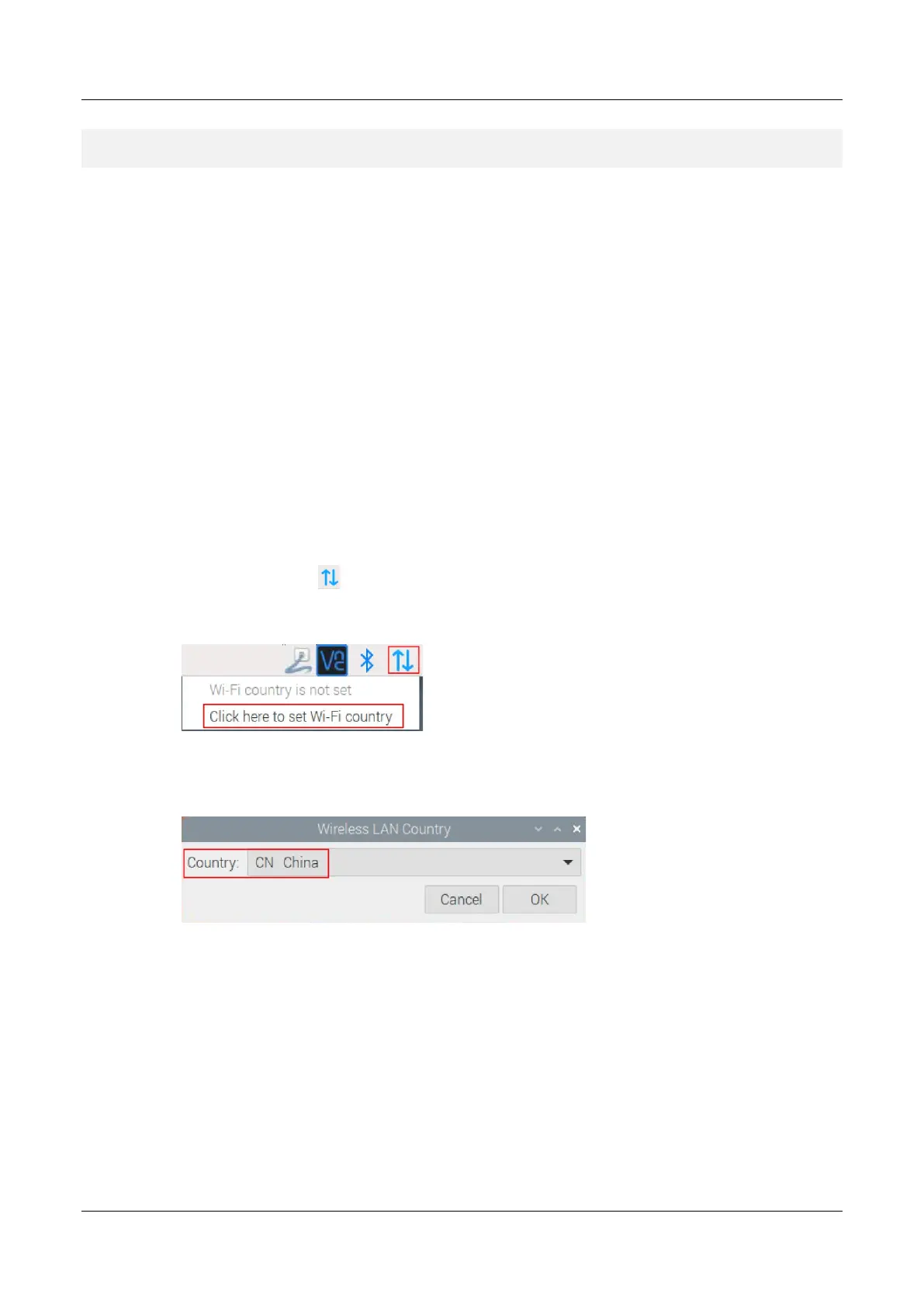
1. Left-click the icon in the upper right corner of the desktop and select "Click here to set
Wi-Fi country" from the menu.
2. Set the value of Country in the pop-up "Wireless LAN Country" pane, and select it according
to the actual region.
3. Select "OK" to complete the setting.
5.5.1.2 Raspberry Pi OS(Lite)
In the Lite version of the operating system, WiFi can be enabled through the command line.
Setps:
1. Open the command terminal pane and execute the following command to open the
Raspberry Pi Software Configuration Tool (raspi-config) interface.



 To Next Page