ELAN HC4/HC8 INSTALLATION MANUAL
© ELAN 2010 | All rights reserved.
Page 18
HC4 Internal Player and IP Video Server
Both the HC4 and the HC8 can play streaming audio files using the Internal Player.
(Uncompressed WAV and constant bit rate MP3 formats only.) While the HC8 has an
integrated hard drive for file storage, the HC4 requires a Network Attached Storage (NAS)
device to hold the files. See Figure 3-11 on page 28 for audio connections.
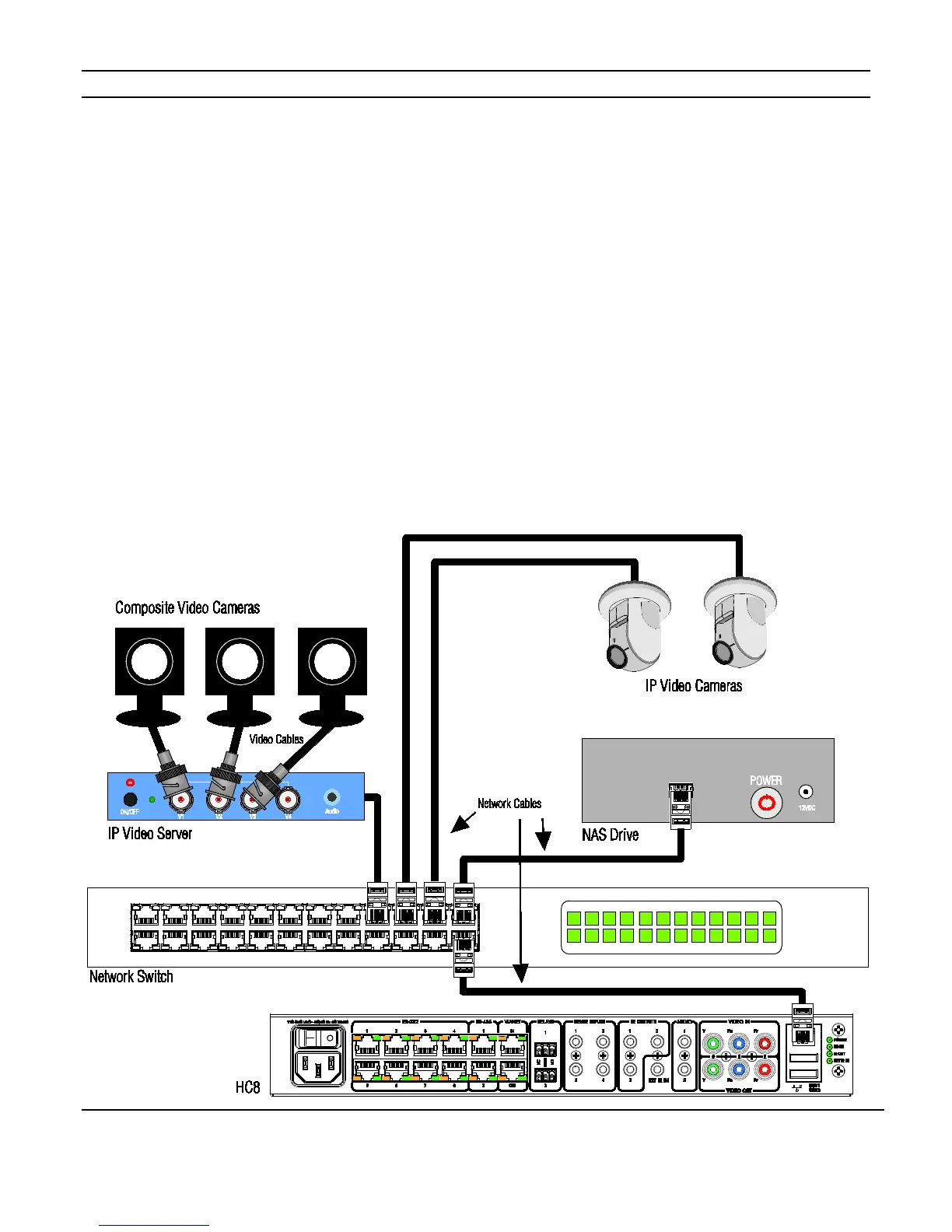
IP Video Servers are used to convert composite video inputs (usually from door station
cameras) to IP data allowing video to be seen using a computer’s Viewer or Touchscreens
and for security DVR functions. IP video sources are also displayed on the component
video output of the System Controller for viewing on a TV / monitor.
Figure 2-4 shows the typical network wiring for these applications.
In the ELAN configuration software, set up the HC4 Internal Player and NAS drive and
program the interface for the video server and IP cameras.
See the Integration Notes at www.elanhomesystems.com/dealer.
Figure 2-4: IP Video Server / NAS Integration



 To Next Page