ELAN HC4/HC8 INSTALLATION MANUAL
© ELAN 2010 | All rights reserved.
Page 35
Chapter 5: Precision Panels
Precision panels provide a quick and easy way to terminate and make sense of complex
wiring. The rears of the panels have neatly arranged 110 punch-downs and screw
terminals to ensure reliable connections for Touchpads, Sensors, Cat5 cables, and power
wires. Refer to the Quick Install Guides included with each precision panel for additional
information not covered in this manual.
The precision panel front connections are identified with the names of the System
Controller connections to which they go. For example, connect the “Sense Inputs” of the
PPCM to the “Sense Inputs” of the System Controller.
Precision panels that are located in a zone such as the PPRM and PPIR are labeled using
the same convention. The “External IR In” on the front of the PPIR precision panel
indicates that the signal received by the IR receiver connected to it will be routed to the
“External IR In” connection of the System Controller.
Unless otherwise noted, the maximum distance from the PPCM to the zone located
precision panels is 1000’.
PPCM Precision Panel
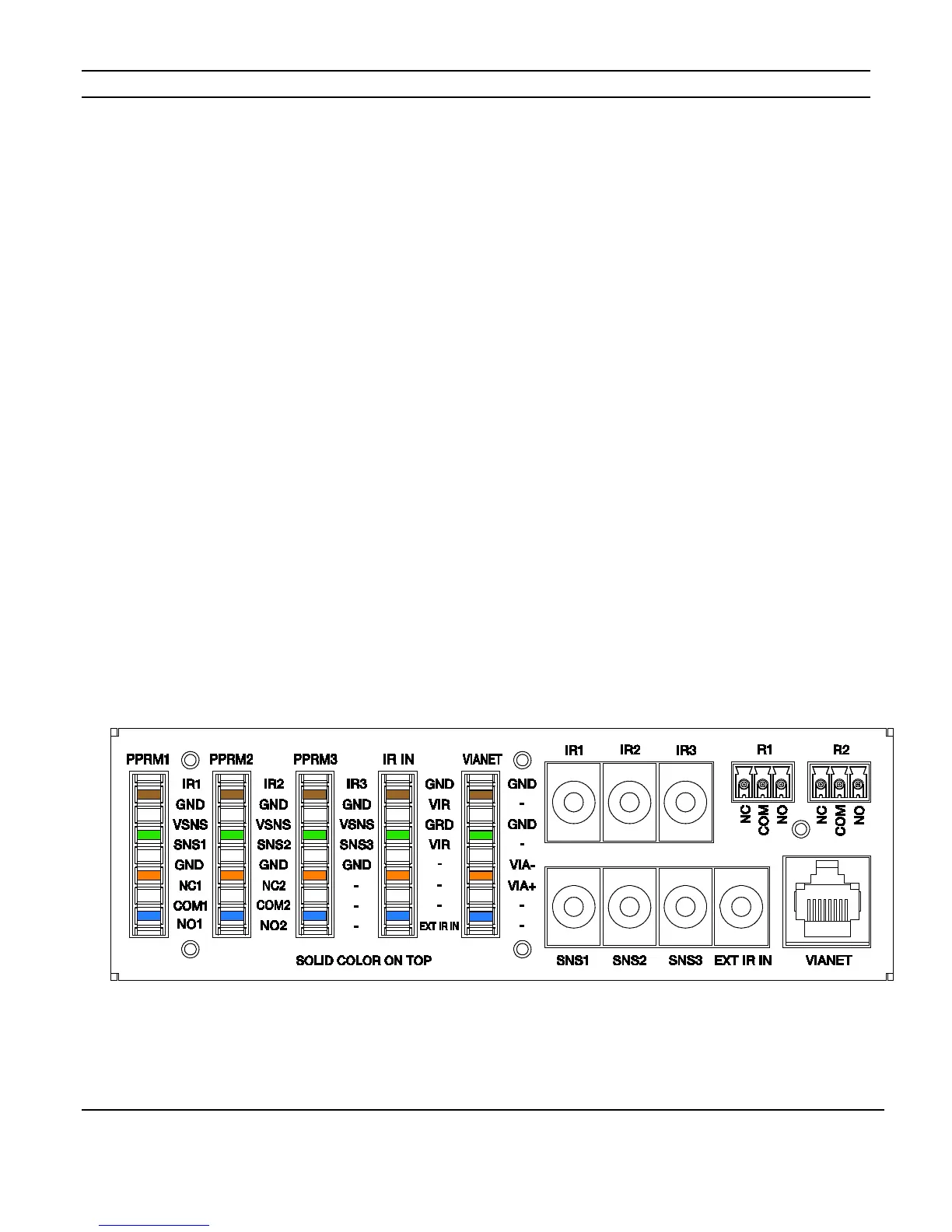
The PPCM is a can mounted panel that is the interface between the HC4 and HC8 System
Controllers and the precision panels that are located in zone locations.
Figure 5-1 shows the PPCM connections for IR Outputs, Sense Inputs, Relays, External IR
Input, Cat5 cables and VIANet.
Figure 5-1: PPCM



 To Next Page